Posted in Uncategorized

IDW looks like an awesome event–can’t wait to go!

"It's just a dream to go to Information Development World, so I can learn more about content strategy! C'mon gang, let's go!" says Barbie.
“It’s just a dream to go to Information Development World, so I can learn more about content strategy! C’mon gang, let’s go!” says Barbie.

Last year, I was really disappointed that I couldn’t go to the inaugural Information Development World (IDW) conference in San Jose, CA.  I knew, since it’s produced by The Content Wrangler and Content Rules, that it would be a top-notch event. After reading all the reviews and commentary from my friends and content strategy colleagues about how great the event was, I was even more disappointed that I wasn’t able to go.

But it’s different this year! This year, I’M GOING! I’m pretty excited about this, because I know this is a conference that is definitely geared towards content strategists who are like me–someone who not only does content strategy, but also does content management, web design, user strategy, works with customer experience, and has a love of localization and globalization issues as well. Of course, the event is also covering other topics like content marketing, data and analytics, digital publishing,  and content engineering. The point of this conference is to help those who touch content in any way, shape, or form and want to enhance the customer experience through content experiences.  Sounds like my kind of conference, as if it was custom-made for someone like me who is still building her content-based career!

I like that there are several workshops and presentations–80 in all–to choose from. I’m sure there will the dilemma of which ones to choose at a given time slot! While looking at the IDW schedule as it’s posted at this writing, there are several sessions I will have a hard time deciding between that I’d really like to see. For example, how does one decide between Work Smarter Not Harder – Remove the Guesswork from Content Creation and By the Numbers: Making the Case for Reuse Based on Facts during the same time slot? Or how can this former Barbie aficianado miss the Mattel Case Study: Maintaining Barbie’s Brand Fidelity Region to Region presentation?  I know I’ll have to make some tough decisions between a lot of excellent topics that I’d really like to learn more about. The fortunate thing for all those who attend is that this group of presenters is the “cream of the crop”. I’ve seen several of the presenters and workshop instructors in action before, so I know that this will be time well-spent, and I will come home with my head buzzing with many great ideas and new concepts to digest!

The main focus of IDW is customer-centric–which is something that will help a lot of information developers. Having originally come from a customer service/client services background before I entered the IT/techcomm world, I tend to have a better understanding than most people, so it comes a little more naturally to me. Today, content strategy really is all about personalization and making content speak to customers in a way that it feels like the content is talking to each customer specifically. That’s not an easy task. The goal of IDW is to help everyone get a much better understanding of how this is done, and how to make it work most efficiently so that content works for you, not against you. How could you not want to learn about that?

I’m not going to miss out this year. I’m going, and it would take a lot to stop me from going. There’s too much to learn and great content strategists to meet–why would I pass this up again? I’m not making the same mistake twice! It’s a fantastic investment in ME and what I can bring to my clients.

Have you registered for IDW yet? If so, great! If not, what are you waiting for? Register today!

You can find out more about IDW by visiting their website at www.informationdevelopmentworld.com

Posted in Uncategorized

More localization and user-friendly features in the new Framemaker 2015

Framemaker2015BoxYou might have heard by now that there have been some updates to the Adobe Technical Communications Suite (TCS) that were released today! Both Framemaker and Robohelp have been updated significantly, while the other programs (Captivate, Acrobat, and Presenter), have had some ongoing updates as well.

Adobe held two virtual press conferences in early May 2015 to let insiders learn about these latest and greatest releases for updating Framemaker and Robohelp. I’ll start with Framemaker in this post, and post about Robohelp in a post coming soon.

The biggest take-away that I took from the Framemaker press conference was that Adobe has worked to make the application more user-friendly so little or no coding is needed, even though access to code is still available, and that efforts are continuing to push forward to make more global and mobile outputs available.

The latest version of Framemaker will be titled Framemaker (FM) 2015. The reason for this is that way, all the versions within TCS will be in synch based on the year that the version was released. So, Robohelp (RH) and the other applications will also be known by the 2015 label for this release. It makes sense, and easier to track than version 10, 11, etc. for different products.

The presentation was given by Kapil Verma, who is the Group Marketing and Product Manager for the Adobe Tech Comm line of products.

Kapil reminded us that in the last four years, there have been a lot of advances in FM, including DITA support, multichannel publishing, mobile publishing, CMS connector API, multiview XML authoring, AEM connector,  native multi-channel device publishing, FM XML author, MathML, Enhanced collaboration w/mobile and cloud based tech, and other productivity boosters. So, while a lot of upgrades and enhancements have happened in that short amount of time, further enhancements found in this update are sure to make technical writers rather happy.

What’s new in FM 2015? There are six main points that were given, and while Kapil did a “deep-dive” into each of these highlights, I’m going to be giving you the highlights of those points.

Framemaker 2015 will allow you to work faster and smarter with several core feature enhancements.

  • Working with tables is much easier and faster now. You can conditionalize columns and rows (formerly only on rows) now, and there are usability improvements to allow arrow keys to navigate cells, tab to insert rows, and drag-drop rows and columns. There are several new table styles available out of the box. When demonstrated it, looked REALLY easy, very clear, and highly flexible.
  • FM writers can now more easily work with conditional text–including applying it at the book level–due to visual indications of conditions applied on tables and graphic objects. Again, when Kapil demonstrated it, it was very clear where color coding was applied so the writer could more clearly see the associations of what conditional text applied in different areas, making it much easier to make appropriate changes and see the changes.
  • You can now generated a “mini” Table of Contents (TOC) in the middle of a document, simply by placing the TOC where you want, then easily modifying it and styling it the way you want!
  • Enhanced Word import provides more options and control, with the ability to map styles for paragraphs, characters and tables while retaining Word formatting for matched styles or inline Word formatting overrides.

Serve a global audience with new right to left language support.

  • Arabic and Hebrew are now included and supported in FM 2015! There is also leveraged support for Right-to-Left (RTL) languages and the ability to create bi-directional documents. This support for bi-directional content means that you can have both RTL and LTR (Left-to-Right) in the same document–you don’t have to choose one or the other. You can have just about any combination of languages in a document now!
  • New object direction properties for document and object such as paragraphs, tables, text flows etc. can be inherited from the direction imported from Word, whether it’s LTR, RTL, or both. You can leverage the direction inheritance model to enable 1-click flip of all objects.
  • You can publish your RTL content into multiple formats including Acrobat, HTML5, HTML, ePub, Kindle, iOS, Android, and Webhelp.

Publish for mobile devices–including mobile apps–natively.

  • FM 2015 has a brand new HTML5 layout with several enhancements, including topic descriptions and breadcrumbs, with the ability to show search results on the left panel for easier navigation. HTML5 layout comes with host of customization abilities including the easy “off/on” functions in which you can choose the component to customize, then view and customize the component properties in a visual/tabular format, allowing writers to achieve frameless outputs.
  • Writers will now be able to publish natively mobile apps using Framemaker that are iOS and Android supported, using PhoneGap:Build, which is an Adobe product. PhoneGap is available for a single app generation for free, while creating multiple apps requires a PhoneGap/CS subscription. The way it works is that once the app is created, it creates a QR code so that a user can scan and download the app, or save the info to your local drive. The content itself can be published to Google Store or iTunes.

Personalized content can be delivered dynamically to your end users.

  • Dynamic content filters are provided in the navigation for the end users to allow them what to see what they want to see. The creation of how to do this reminded me of how taxonomy tags are used in Adobe’s AEM to filter content for readers. This can be done by enabling the dynamic filter in the output, then creating and customizing with the conditional tags used in the content for the end user filter. The Dynamic Content Filter applies to all content, meaning the main content as well as TOC, topics, and search results. Existing tags can be re-used, based on existing conditional tags/expressions functionality.
  • Generate high fidelity ePub outputs by embedding your custom fonts.

XML authoring is easier now for SMEs/Contributors.

  • There was the realization that the current XML authoring workflow in FM 12 has been too complex for SMEs and other “casual contributors”, so a simplified XML authoring environment was created.  This new XML Authoring environment is ideal for SMEs, Casual contributors, and even technical writers who are new to XML/DITA,  as it was created for those who have not been exposed to XML, allowing them to work with common objects rather than elements that will always produce valid XML. The input for these users looks like a form, which is easier for most anyone to figure out.  You can create a free form authoring form, or a guided authoring form where you ask for specific info. (This looked really good, because I could see some benefits for this for a project that I’ve been working on.) This simplified form-like environment allows the end user to enter various types of content quite easily, with a simplified menu and tool bar, an enhanced quick element toolbar which mimics many of the same features as an MS Word text editing toolbar. A DITA toolbar is also provided out of the box, as well as a BYOT (build your own toolbar) feature for your custom application.
  • MathML has been enhanced so you can easily do in-line MathML equations through MathFlow Editor, pick up paragraphs properties so that the equation merges well with the surrounding text, and high quality, searchable vector (EPS) output as opposed to raster (PNG) in FM12.
  • A new connector with DITA Exchange by Content Technologies will be shared natively with FM 2015. An enhanced FM-SharePoint connector with claim-based authentication support and support for SharePoint 2013 is also available.

Enjoy a rock solid product with improved usability and performance.

  • To improve usability and performance, Adobe addressed many bugs from its prior release of FM. In fact, more than 90 bugs were corrected in this release!
  • UI enhancements include the ability to resize dialogs (both TOC, Add/edit and show/hide conditions, x-ref, conref, link-ref), conditional text checkbox behavior mentioned above, and no grey areas when you reduce pod width.
  • Performance enhancements include EDD update performance improvements (same operation has been reduced from hours to minutes!), a smart pod refresh, the FM-Adobe Experience Manager connector  has improved performance with multi-threading support), and contextual in-product tips as needed are now included.

There were SO MANY more details about these new features that I left out for the sake of the length of this post, but if you have any questions whatsoever about this new product, I highly encourage you to contact Adobe. To make it easier for you, click on the ad in the right column of this post to find out more!

As mentioned earlier, this will be part of TCS 2015, which will include the 2015 versions of Framemaker, RoboHelp, Captivate, Acrobat, and Presenter. Buying it as the Tech Comm Suite is a 57% discount from buying buying each of these separately, and you can use these in an end-to-end workflow, so it’s worth getting the entire package!

Pricing & Availability on June 2 (in USD):

Product Full Price Upgrade from last release Upgrade from 2 releases Subscription Price Languages Supported
FrameMaker 2015 $999 FM 12 :$399 FM 11: $599 $29.99/mo English, French, German, and Japanese
FrameMaker 2015 XML Author $399 (no upgrade) $19.99/mo English, French, German, Japanese
FrameMaker 2015 Publishing Server $14,999 FMPS 12: $5999 FMPS 11: $8999 $499/mo English only
RoboHelp 2015 $999 RH 11: $399 RH 10: $599 $29.99/mo English, French, German, Japanese
Technical Communications Suite 2015 $1699 TCS5: $699 TCS 4, 3, 2 or 1: $1199 $49.99/mo English, French, German, Japanese

Overall, as the main foundation product of Technical Communications Suite, Framemaker 2015 looks to be a significant update that will help provide technical writers with the user-friendly, flexible tools needed to truly create the best content possible for their end-users that serve their ever-growing global and mobile needs.

Oh, and there’s a FREE webinar on June 16th, 2015 to launch the product. If you would like to attend that, register on the Adobe Online Event site. The event runs from 11:00 AM-1:00 PM Eastern Time.

Posted in Uncategorized

Move over, Grammar Police. The Digital Literacy Squad is here.

Fezzik says, "Now that my job on the Brute Squad is done, I can help society more on the Digital Literacy Squad. It's so modern!"
Fezzik says, “Now that my job on the Brute Squad is done, I can help society more on the Digital Literacy Squad. It’s so modern!”

As technical communicators, we are all used to being the grammar police. More often than not, we are the ones who have to clean up the grammatical mistakes of our colleagues who are not technical communicators. It’s a dirty job, but someone has to do it. It’s part of the job description we bear in tech comm.

However, I have gotten to a point where I think we need to create a new squad that takes policing to an entirely new level. I propose that we form the Digital Literacy Squad. We are in the 21st century, for goodness’ sake, and I still see content that’s not written in a way that acknowledges that 99.9% of us are digitally literate.

Here’s an example:

For more information, contact Danielle Villegas at techcommgeekmom.com.

NO! It should be:

For more information, contact Danielle Villegas.

See what I did there? I made it a hyperlink. Simple enough, right? People generally understand that something that is a different color from the rest of the text–within context–and/or has an underline under the text is a hyperlink, and that link will take them somewhere else. This is not 1998, where we need to spell it out because the act of hyperlinking is inconsistently reliable. And there is software to help you with those spambots now.

There are some exception, but they are rare. I’m sure someone will post one of those types of exceptions in the comments.  The only one I can think of is something like, “Click on the image below for more details,” if the hyperlink is not obvious to the user, or something along those lines. But in text, it’s usually VERY obvious, and that’s what annoys me.

One might think that this is something that “older” web writers do, but you would be wrong. Just today, I received a content change for a webpage I manage, and this same mistake was sent to me by a millennial. A MILLENNIAL! Someone who has been raised in the digital age and doesn’t know any differently. We are teaching everyone to write incorrectly for the communications and content that we put forth now, and that needs to change.

Just as technology is constantly changing and we need to keep up with it, we need to also keep up with how we create content for the web or other digital devices so that hyperlinking or creating some sort of action is intuitive, and doesn’t need to be spelled out anymore. People are smarter than that now. Internet access has been mainstream for more than 20 years now, and smartphones and tablets are an extension of that. We all know how to use the web, overall, now (yes, there are exceptions, but they are far and few), and we need to write for that, and keep up with those tech changes. With mobile becoming more and more pervasive, this is important because the best use of screen “real estate” is crucial!  Don’t sit back and continue to write as if it’s 1999. It’s 2015 already. Keep up!

This is the kind of content editing I do on a daily basis on my job. It drives me crazy, because often the content is written by great writers who can’t seem to get this concept through their head.

This is such an easy thing to enforce, and it will raise the digital literacy of everyone on the planet.

So who’s with me? Let’s storm the castle!

Posted in Uncategorized

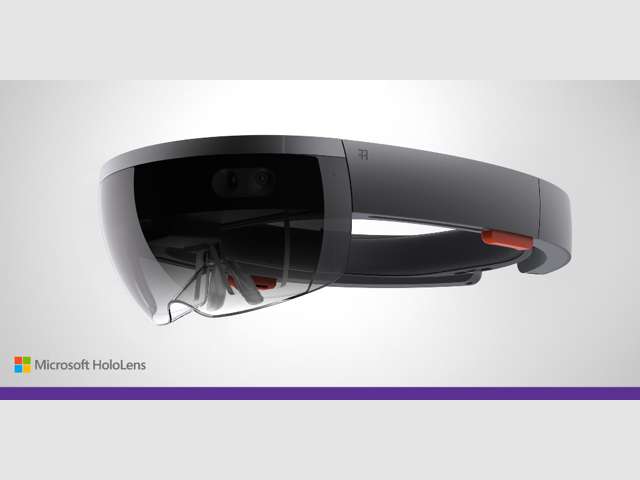
Move over, Google Glass! HoloLens is here!

http://recode.net/2015/01/21/microsofts-hololens-makes-the-leap-to-holographic-computing/
Photo courtesy of Recode.net

Today, I tuned in to listen to the Windows 10 event that was to promote more about the upcoming new OS that many are anticipating will be a big improvement over Windows 8 and 8.1. While I’m a huge fan of iOS products like iPad and iPhone, when it comes to my laptop, I’m a devoted PC gal who would much rather use the Microsoft operating system and tools. I suppose it’s because this is what I’ve been used to for 20-plus years, and it’s easier for me to adapt those changes, and more of the tools I like to use are available for PC use. Yet, while I’m usually a relatively early adopter with many things, I’ve been very hesitant to adopt Windows 8 or 8.1. There are some improvements with Win 8.1, but when I first encountered Win 8, I balked.  So, time will tell what happens once we all get our free upgrades to Win 10 (which is great–it’s going to be free for the first year of availability to Win 7 users like me, and to Win 8/8.1 users). There was a set of business apps called Surface Hub that looked good that combined OneNote with a digital whiteboard and provided new sharing capabilities for workgroups and meetings. I could see the practical uses for that in my own work right now.  The new browser called “Project Spartan” looks incredibly promising as well, based on some of the new functionality that will be forthcoming.

But what REALLY caught my attention in this event was the introduction of a new device that Microsoft introduced. I think it was a bit of a surprise to see this, but it is a sign that Microsoft means business, and to me, it’s a positive sign.  Microsoft has created a new device called the HoloLens. And from what I could tell, HoloLens is everything that Google Glass wishes it could be. While the viewing apparatus used is certainly more…clunky looking…than Google Glass, everything else about it (and why it’s probably still clunky looking) is what it has going for it. There are no wires, no synching it with your phone–it is an autonomous device unto itself. The connection with today’s Win 10 event is that it will run Win 10, but it showed how people can interact with the world around them, and still use the holographic tools around them to merge reality and virtuality. It’s difficult for me to describe, but the 3D imagery used was fantastic, and they showed several applications of how it could be used more practically with other people–including those who don’t have a HoloLens.

I think the biggest difference of all–other than the fact that this is a device that acts on its own, with its own processors among other things, is that unlike Google Glass that was being promoted as a device that could be used as a tool and for everyday use, HoloLens seems to be promoted solely as a tool. Now, it can be used for gaming and such, but the tool applications were what really made it stand out more than anything. My husband and I were using Skype and exchanging comments while watching the live streaming video, and when we were commenting about the differences between HoloLens and Glass, his comment was, “…but this is built as a tool.. you can see the size. It’s not meant as an accessory.. it’s actually a tool.” He’s exactly right. This isn’t a novelty item with potential for greater capability. It has the greater capability, but it’s not an accessory.

I recommend reading this article by The Verge that includes great video and further description of the product. 

I don’t think this is the type of thing that I need right now, even when it comes out. I don’t have any practical application. But I could see how this could be used in several years once the components do become smaller and I can use it as an accessory. (Give it time!)

What do you think? Do you think this is the next step of merging the virtual world with reality? Sure looks like it to me. Post your comments below.

Update: When I mentioned the new HoloLens to my son, he asked me, “Are you sure they aren’t just ripping off Oculus Rift?” Good question. I don’t think so, because HoloLens lets you see through to what’s actually around you, whereas Oculus Rift is contained in its view. Tell me what you think.

Posted in Uncategorized

TechCommGeekMom reviews 2014 – So, how was it?

This was part of the Chiluly exhibit that was at the Botanical Gardens while I was at the STC Summit in Phoenix, AZ. It was cool!

As the year 2014 winds down, many have summarized the past year, as a reflection of all that has transpired.  When I started to think about the past year, I wasn’t sure that it was all that great of a year at first, but the more I thought about it, I realized that despite some less than desirable things transpiring towards the end, there were actually a few good things that happened that were worth noting.

1) This was the first year that the number of hits my blog received for the entire year topped over 10,000 hits. It was a goal I had hoped to achieve, and I had to work for it. My stats would falter if I didn’t write an original blog post (like this one), and I think, despite the new achievement, my stats didn’t reflect what I had hoped, but I put that on myself. This was a very busy year, and it was difficult for me to keep up with writing original posts. So despite that, I’m glad that so many people still enjoy the content that I share here, whether it’s original content or shared content. I try my best to share what I find interesting in the hopes that others will find it interesting, too, and perhaps learn from that little piece of information as well.

2) I was able to travel to some new places and do new things. I went to the Intelligent Content Conference in San Jose, CA back in February, and went to the STC Summit in Phoenix in May. Not only did I have an opportunity to enhance my knowledge during these conference through the fantastic learning sessions, I also met a lot of new people. I love that I have some wonderful new professional connections as well as new friends. These conferences also gave me the chance to strengthen professional connections and friendships with technical communicators I met in the year before and the year before that. Becoming more ensconced in the tech comm community has meant a lot to me, and I have appreciated every connection I’ve made or deepened in the last year.

3) My writing opportunities changed. While I was writing mostly for my blog this year, I also wrote for other outlets instead. Some of those opportunities folded or didn’t work out, but other opportunities arose from the ashes, including two top ten articles for Content Rules’ blog, and a new opportunity to write for STC Intercom (which will be seen in the new year). I thank those who helped make those opportunities, and appreciate your faith in my abilities when I’ve sometimes doubted them.

4) I gave more presentations this year. I presented at the STC-PMC Mid-Atlantic Conference, but I also did my first presentation at the STC Summit. I also presented for the first time to a non-tech comm audience at the e-Learning 3.0 Conference at Drexel University this year.  In other words, I pushed myself to do more this year and put myself “out there” more, even though I think there are others who have more to contribute than I do.

5) I had an opportunity to stretch myself professionally at work. I became more confident in my abilities to be a project manager and content strategist working on new websites at work with assignments I was given. I learned a new CMS (Adobe CQ) as a skill I’ll be able to carry with me going forward, and I was chosen to help with the most important part of the company’s new external site–the Careers section. I spread my wings so much in my job this year, and gained myself back in the process. My knowledge and full abilities were suppressed for so many years, that having the chance to truly use them and have people find them to be valuable helped me immensely.

6) In a somewhat unrelated topic, while I stretched my mind, I shrunk my body. To date, I’ve lost about 40 pounds this year. For once, I kept to my new year’s resolution, even if didn’t actually start until May or June! Part of my success was due to the tech comm community. Many have supported me or taken this journey with me. I love that the tech comm community’s reach goes beyond tech comm–and with this support, I know I will be able to continue to lose another 40 (or more) pounds into the next year.

I took a quick look at last year’s year in review, and in some respects, this year’s review isn’t that much different in overview.  What makes this year different was that many of the events were new experiences, new faces came into my life both online and in-person, new relationships were forged, and old relationships became deeper and stronger. Networking connections have become friendships, both professionally and personally. For a person who lives a highly isolated life as I do, this is so incredibly valuable to me.  I’ve always supported social media because it supports connections between people all over the world. Social media keeps me connected to all of you who support me–whether it’s through this blog, or on Facebook or Twitter or Google+ or LinkedIn.

Thank you all for being there for me through the good times and the bad. It’s because of these connections that this upcoming year, which is going to be filled with a lot of changes, that I know I’ll be okay. I have a support system that I didn’t have a few years ago. And hopefully, I’ve been part of others’ support systems as well.  I know that several people were kind enough to reach out to me after my last blog post, and I felt humbled. I also reached out to a few people who were happy to offer help when I asked. I know that as I go forward in the next year, the tech comm community is one that I can easily crowdsource for feedback in my steps forward. My experiences this year reinforced this for me more than ever, and it’s not one I take for granted.

Happy New Year–welcome to 2015!