Posted in Uncategorized

iPads and Surface and Nexus…oh my!

With the announcement of the new Windows Surface tablet coming out later in 2012, the new Nexus tablet coming out as well, and the rumors of an iPad mini possibly coming out in the fall, it’s made me think about what this all means in terms of “what device would be best?” especially for m-learning and other mobile applications.

First, I need to clarify that when it comes to technological devices, I’m generally torn. I’m all for having variety and such– it’s what makes market competition possible, but at the same time, each thing has its benefits and place, and it’s like comparing apples to broccoli. It’s no secret that I love my iPad. I got it almost a year ago after owning my iPhone for a couple of years. At the time, my husband retorted, “What do you need that for? It’s just a toy, if anything.” Or IS IT?

When I was doing my graduate studies, all I could think about what how I could use it for my own studying purposes, and I did several projects centered around the idea of using iPads for flipped classrooms or even classroom use, and based much of my experiences of what mobile learning is between my iPad and iPhone. I love the flexibility of the devices, and how lean and mean they are in how they operate.  Like many students out there with tablet devices, I read articles and e-books, I wrote up assignments and papers, did my research– did most everything I could with my iPad. The downside? Well, I didn’t have 4G on my iPad, so sometimes having web access was limited, but it wasn’t anything that bad that couldn’t wait until I did have connectivity, or until I got home and could use my laptop or the wi-fi at home. (There are 3G and 4G versions available–I just didn’t want to shell out the extra cash for that ability.) And until I had my wireless keyboard, doing all those papers and assignments could get a little rough.

At the same time, while I have an iPhone and an iPad, I can’t say that I’ve been totally sold on the idea of getting an iMac of some flavor. I love my PC laptops. While the last Apple computer I used was an Apple IIc about a million years ago (be quiet! I was a kid back then–really!), my entire IT existence both professionally and personally has always been on a PC. Yes, I’ve experienced the blue screen of death several times, and had numerous crashes over the years, but nothing that couldn’t be fixed unless the hard drive was dying. Until I got my iPad, my laptop went with me on vacation or whenever I was away from home. Even writing these blog posts is easier on my laptop than using my WordPress app on my iPad. Ninety-eight percent of my online degree was done on my PC laptop– the other 2% was on my iPad. I’ve owned 3 laptops in the last ten years, and had at least two or three PC desktops for years before that. So yes, I’m a devout Microsoft geek as well.

So when I heard that Microsoft had finally come out with a tablet they were going to release, I had to find out more. I thought that it would be helpful to understand what the Microsoft Surface tablet was all about, and was hoping that it would work well in the future for single-sourcing initiatives. I felt like the Microsoft presentation and reviews I was seeing online was just mirrors and smoke, and after three iPads having been in the market now, why a Microsoft tablet now? Was it worth me getting one, as if I were to abandon my iPad for…heaven forbid…something else?

On a recent weekend jaunt to a local mall that had both an Apple store AND a new Microsoft store, I actually asked a Microsoft store employee about the new Microsoft Surface machines, and he said it was rather simple to explain, actually. The new MS Surface tablet was Microsoft’s answer to having their own hardware like a Samsung Galaxy or other PC-type tablet, running on a Windows 8 OS platform similar to the Windows Metro platform used on their phones. The guy had his personal PC tablet loaded up with Windows 8 on it, and proceeded to show me how it worked. In a nutshell, it worked exactly like my laptop, just a few more bells and whistles for the interface. And this, as I was told, would be pretty similar to what my experience would be like with a Surface machine, but with a handy keyboard in the cover. So anything that I was running on my laptop–full versions of Adobe Tech Comm Suite or Creative Cloud, Flare, PC games, Microsoft Office– as long as it all fit on the flash drive inside, or ran off a Flash card or external drive device, you could use it on Surface.

But wait…if Microsoft Surface is essentially just a flatter, touch screen PC version of my laptop, did this make it the iPad killer that everyone (especially Microsoft) has been claiming it to be? At first, I thought it could be. I was thinking that Surface was what I was looking for over a long period of time before my iPad. Sure, there have been other tablet computers out there, but they were always out of my price range and weren’t as powerful as my regular PC laptop. So, a former me that was shopping for a tablet would have loved that. But now, in my mind, I don’t think it’s the “iPad killer”. It just sounded–to me–like it was just a flatter, touch screen version of my laptop, with less storage room and possibly less power. Would it replace a laptop for me? Well, maybe not me, but for the average person who is not a power user, it might be a good alternative for someone else who is less tech savvy. Imagine if all the full features of your laptop were in a convenient package like a tablet, so it’d be easier to bring with you–it would work well.

At first, that sounds great. Just in mobile learning alone, that could be monumental. And that might work better for many people who want the convenience of a tablet with all the power (but less storage space) as a laptop. For some, it’ll be just what they need. But for me, as I’ve thought about it, and debated whether to get one in the future, I decided it wasn’t worth it. First of all, for the same amount of money that this Surface machine is going to cost (if it’s financially on par with iPads, as Microsoft claims it will be)–what’s the point of getting a tablet with little storage space and not as much power when you can get something more powerful–more storage space and higher processor speed–in laptop form for the same price? There doesn’t seem to be much of an advantage in having one, unless you are a person who wants to make the switch, and you don’t do much on your laptop to begin with. Yes, there are some operational advantages, but they are minor. The convenience of a tablet? Oh yeah, that’s definitely a plus, but it seems so late in the game. And in the end…it’s still a PC. You can get this now on a Samsung Galaxy Tab or other PC-based tablet now, for the most part. Maybe it’ll be a slightly ramped up OS, but then again iOS6 will probably be coming out around the same time (more or less), so it’ll be interesting to see who wins the latest Apple vs. Microsoft battle.

But just as everyone is focusing on the usual heavyweights battling it out, Google has been a contender for a while–much more than Microsoft has been. Google has recently announced that it was releasing its new device, Nexus 7, running on the latest Android OS called “JellyBean.” Reports I’ve read is that since this is a full OS, not an abbreviated version like on a Nook or Kindle Fire, it runs more smoothly and robustly. It allows for more Google features like Google Now and Google Play to be used more fully, for example. This leads me to believe that while this is a smaller tablet in size than an iPad or Surface, due to it’s great affordable price starting at $199 (as compared to a “bottom of the barrel” iPad at $499 for the new iPad, $399 for the same in an iPad), it’s definitely a dark horse contenter to come in and steal some thunder. In the end, though, it’s not really in the same category as an iPad or Surface machine. Let me explain.

The way I see it, there are two categories of tablets. The first category is one in which the tablets are almost PC replacements, but not quite. They have the most flexibility due to their ability to do anything from word processing and reports, graphic and image editing, games, video, email, web browsing, etc.  They are generally a much leaner version of a PC, not only physically in the hardware, but also in its capabilities. iPads have this down to a science now, whereas Surface will be just a slimmed down physical version of what most people have already.

The other category includes the small tablets. These would be your Nook, Kindle Fire, Nexus 7 and if it actually comes out, iPad Mini. While it has great perfunctory use, it’s not meant to be anything but a basic device to provide basic services. I’ve never heard of doing presentations off of a Nook, or a report being written on a Kindle Fire.

Are there uses in education and business for any of these kinds of tablets? Sure there are. Because of their enormous flexibility and functionality, it’s no surprise that iPads have been dominant in both education and business, and will continue to be dominant. Will the Surface upset that dominance? It might, only because so many are used to using a PC that the learning curve (not that there’s a huge one in learning how to use an iPad) would not have to be contended with, and some might like that full PC functionality over a streamlined one like an iPad. I see iPad and Surface being more productive than the smaller tablets.

Does this mean that smaller tablets don’t have a place in education or business? No, not at all. It can still be used for reading, communication, video and basic web searches– that might be all someone needs.

But from my own personal experience as a student as well as a professional, I don’t see how the larger tablets could lose. The question will be whether educators or business people find the streamlined functionality of an iPad more beneficial or the PC-similarity of the Surface to be more productive in the long run. Hmm…I think I found the topic of my PhD thesis (if I ever do it in the near future)!

What do you think? Let me know the comments below.

(PS–Microsoft or Google– if you want me to try these devices out once they are out, I’m glad to give them a go. 😉 )

Posted in Uncategorized

I’ve hit the “Big Time” in Tech Comm!: I’m an Adobe Webinar Presenter now

It’s been rather exciting in the last week or so for me. Much like being in Times Square where there are so many lights and sights and sounds that one can’t possible keep up with it all in one outing.

Last week was a big week for me. My much-publicized webinar that was hosted by Adobe was presented last week. It went by so fast that it almost feels like a dream! But now I have evidence that it really happened, as Adobe just published the recording of the webinar presentation on its Technical Communications Suite -OnDemand Seminar  website today.  I’d been waiting all this time to comment about it, but wanted to have the link first.

You can find my webinar–now an Adobe OnDemand seminar here:

Transition from Content Consumer to Content Creator: Dual Viewpoints.

(There is a sign in at the Adobe site, but it’s free.)

I need to thank Maxwell Hoffman for his guidance in the process. He gave me a lot of fantastic advice and things to think about, as well as some great editing of the drafts for the slideshow that accompanied the talk.  If you ever have the chance to work with him, you will definitely enjoy yourself and learn from a master.

I also need to thank Adobe and especially Parth Mukharjee for the opportunity of a lifetime to do this. It was Parth who read my posting here and contacted me through Twitter to make it all happen.  Thank you, Parth! Another Adobe “shout out” to Saibal Bhattacharjee as well for his assistance in this process. I have to say, all I did was use my voice, and to know that people at Adobe were listening, well, that feels rather great, and again, I appreciate this fantastic opportunity. I was already an Adobe fan, but this experience made my loyalty to the brand even deeper. I would readily welcome the opportunity to do another webinar or any other opportunities that Adobe might bring my way. 🙂

I also can’t forget to thank Mr. Mobile himself, RJ Jacquez, blogger of The m-Learning Revolution blog. In the past few months, this former Adobe evangelist has become my friend and a mentor, and I felt that before I took on this endeavor, I needed his blessing. (I didn’t really need his blessing, but it felt right to talk to him about it first.) He definitely supported me and encouraged me to take advantage of this webinar opportunity, and I’m glad he did. So, thanks RJ. You da man. 😉

And then there are the other friends from all walks of my tech comm life that attended–many thanks for your support as well!

I’m proud of the work I did for this presentation, and I hope that anyone who takes the time to listen and watch it will get something helpful out of it, and learn something. I will never claim to be an expert on anything, but as this entire experience has taught me, it is worth it to try new things out by doing and not be afraid to use your own voice now and then to express yourself. You never know what good things might happen. 😀

(Update 9/17/2015 – The links to the webinar have been updated as Adobe has archived the presentation’s location on their website.)

Posted in Uncategorized

m-Learning and Single-Sourcing Aren’t The End of the World

Does anyone remember all the hype about 13 years ago about how life as we knew it was going to be destroyed merely by the fact that most of the computing machines running around the world weren’t programmed to go beyond the year 2000 because it would reset itself to start back at 1900 again? Do you remember the mad rush to make everything “Y2K” compliant?” I do, and remember being in the thick of it. I even remember secretly bracing myself mentally, just in case Armageddon did happened. Nowadays, people are thinking about this supposed Apocalypse that will happen on December 21, 2012– about 8 months from now. Is it going to happen? And what does this have to do with m-learning and single-sourcing?

Here’s my take on it, having lived through that time from an IT perspective: nothing happened, and nothing will happen. Well, nothing catastrophic happened or will happen. If anything, the Y2K crisis brought to the world’s attention (or at least the IT world’s attention) that details are important when creating and developing software and web development. Y2K made the IT world take notice that it had to get its act together better, and if the world needed reliable, safe, easy-to-use products, then that attention to detail has to be put in from the beginning. The same thing happened with the tragedy of the attack of the US on September 11th, 2001. There was a realization that email and other digital means of communication could be used to circumvent security, and it caught everyone’s attention enough that the IT world had to step it up.

Think about how many strides have been made in since that 2000-2001 time period in the digital world! Smartphones and tablets were developed and constructed over this decade or so, and now we are a much more mobile society than before. I mean, seriously, in 2001, could you imagine yourself walking around with a tablet in your messenger bag just to read a book, do your email on the go, write papers, watch a movie, have video chats with friends around the world, or just to instant message/text friends that quickly?

When I had my first cell phone around the time of the turn of the century, it could do simple SMS messages and make phone calls, but nothing more. My iPhone is WAY more sophisticated than even my first desktop! We’ve actually gone beyond the imagination of what the Dick Tracy wristwatches of yesteryear intended to do– and then some!

We are in a really critical time in the development of the digital world right now. It’s as if nothing is impossible, especially with the huge chances that made us think about all those details around us. But that’s also the point– we have to make sure that we actually pay attention and heed the warnings of the past to make sure that all those details are included.

This brings me to m-learning. Right now, we are in a very exciting time with m-learning due to the great strides that have been made with technology in recent years. We have huge opportunities to reinvent the way things are done in e-learning on mobile devices, mostly because the medium is different than anything we’ve had before. It’s not just putting up pages and pages of content, but reformatting and rewriting to make it accessible to a wider audience. Cloud technology and wireless technology makes m-learning not only something that is portable due to device size, but accessible anywhere, anytime. Think about it– it’s a big game changer.

This brings me to the idea of single-sourcing and m-learning. It’s something that’s been on my mind lately, because as I try to learn more and more about m-learning and getting involved in m-learning, I realize that flexibility is something I need. In other words, while I am attached to my Apple products for my digital mobility, there are others who are strong devotees of Android products and there will be those who will be signing the praises of the Windows 8 mobile system soon enough. In the end, it’s three of a few of the different OS systems that will need to be able to receive the same information, but be able to communicate to each other clearly and cleanly to each other as well.

Many years ago, the Portable Document Format or PDF was invented by Adobe with the intention of inventing a common format that any OS system could read with the proper viewing tool. Today, PDFs are still used, and additional single-sourcing formats such as MP4 and MP3 for video and audio and ePub for publications are coming to the forefront. Heck, even as we speak, Flash is starting to slowly retreat in favor of a more common HTML5 format, even if all browsers and devices are not completely on board with that. I attended a great seminar the other day put out by Adobe and hosted by Maxwell Hoffman about how to use the Technical Communicator Suite–especially, in this case, RoboHelp 9 to help create ePubs for mobile devices like tablets. The main idea behind this seminar was to help users of Adobe’s Tech Comm Suite see how they could get on-board with this idea of single-sourcing through the creation of e-Pubs using the TC Suite.  Even though I don’t really know how to use RoboHelp at all yet, it was evident that this was a hot topic from the way it was presented and the questions being asked. I felt empowered to get started on trying to master this piece of software, because Maxwell made it look so easy to do, and his emphasis was not only on any particular device, but rather that this tool would be good to help develop for just about any device. Understanding how to create ePubs is an excellent stepping stone to bigger and better things! I’m sure that other companies are also realizing that single-sourcing is the way to go to connect with as many users as possible.

m-Learning is about reaching as many learners as possible in a way that’s user-friendly as well as compatible with the technology, while still being engaging. There are so many devices out there, that it’s really important that programmers and developers, as well as instructional designers and other technical communicators really take the time to care about those details so that we can truly have single-sourcing. Even just between my iPad and iPhone, I don’t always feel that apps available have the same functionality as they do on my laptop, and vice versa. Going between devices–whether mobile or stationary–should be seamless. It’s been mentioned that some companies are already on the right track with this thinking, such as Kindle. You can open up a book at one spot on your phone, then switch to where you left off on your Kindle device, then pick up again where you left off on your laptop. Much of this is done through the cloud and wireless connections. This is definitely the right idea, and going in the right direction. For me, it’s even the functionality. My Twitter doesn’t work the same way between my iDevices and my laptop, and that’s not right.  It should work the same exact way on all my devices, and Android users should have the same experience as I do. This is a really important concept for m-learning. You want to make sure that the deliverable presented is the same for everyone who comes to a course, and that’s a tricky thing to do right now.  This is why discussing and creating new standards for m-learning are so crucial. The single-source perspective is truly needed in e-learning and m-learning universally, so that the same quality of content is delivered to ALL universally.

So will I be jittering in my boots when December 21st rolls around? I don’t think so (unless there’s news of an asteroid bigger than the moon is hurtling directly towards us). If anything, I’m thinking that December 21st will be a day when it will start a new age of enlightment, and m-learning and single-sourcing will be a big part of that. We are already on our way, but perhaps there will be something on that day that will be a big boost towards a positive path.

www.startrek.com

Maybe that day will be as monumental as First Contact Day.


Posted in Uncategorized

The Wrath of Khan (Academy)

Khan Noonian Singh from Star Trek

KHAAAAAAANNNN!!!!

←No, not that one.

I first heard about the Khan Academy from my husband. My son, who is a high-functioning autistic, had fallen behind in his math skills because of problems with his classroom teacher (that’s a long story, I won’t get into it). Needless to say, a kid who had been doing fine in standard third grade math was still doing third grade math, and we were trying to find solutions to figure out how we could get him to catch up in a way that might interest him. My husband, in his quest to find something online, had found the Khan Academy, and had explained to me the history of the site. It sounded like a great idea, so I took a look at a couple videos on some of the simpler math concepts. It was great! I mean, what’s not to like, and why didn’t I come up with this idea myself? I liked the concept of what Salman Khan was doing, and it was easy to follow, and interesting to watch. While we didn’t introduce it to my son as we got sidetracked with other things (again, long story), I never forgot what the Khan Academy was about, and hoped that it would do very well in years to come.

Well, much to my happy surprise, it’s caught on like wildfire. It’s actually built up to a little business, and is now a leading standard in reverse classroom or “flipping the classroom” techniques. What’s the reverse classroom, or how do you flip a classroom, you may ask? (It’s okay– I didn’t know until about a week ago or so myself.) This concept is where at night, student would study and learn the new concept, and then do the homework at school. The idea is that kids would learn a new concept on their own, and then use class time for putting what they learned on their own the night before into practice with exercises, and the teacher would spend the time helping reinforce the ideas and helping to clarify what wasn’t clear. When I read what the idea of the reverse classroom was, I thought, “Brilliant! Why didn’t they do that when I was a kid in school?” I can see a lot of subjects where that would come in handy, and to hear that Khan Academy was one of the leading online resources for such learning, my main thought was how cool that had to be, and how much more fun learning would be. (Yes, even for those subjects you hated.) The CBS program, “60 Minutes” even just did a piece on Salman Khan and Khan Academy, which you can see here.

Now, like the “genius” character from Star Trek who appeared and then reappeared for a movie of epic proportions, Sal is back with a new way to distribute Khan Academy information, namely with a newly minted iPad app. It seems only natural that something like this had to be next, especially in light of the mobile learning movement that’s starting to take hold. I downloaded the app, and figured that I would review it here for you.

I looked at two courses within the program. It appears that all the content– and then some, that’s currently available on the Khan Academy website is available through the app. Now, I started tonight to keep track of what I looked at, and logged into the site. Login is either through Google (which makes sense, since Google is one of Khan Academy’s benefactors) or through Facebook. I chose to sign in through my Facebook account, and it only took basic information, nothing more, which is good. (I wish more apps that you sign into from a social media site only did that!) Anyway, the design was slick and simple. In landscape mode on my iPad, videos were listed on the left from a menu, and the video was found at the right. One feature on the iPad, you will notice in the screenshot image I have below, is that there is also a transcript of what Sal is saying in the video. I suppose this is good if you speak English but are not a native speaker, and you want to understand what he’s saying. (He speaks clearly for native English speaker, just so you know.) It also helps as a table of contents of sorts, so you can always say, “Oh, at this timestamp…” or “When he said….”, a person can find it within the video.  I found that at first, the scrolling of the transcript wasn’t working too great, but the longer I left it going through the lesson, it eventually synched up.

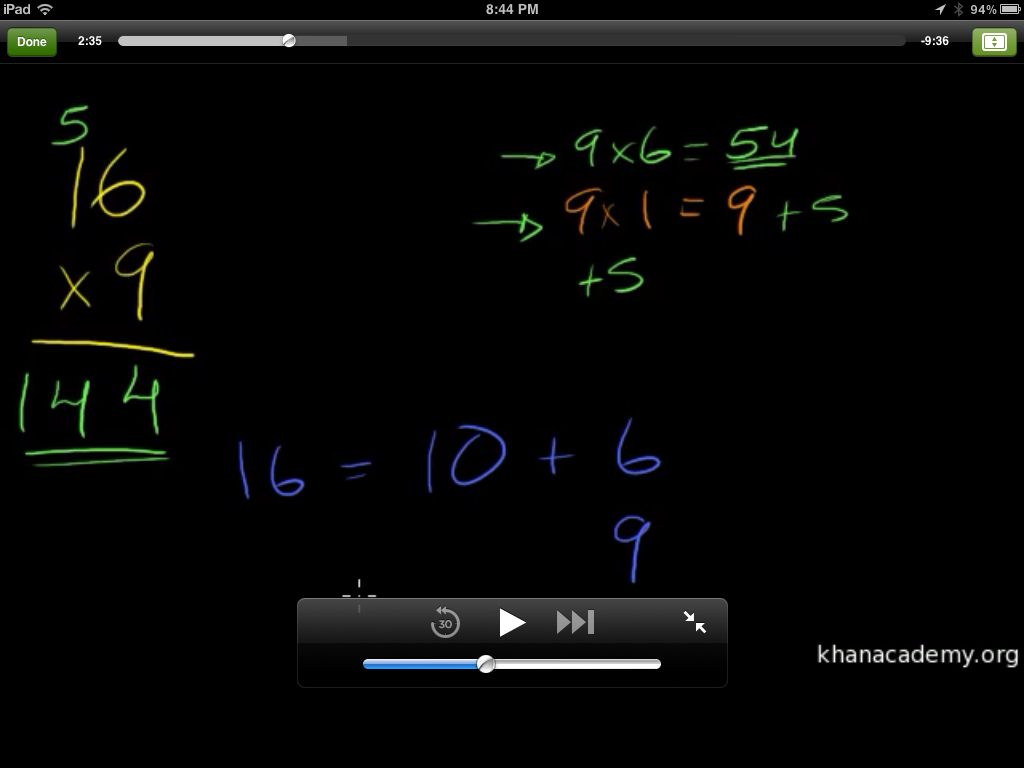
One of the neat features that I didn’t realize right off the bat, was that the video is not limited to the small screen seen above in the main interface– although what’s there is still clear. With the swish of multiple fingers, the video can expand to full screen like below:

I was glad of this feature, not only because that way, the learner can see things better, but with the full-size, larger interface, it gives the experience a homier feeling, like someone sitting down next to you with a set of colored markers and paper (albeit black paper, but hey, I’m fine with that.)

I looked at the display through a portrait view, and it looked like this:

(Sorry it’s a little smaller– the larger size image was TOO big.) You can see that the menu list is gone, but the video screen and transcript are still in place. When expanding the video in portrait format, it looks like this:

It’s still legible, and clear, and has that same comfort level as when it was in landscape mode. The screens adjust quickly between the landscape and portrait modes, which is good.

I won’t review the videos, as that’s been done before. I took this multiplication course, as it’s information that I’ve been reviewing with my son, but I also took a history lesson on Allende and Pinochet in Chile, and I thought it was well done. Sal does not show any bias towards one or the other, but does a pretty good job of presenting the facts, and actually invites the learners to draw their own conclusions, ask their own questions about the historical information. That is real teaching, my friend. A true authority will never admit to knowing it all, but will admit to being incredibly well informed, and always willing to invite curiosity, which is what Sal is doing here. He really does an excellent job.

Now, you may ask, what does this have to do with mobile learning? LOTS. Khan Academy is a rising star in e-learning right now, and by creating an app for iPad makes the courses even more accessible than ever. And just to play devil’s advocate, I accessed the Khan Academy through my iPhone’s Safari browser, just to see if everything would be teeny weeny and a waste of my time, but since all the videos are saved on YouTube, it’s very accessible. In fact, on the Safari browser, the site switched to a mobile browser version of the site, provided the same main menu of topics and videos, and upon choosing the video I wanted, I could still view the same videos pretty clearly. So even if a student didn’t have an  iPad or computer at home, if they or one of their parents had a smartphone, they could still access the information fairly easily.

So, is there a wrath of Khan? Not really. The only wrath that Salman Khan might have is what motivated him to start his non-profit academy in the first place– a passion to be able to provide basic (and not so basic) educational information to masses of learners all over the world by an easy means of communication at an affordable rate. (Who can’t afford free? Only cost is the computing device used, and many have access or have one.)

And isn’t that what mobile learning is supposed to be about? Easy access to easy to understand education information? I encourage anyone reading this to look into the Khan Academy. The firm is full of movers and shakers in the e-learning world that are dedicated to a higher purpose. It’s the kind of firm I would LOVE to work for, if given the opportunity. (Sal, call me!)