Posted in Uncategorized

Tech Comm and The State of Urbanization

This is how I view many cities.
Is this really where all the tech comm work is?
Photo by Lee Aik Soon on Unsplash

Being that I’m a person whose career is always seemingly in flux, I was listening to a past webinar that featured a few people I knew who were giving advice on how to stay current within the tech comm profession.  While I found there were a few tips in there that were useful, I found that many of them were things that were things I had already tried, but hadn’t found true.  Or, I’ve been doing them all along, and I’m not as far into my career as I want to be.

I’m sure after reading a lot of my posts about remote work, people obviously know what a big proponent I am of remote work–especially in the tech comm field.  But I started thinking about additional aspects of it, and why it’s important that we try to keep working towards remote opportunities being available in this day and age: urbanization.

Now, just so you know, I’m currently contracted at a company–remotely–that has a vested interest in urbanization. One hundred and fifty years ago, people swarmed to the cities to find jobs–industrial jobs in factories, mostly–to support themselves and their families. Once the industrialization craze calmed down, as housing and cost-of-living costs went up in the cities, the move towards more suburban areas started.  People could live outside the cities and still have really good jobs, or they lived in close enough proximity to get to a city without the hassles of city life. It was a winning situation.  I’m finding that now, that is changing back to the industrial revolution thinking again, except there are differences this time.

This time, we are driven by the digital revolution–not the dot-com industry, exactly, but all the digital companies that run throughout the internet that provide information, development, and other resources in our lives.  This sounds like it’d be a tech comm paradise–and it could be–if it wasn’t for one thing. Many of the opportunities are in the cities. Millennial are willingly flocking to the cities to hopefully provide manpower needed, but even they can have issues with living in the cities simply because of one thing: cost.  I know I’ve read where you can’t even afford to live in the San Francisco Bay Area/Silicon Valley, even on the generous paychecks they dole out there, even if you live hours away.  I think I just heard or read the other day that millennials are the first generation that won’t be able to buy cars or homes easily after a couple of years of working out of college.  Baby boomers could because the cost of college, housing, and other “normal” living arrangements were still easily attainable. With each generation, it gets harder, and even if you are a Gen-Xer like myself, it doesn’t mean it’s easier necessarily.

I can’t speak for everyone, but as for myself, I find it very difficult to think that the only way for technical communicators to get jobs is to uproot themselves–and in some cases, entire families–for jobs in the cities, and that includes contract jobs.  It’s bad enough that tech comm struggles to prove to industries that it has permanent value, and that technical communicators are not engineers, scientists, pharmacologists, executive MBAs, or computer programmers/developers who can write. The industry expectation is that you are one of those things, and you can write, instead of the other way around–a writer who can learn terminology and research, and can turn techno-babble into clear language for everyone else. That’s already a battle. But to say that those who do value tech comm are only found in the cities? That’s horrible.

Photo by Annie Spratt on Unsplash

Why is being in the city so important in the digital age? Is it because that’s where the financing is found? Is it because of corporate offices being in a city? I’m sure it’s yes, on both accounts.  But when you really stop and think about it–why, in this digital age, are we having another flocking to urban areas? This doesn’t make sense to me.  I think about where I live in Central New Jersey.  When I was getting out of college, this area was the hot spot if you wanted to find a job. I moved from my parents’ house to the town I live in now to be closer to Princeton. Now…unless you are in finance, pharmaceuticals, or are an ace web programmer/developer (none of which are me), there’s nothing. All the appropriate jobs in are either in New York City or Philadelphia, both of which are at least an hour and a half commute in each direction. That would be three to four hours out of my day. Now, not to sound old, but that’s WAY too much of my time that could be my own. Taking public transportation doesn’t make it any better, really. It makes it more of a hassle, and still doesn’t allow me to own my time.  I know people who do it, and I think they are crazy.

There are a LOT of talented people around the world. A lot of smart people around the world.  I know technical communicators who, like myself, are at a loss as to what to do, because either they already live in a city and struggle to afford it, or like me, struggle to find something that’s either remote, or nearby so they can have a good quality of living for themselves and/or their family.  Why should we sacrifice so much? It’s bad enough that the jobs are in the cities, but if the cost of living in those cities is making working at those jobs unattainable, isn’t the solution for companies to start either moving to the suburbs OR figuring out ways to encourage remote working? Perhaps that’s too logical.

The re-urbanization of society is not necessarily a good thing, especially considering this is the digital age, where we can put up hotspots and satellites and wi-fi towers anywhere we want within reason.  Why aren’t companies taking advantage of this technology? If they like to think of themselves as global and inclusive, why are they limiting that global access and inclusivity only to their urban work sites?

As technical communicators, it should be a big part of our initiative to promote ourselves not only as people who add value to a company’s bottom line through documentation, UX, content strategy, and other skills we have, but that we are also able to work just about anywhere–including in our home offices–and still be effective at what we do. We can help our local economies by staying put and not contribute to the overcrowded cities and the rising costs there.  Why would I want to try to get a studio apartment in San Francisco or Silicon Valley or New York City for USD$1-2 million when I can get a three-to-four bedroom house in a nice neighborhood, have some green space/a garden, a good school district for my child, for a fraction of that? Why should I have to sacrifice my time with my family and other obligations I have to my community by commuting four hours round trip everyday, and sacrificing my physical and mental well-being at the same time?  Urbanization is not a solution, it’s more of a problem. Digitization should be allowing for more widespread resources, not confining them to one area that everyone must flock to.

If companies truly embrace global digitization and global opportunity, they shouldn’t focus solely on cities. They need to look EVERYWHERE, and provide opportunities everywhere.

What do you think? Include your comments below.


Posted in Uncategorized

Moderately Motivated Gen-Xer for Hire – McSweeney’s Internet Tendency

Source: Moderately Motivated Gen-Xer for Hire – McSweeney’s Internet Tendency

This was published a year ago, but it still works. While this is meant to be satire, as it is, it’s almost accurate. When I look at the description, it’s almost exactly what I would say. You know my position. I think Gen-X gets the short end of the stick, as they say. Read this, and understand while this is said sarcastically, there is some truth in it.

The growth of STEM careers, including Tech Comm, cannot be limited to Millennials or resting on the shoulders of the Baby Boomers who invented the tech. Ageism in tech is still an issue, to the point that I learned a new hashtag recently– #techageism. (I plan to use that one more often.) Ageism in the workplace needs to stop. Really. I mean it.

What do you think of this article, even though it’s meant to be humor? Include your comments below.

-TechCommGeekMom


Posted in Uncategorized

Music is the ultimate single-sourcing resource

A few years ago, I wrote an article for someone else about how music was used in remixes and mashups, but it never got published. Even so, I was reminded of how music has a lot of reuse due to two events that happened to me over this past weekend.

First, I went to a concert given by the Princeton Symphony Orchestra. The pieces that were played were Tchaikovsky’s 1812 Overture and Beethoven’s Ninth “Choral” Symphony. About an hour before the concert, the maestro/conductor held a little talk about the pieces, giving some history and other notes about the pieces. He mentioned that both pieces were reflections of the times, in that the music reflected the turmoil that was going on in Europe during the early 19th century. But what also struck me–and what I listened for–was the reuse of music to reflect some of the action or feelings of the time. In the 1812 Overture, for example, they played the original Russian version, which begins with a Russian Orthodox chant. Later, you hear the French National Anthem several times repeated over and over to reflect Russian and French forces at odds. Beethoven also used bits of well-known (at the time) country songs that were reflected in each movement.

Second, I started to watch an excellent program on television about the Beatles. It was on very late, and my husband and I–who are big Beatles fans–got drawn in, but had to turn it off as we needed to get to sleep. But when we did see was fascinating, and it put an interesting spin on their music. The episode was concentrating on how revolutionary the Sgt. Pepper’s Lonely Hearts Club Band album was. It was the first time any musicians purposely made a studio album that wasn’t meant to be played for touring. This allowed the Beatles a lot of freedom to experiment with sounds that were either repurposes or found a new place. Sometimes it was the instrumentation that was new; sometimes it was the hybridization of two or more different styles. The one piece that they broke apart that captured my attention was “Penny Lane”. “Penny Lane” is about observations around the area where Paul McCartney and John Lennon grew up. Musically, it captured the old vaudeville sound yet at the same time had a pop/rock sound to it, with overtones of baroque as well. The final track included 4 separate tracks of piano, and a host of other instruments like a special piccolo trumpet (I think that’s what it was called, but correct me if I’m wrong), which wasn’t an instrument used often in modern pop music! Another example, although not part of the album but part of the recording period, is “Strawberry Fields Forever”. Did you ever think that the vocal track sounded a little weird, even though it worked? That’s because the main music background track was made on one day at one speed, and the voice was recorded at a different speed on a different day. John Lennon wanted to use both tracks, but they didn’t synchronize well. Because the technology wasn’t there electronically like it is now, sound engineers had to figure out how to change the variable speed on both recordings so that they could get them to synch. That sort of thing didn’t exist until then! Fascinating stuff.

So what does this have to do with content strategy? Everything. Here’s why.

A big part of content strategy is knowing what to keep and what not to keep. Content strategists are always promoting reuse of content to be used in new ways. By mixing and matching content appropriately, you can get a hybrid that is something new and unique to itself. Nowadays, copyright laws can get in the ways, but if they are heeded appropriately, something new and wonderful can be produced. The music world really started to notice when rap and hip-hop started sampling and reusing music, a practice that’s still used today for new music, remixes, and mashups.

What do you think? Did musicians have this figured out well before writers by almost 200 years? Include your comments below.

Posted in Uncategorized

The Complete Guide to Working On A Remote Team – Megan Berry – Medium

The secret to increasing productivity, work–life balance, and team happiness

Source: The Complete Guide to Working On A Remote Team – Megan Berry – Medium

Thanks to Adam Helweh of Secret Sushi for finding this gem. And oh–what a gem this is!  I think this is probably the best article I’ve ever read that discusses the advantages of working remotely. I’ve been working remotely on and off (mostly on) for the past five years.  I LOVE working remotely, for all the reasons listed in this article. The methods mentioned in this article are along the same lines of what I’ve practiced for years successfully, and I can endorse and validate everything that’s said in this article. Working remotely CAN be done, if it’s done in an organized manner, the work is still taken seriously and done well, and you maintain your communication skills. It’s no different working out of your house as it is your office if you are communicating with other team members or clients around the world! It’s still a conference call, or email, or instant messaging, or video calls, no matter the location! It’s the 21st century already! More companies need to get on board with this, especially for technical communicators!

If you are looking for a remote worker, I’m available right now! You can visit daircomm.com to learn more about what I can offer.

What do you think about the perspective of this article’s author? Include your comments below.

–TechCommGeekMom

Posted in Uncategorized

9 Recommended Tech Tools for a Conference Attendee

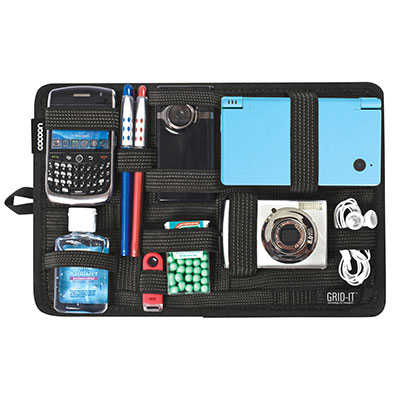
tech organizer for accessoriesI don’t attend as many conferences as some people, for sure. There are those I know who whisk off to different parts of the world to attend such conferences–I’m not quite one of those.  I’m usually going to at least 1-2 local conferences, and 1-2 not local conferences a year on average.  This year, at this writing, I’m only planning on one big conference, and namely that’s the STC Summit in a couple of days.

While I’m on these trips, I usually try to put some careful consideration into what I’m bringing with me. This year, I have my car (an SUV, no less) with me, so I can load up the car as much as I want.  But in other years, like many, I usually have to get on a plane to get to the conference destination, so taking as few things–and lighter items–is necessary.

Liz Fraley wrote an excellent article about a year ago about her Presenter’s Tech Travel Kit, and it’s pretty comprehensive.  I have most of the same items as she does. Some I don’t travel with, and some are items I still desire to add to my travel tech.

But that was written from the perspective of a frequent presenter. What about some recommendations for those who aren’t presenters, but still want to bring some basic tech with them?

I’m looking at this perspective myself, as I’m not a presenter this year. I usually have one big suitcase for clothes, shoes, things I picked up at the conference, but I also need to bring tech, since I am either taking notes, or sharing my experiences on social media during a conference. I’m still developing what works for me best, but there are a few things that I usually bring with me no matter where I go, whether I’m a presenter or attendee. There are also a few (hopefully) clever solutions to help lighten my load, but maintain some good tech.

  1. My iPad/tablet
    My iPad comes with me everywhere. I have a large, 17 inch laptop, and while it’s one of the “lighter” ones, it’s still rather heavy, and it’s a pain (literally and figuratively) to carry places.  In most instances, I don’t need to bring a full laptop computer with me, as I’m only accessing  my word processing programs (Notes or Word) for note taking, I have full access to social media apps, I can still get my email, I still have Skype–I have most of what I need to record what I need and still communicate with the outside world in my iPad.  My iPad is thin, and it’s lightweight. It’s as good as having a paper notebook in size and weight, but better.

    Someday, I hope to be able to afford one of those super sleek, thin, streamlined ultrabooks that I can bring anywhere, but in the meantime, this will do nicely. If you don’t have an iPad, an Android or Fire or other equivalent will probably do just as nicely.

  2. My Wireless Keyboard
    This is an optional one, only because I don’t have an iPad cover that is also a Bluetooth keyboard. But having my wireless Apple keyboard–or for that matter, any Bluetooth keyboard–is great because then you feel like you do have a very compact laptop with you. I keep it in a special case (similar to this one–same manufacturer, older model) that has some extra storage. (Waterfield has some nice travel bags as well.)

    But what if you have to access a “power” program due to a workshop, and there isn’t an app for that? Well, I’ve figured that out too, but it’s on a case-by-case basis (meaning there are some exceptions when I, unfortunately, do have to lug my laptop with me). I hate bringing my laptop just for one workshop or one session, when I know I’m not going to use it for the rest of the conference.  I have a solution that might work for you, and it’s worked for me.

  3. Remote Machine apps
    Yes, if you pick the right one and play with it a little bit first, there are some decent remote machine apps that will connect your tablet (in my case, my iPad) to your laptop at home. You just have to install the app on your iPad, make sure the app is installed on your laptop at home, and remember to leave your laptop on at home before you leave! I’ve played with a few.

    TeamViewer is a popular one. My husband likes that one. It’s free for individual use. There’s also Splashtop. That one, if you are travelling, is about $3/month, but it provides a good connection. I used that last year, and it’s another popular one.

    This year, I’ve switched over to a free one that’s available, and I like this one the best. It’s called VNC Viewer. There’s an app for it on iTunes, and it’ll give you directions on how to make your laptop the “VNC Server”. The beauty of this one is that it’s mostly maintained on the cloud! And it’s free for individuals! I also liked the screen resolution on this one, because it showed what’s on my laptop screen better than the others, and I could get the tapping tasks down easier than the others.  I could access those “power” apps (like various XML editors) from my home laptop from my iPad, and still do the same actions as if I were using my laptop. There might be a few tricks to use it on an iPad, but the work itself is being done on my home laptop. Cool!

  4. Skyroam Personal Hotspot device
    This is a new item that I’ve added to my collection. It’s a personal hotspot that doesn’t work off your phone, and it works internationally in most major countries.  You buy unlimited connectivity passes which last the full 24 hours.  If you buy your passes in bulk, they come out to be about $8 per day, and you can connect up to 5 devices at a time. The device is usually around $100, and comes with 3 free day passes to start. You can also rent them at airports and–I think–through the website at skyroam.com.

    Why would I need that? I bought it for a few reasons. First, during my last international trip, I found I was using the data that I had bought through my phone contract wasn’t enough for when I was out and about. It was a lot of data just trying to pull up a map and figure out where I was going! And wifi wasn’t always perfect trying to glean it off of stores or other public places. This way, in the future, I’d have this small device with me, and not have that problem anymore. Second, when we travel, my son is ALWAYS using up a lot of data so he can play games on his phone. This, again, eliminates the huge cost. The last reason I got it was that even though certain conferences offer wifi services, sometimes, well, they just aren’t great wifi connections.

    Since I do a lot of Twitter feeds and such during conferences, it’s important that I have a solid wi-fi connection. This solves this problem. I used my Skyroam at the CONDUIT conference last month, and it works GREAT.

  5. My Smart Travel Router and International Power Converters
    This one is especially helpful if you are travelling internationally, but I still bring them with me on domestic trips as well.  They not only provide international outlet adapters for other countries, but they usually have 2 USB outlets on them to charge my devices. I use these heavily– I have 3 of these, so I can charge up to 6 devices at a time if needed! One of these three is my smart travel router. The one I own is a Satechi Smart Travel Router, which you can find on various websites to order. If you have access to a network cable, this little device is marvelous. It’s not only a outlet adapter that has USB outlets on it, but it also acts as a mini wifi router when connected to a wired network.

    I’ll give you an example when it came in handy. When I went to IEEE ProComm, I stayed at one of the dorms at the University of Limerick. They had no wifi available in the rooms. HOWEVER, they did have network outlets. All I did was connect my networking cable to that outlet, plugged the other side into this Smart Router, and VOILA! I was the only one who had wifi! I was able to talk to my family on Skype at night and check on other things that required internet connectivity.

  6. Battery packs/Power banks

    Portable batteries/power banks come in all sizes. I actually bring three– two small ones and a big one. Why? I don’t want to be lugging a charging cord and power adapter for my iPad or my phone and trying to be near the nearest outlet.  These batteries can easily charge overnight, so I will charge the big one (which has two outlets for two devices) one night while I use the smaller two, and then switch off the next day.You can find smaller ones under US$10, and some of the larger, more powerful ones can get to cost as much as $70. Pick what’s whatever in your budget, and you’ll find it’s handy to have just in case. My two little ones were gifts, whereas my bigger one is one I bought for about US$25-30.  You can get fairly powerful ones these days, and find them almost anywhere that they sell phone and tablet accessories.
  7. Cables/Power Cords
    This is an obvious one. You can’t charge any of these devices up with a plug, battery, car power adapter, or wall power adapter unless you have all the right cables and cords! I always ensure that I have one for each device (for me, that’d be 2 Apple lightning cords), and at least 1-2 USB-C cords that will charge the battery packs. Sometimes you can get a power cord that powers multiple devices–a multi-port cord. I have one of those that one of the vendors gave out at a past conference that works beautifully, even with my fickle i-Devices. I keep them all together in a Skooba Design cable wrap case so I can find them easily, and it’s compact. (Skooba Design also has some nice travel bags as well.)
  8. Earphones of some sort
    I tend to bring a few things redundantly, so I do bring my regular Apple earphones with me, but I also bring my fancy Bose Noise Cancelling Headphones with me as well. The second ones are for the noise cancelling feature. Sometimes I just need to tune out, you know? (Introverts, take note!)
  9. Extra batteries
    If my Apple keyboard or the noise cancelling feature of my Bose headphones die, then I have at least one set of backup batteries (2-AAs, 1-AAA) with me. I keep them in the small case I keep my keyboard in.

That seems to cover the basics of what I find I need as a conference attendee. I don’t run out of power. I have something to take notes electronically or connect to the outside world. I have devices to help me connect to the Internet. I’m pretty much set, and it can all easily fit in my messenger bag or backpack, and still have room in my bag to collect some goodies from the Exhibition Hall.

As a presenter, I think the only other things I would bring would be some sort of an A/V adapter (see Liz’s article for suggestions–I just hook up my iPad with my adapter, and I’m good), or as is often suggested, I bring a thumb/flash drive with my presentation on it–just in case.

Between my list and Liz’s list, can you think of other devices, tools, or other tech accessories that you find that you absolutely need to bring with you to a conference? Include your comments below.