Posted in Uncategorized

Blast From The Past – Volume 3: Interior Design Influence on…Tech Comm and Social Media?

For this week, I decided that I would post another one of my “Blast from the Past” entries from my graduate school blog. When I go back to review these, many of which were written when I was just starting to understand what technical communications were all about, I see some pretty decent reflections.

I’ve lost direct contact with the person in this entry, as life moves on, and Twitter exploded, but I still learned a lot from the experience. Perhaps I still need to follow-up on the blog entry I proposed at the end based on his books! He’s still out there and making the most of social media and media at large, and has always been ahead of the curve in this regard, continuing to make the most of both marketing communications as well as instructional design with his television shows and now instructional videos on his website.

Enjoy this entry that was originally from March 20, 2010, originally titled, “Interior Design Influence on…Web Design?”:


Recently, I’ve struck up a Twitter friendship with renowned interior designer, Christopher Lowell. He is a very thoughtful, sweet guy. He also posts these great dishes he’s having for dinner that make me hungry! But I digress…

Christopher has always been a little bit ahead of the curve when it comes to media and the wave of the future in communications. He was revolutionary in breaking down the basics of interior design in a user-friendly way, and bringing it to the public on the then-new media outlet of cable television. Between his shows and his books, which eventually branched out into his own product lines of furniture, fabrics and other home accessories, his goal has always been to make interior design about making a home, and making it with your own special stamp. All these years later, he still has that goal of bringing things that seem so lofty down to earth for all of us to enjoy.

One of the things I like about corresponding with him through Twitter is that he really seems to be exactly who you see on TV and read in his books. He’s down to earth, he can be silly, but he really does care about important issues and cares a lot about other people and really using social media as a means of communications. I know that I’ve certainly enjoyed getting to know him little bit by little bit.

So, today he posted on Twitter that he had a new blog post, in which he talked about how he likes how reality TV is starting to be used more constructively, and used Jamie Oliver‘s show about how Jamie is trying to change the diets of school lunches to more wholesome foods for kids as a good example.  He segueways into how he feels that the internet is what the next big wave of information and entertainment will be– more so than it is now, much like cable TV was in its infancy. He alluded to the fact that part of the reason we don’t see him on TV (cable or otherwise) much these days is that he’s exploring these new media. He wrote, “As we continue to open new portals and refine new media platforms, you can bet, I’ll be there, doing what I do best.” That seems appropriate for a guy who has always been on the cutting edge of things.

So what does this have to do with technical writing? Well, a lot. You see, I feel inspired by what Christopher has been talking about, because it’s not only about what he’s doing, but where the future in technology is going, and technical writing is part of that.  I’ve thought of two projects that he’s inspired me to do, but I don’t have the reason to do it other than “just because I feel like it” at the moment, so since I’m busy enough, I’ll have to wait until I have a little more time to work on them, or can work it into a school project for my e-Portfolio. The first idea was just to interview him, and get more details of where he thinks internet media is headed, and the sorts of projects he wants to do, or sees happening. You know, get inside the head of one of the big “movers and shakers” to understand future trends. The other idea is to write a piece called, “The Seven Layers of Technical Writing” or “The Seven Layers of Web Design,” or some similar theme, as Christopher was the one who revolutionized the idea of the “seven layers” of interior design. (Heck, I wouldn’t be surprised if he invented the Seven-Layer Dip!) In my mind, it would be an article that would show, especially for the newbie technical writer, that by sticking to some basic rules of thumb, like the Seven Layer of Design, that you too can master what it takes to be a technical writer.  I’d really have to think it through, because I’m sure it’s not that easy to whittle anything down that has so many variables, like tech writing, like web design, or interior design.

Kudos to you, Mr. Lowell, for giving me some inspiration outside the (technical) box, and getting a new dialogue started in my head…

Posted in Uncategorized

Is iPad Mini the “Fun-Size” tablet, or does it mean business?

As the end of October approaches, so does Halloween. And with Halloween, most people would think of ghosts, witches, vampires and other monsters along with other spooky stuff. As for me, I think of trick-or-treating and the all important CANDY. Mind you, the candy usually given out is not full-sized candy bars, but rather “fun-size” candy–usually miniature versions of the tastes we know and love.

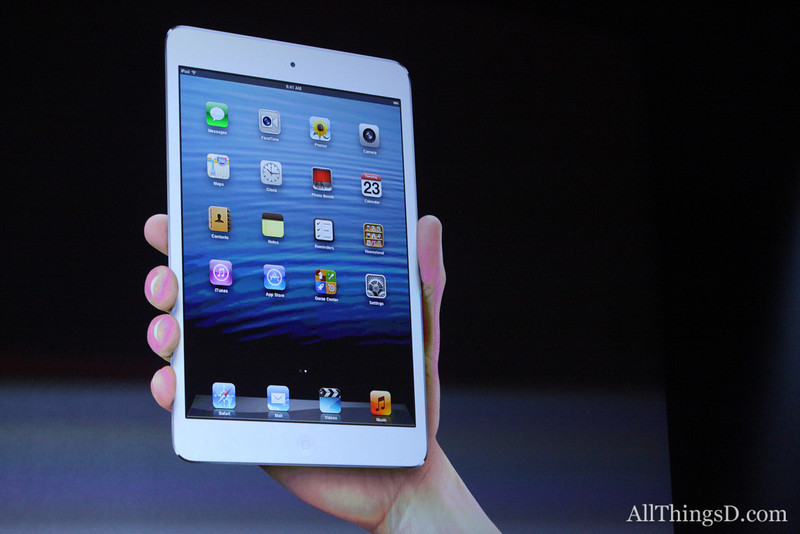
Apple decided to provide us with a new fun-sized item just in time for Halloween–the iPad Mini. It was highly anticipated, and naturally, I sat and watched the announcement. The iPad Mini appears to be about the same size as the most popular e-reader/non-iPad Mini devices, such as a Kindle Fire HD or a Nook. It is small enough to fit in one’s hand, and Apple claims that it’s a new design–and stressed that it’s not a shrunken iPad, but rather a concentrated one. It has all the same features of the iPad 4th generation (which was also introduced during this event), but it’s as thin as a pencil and as heavy as a pad of paper. The screen size is significantly larger than its competitors even though the device is of comparable size. I’ll leave out most of the other details, but needless to say, it performs the same as the new 4th generation iPad also introduced today, and runs all the same iPad only apps. The nice thing that Apple stressed about development for iPad Mini is that it doesn’t change from what is done for iPad–what works on iPad works on iPad Mini. NICE. Everything is faster and more powerful than before, and that makes for a great experience.  Its flash storage is the same as a full-sized iPad as well, coming in 16GB, 32 GB and 64 GB. That’s great in itself too.

Photo from AllThingsD.com

So, is it fun-sized? It sure looks like it. Am I getting one anytime soon? No, I don’t have a need for one, considering I just got my cool new iPad 3rd generation not too long ago, and am very happy with that.  But I can see a lot of benefits for the iPad Mini, especially for m-learning and use in schools. Sure, having all those cool new features alone make it great, but knowing that it has the same functionality as its full-sized counterpart, there are two features that will make it really great for education and schools.

First, it’s the smaller size. The smaller size will make the device even more portable than a standard sized iPad for students. It’ll be easier to fit in a backpack, or even to use in a classroom or on a field trip. For the elementary school students, the size will make it easier to use for smaller hands. I’m sure that typing with littler hands will be facilitated more easily on a smaller devices. It’s almost as if iPad Minis were MADE for the elementary school crowd! The size also makes reading e-books more like reading from a competitor’s device, in that it’s not much bigger than a paperback novel. The device itself allows for even more mobility than its larger counterpart. It seems to me like this will be a winner in these respects.

The second feature is the price. At a starting price of $329 for the 16GB Wi-Fi version of the iPad Mini, that’s a savings of $150 over the 16GB Wi-Fi version of the full-size iPad. Multiple that $150 many times for all the students that would be given iPads at schools… incredible savings, and maybe more iPad Minis to be bought!

Now, I’m not knocking the full-size iPad. It’s been revolutionary since its introduction two years ago. Tim Cook of Apple spouted off a lot of incredible statistics about iOS downloads and upgrades that were staggering, like 200 million devices upgraded to iOS6 in the past month, and the 100 millionth iPad was sold two weeks ago! (I wonder if it was mine? Ha ha!) Apple stressed their role in education not only with the introduction of iPads and their impact on schools, but also the impact of iBooks as well. (There is a new upgrade of both iBooks and iBooks Author available today as well). iPad full-size will always have a place, just like full-size writing pads have not gone away just because smaller writing pads can be made. There are advantages to full-size iPads, especially when doing larger scale work. Having more screen to view is easier on the eyes in that respect.  Like I said, I personally wouldn’t give up my full-size iPad even if given the opportunity to trade it for a smaller one. That’s just me.

But then I think about my middle-school aged son. Having his own iPad Mini would be perfect for him. Not too big, not too small, and at a relatively affordable price, and he’s still get all the features found in the full-sized one. Or for someone who isn’t an avid computer geek, but wants something that’s more beefed up than the Android tablets and e-readers, this is an excellent choice.  Or, someone who’s been wanting an iPad but couldn’t afford one, now they can in a “concentrated” size.

I think this means that the iPad Mini is both fun-sized, AND means business!

Now, will the next one be available in chocolate with nuts, caramel and rice crispies?

Posted in Uncategorized

Digital Tablets for Kids–Child’s Play, or should we take it seriously?

Just within the last month or so, I’ve been made aware of two tablet computers made for especially kids–and ones that weren’t something like a glorified LeapFrog or VTech toy. There is a place for LeapFrog and VTech-type tablets for the preschool/early elementary school set, but the ones I list below were recent ones that I became aware of targeting the grammar school demographic.

The first one I saw was the Tabeo tablet. I read about it in the following CNET article:

Toys ‘R’ Us unwraps $150 Tabeo tablet for Kids

The Tabeo, according to the article, is an Android-based tablet that includes drop-safe bumpers, wi-fi, and parental controls, and will only be available through this toy selling-enterprise.

The other kids’ tablet that I came across (and I don’t remember how–perhaps watching TV with TechCommGeekSon?) is called the Meep Tablet, which is being released by Oregon Scientific.

You can find the product website here:

Meep Tablet

It, too, is a tablet that runs on an Android OS, has drop-safe bumpers, wi-fi, and parental controls, and it appears that it is sold only through Oregon Scientific.

What would be appealing about these tablets, which are targeted for the ages 6 and up crowd? Part of the appeal would be the price– about $150 for either tablet. Yes, the parental controls and such are nice features–no denying that, but what else? Neither item has much memory, and if kids are going to use these tablets for games, then they need a lot more memory than what a first generation iPhone had. While memory cards can be added, why go to those lengths? Why not just put decent memory chips in the devices in the first place?

Being that I’m an m-learning TechCommGeekMom, I also tried to think about how such devices would be good at a school setting. Could they be used in a school setting? I suppose they could be on some level, and it’d be a decent investment for a school at just $150 a pop. Schools could control the content, using the parental controls. The bumpers used to protect the devices would allow for some longevity for the devices as well. The devices still have video and web cameras, and are still wi-fi enabled. Since they run on a version of Android, they could download Android apps.

But is buying either of these devices worthwhile? Since only the Meep in available now, and the Tabeo is coming out in a few weeks, we’ll have to see what the big reviews say. I wouldn’t mind reviewing them myself if I could get a hold of each of these, so in the meantime, I can only go by what each manufacturer has promoted.

But in thinking about the age group of “6 and up”, and thinking about my own son and how I would want to invest money in a tablet for him (if he wasn’t usually borrowing my iPad), why would I bother to get a kiddie version that’s barely expandable or that could be updated with later software, and had more memory?

My first thoughts turn to the idea of the rumored iPad mini. Oh, if that was out there (and I had the cash), I’d buy that in an instant for my son. Why? Well, first of all, it’s no secret that I LOVE my iPad. I love the variety of apps available–both educational and for games for him. Since he has to use my iTunes account to download apps (and I don’t give him my password), I can supervise what  goes on the device and what doesn’t. That seems like parental control to me. I would be able to use the “Find iPhone” app to track him as well, as needed. It also would much more internal memory, I should think, than what the Meep or Tabeo is offering. Even if it only had a 8GB or 16 GB memory, that’s better than the base memory offering of Meep or Tabeo. Additionally, there are already school programs out there using iPads, so adapting to iPad minis would be an easy transition for many schools, and be easy for kids to use due to its smaller size for smaller hands.

This leads my thought stream into thinking about Nexus 7 tablets, Nook HD tablets, Samsung Galaxy or Kindle Fire HD tablets. Why not get those for a child? They are smaller Android-based tablets as well, right?  Well, the prices tags are a little higher, that’s for sure. In most situations, however, several of these tablets are not THAT much more money, and yet there would be more flexibility in these devices.  I was just even reading a rumor that Microsoft’s Surface tablet may come in a variety that’s in the $200 range. Talk about flexibility compared to some other tablets, even if it’s still more of a PC than a tablet! Why wouldn’t a parent invest in that type of tablet instead, knowing that there are more apps, more downloadable programs, and more memory with these machines?

Business Insider recently posted this article comparing tablets, and it’s worth a read:

The Only 7 Tablets Worth Buying Right Now

Of course, my money is on the hopefully impending iPad mini. But even if that never comes to fruition, these other tablets provide some good bang for your bucks.  I think cheap childproofing bumpers and kid-friendly can be found on eBay and other retailers, if that’s a concern. But I see these other mainstream tablets being a better investment, as they can grow and upgrade with your child better than one “made for children”.

My child is part of the demographic that the child tablets are targeting. He’s now 11, and is a very different child than when he was 7, 8 or 9 years old. His tastes and needs have changed in just a few short years. Heck, he’s even upgraded his Nintendo DS two times in the last three years, because he wanted better memory and flexibility with the DS apps offered, as well as more powerful hardware. He might not put it in those terms, but even he knows the game. (No pun intended there!)  Looking at tablets for growing kids should be looked at the same way–a tablet, for the investment, should be able to grow with the child, and a regular tablet would better suit those needs. With a regular tablet, not only would there be personal flexibility with games and apps, but more opportunities to use it for educational purposes–for homework, classwork, etc.

And that’s TechCommGeekMom’s take on that. If some manufacturer wants to send me one to be put through the TechCommGeekSon wringer, or if someone has had a different experience with a made-for-kids tablet, let me know. I’d be glad to share your experiences in a post here.

Posted in Uncategorized

Welcome to TechCommGeekMom’s First Advertiser!

Just a quick note to have you notice something new on the right-hand column of my blog. It’s an ad for our first advertiser, Adobe!

I’m very excited to have this relationship with Adobe, who have been just huge supporters of TechCommGeekMom.com since the blog first started. Please be sure to click on the ad and check out the Technical Communications Suite 4! I did a review of TCS4 back in July which has been received very well, so here’s your chance to check the product itself out!

Hopefully this is the first ad support of many more to come.

If you, someone you know, or your business is into technical communications, education or e-learning, and are interested in advertising on my blog, let me know!

I am an equal opportunity blog here, and I would like to be able to help present the best products on the market when I can, and I’m off to a great start.

Thank you, Adobe!

Posted in Uncategorized

Remote and Mobile are not the same thing…but could or should be.

TechCommGeekMom is back! I’m sure you didn’t notice that much, but I was away for a week at the beach (or as we Jersey gals say, at the shore) in South Carolina, and while I wasn’t totally away from technology the whole week, I didn’t stay in touch with it as much as I usually do either. Hopefully, I can make up for some of that this week!

Just because I was away, it didn’t mean that I wasn’t thinking about tech comm, e-learning or m-learning while sitting on the beach. Quite the contrary. I had things going on related to all those topics that I still needed to keep up. And sitting by the ocean, listening to the waves, as well as traveling in lots of places far from home and working somewhat remotely got me thinking about the topic of working remotely and mobility, or rather mobile working.

I was actually put to the test in some respects during the trip. There was some important business correspondence that was going on during the week, and I had only my iPhone and trusty iPad, and spotty wifi to enable me to communicate with the “outside” world. I didn’t have the comforts of working from home with my laptop and reliable wifi connectivity that I have at home. (I do live in “Einstein Alley”, after all, so reliable wifi is almost a requirement where I live!) If I went to one of the Starbucks near where I was staying, then there was good wifi, and I could catch up with some of that correspondence. But if I was in my hotel room, it depended on the time of day and which room I was in, which was not exactly convenient.

As we travelled down some country roads before hitting the main highways on our way home, I started to think about mobile learning in these areas. How, in many respects, is this area that I was traveling through any different from any other remote area of the world, where education isn’t always cutting edge, and computers are difficult to access? The mom in me thought deeply about the educational part of this. If I lived in an area that was distant from a lot of technological access, but wanted the best education possible for my child, how would that be achieved?

My imagination first made me think about remote education. What is that? It could be online learning, or even just something static, like the equivalent of a correspondence course. How would that work in a classroom or standard educational system that is not near any major towns? Connectivity is the key for that. Having that connectivity would be greatly needed for the students to learn. Learning about what is happening in the “outside world” will open the minds of students not only to new ideas, but also how to bring those new ideas to their community. For example, would learning a new technology help with growing crops or improving productivity in some sort of service or manufacturing process prevalent in that community? I’m sure it would.

In my opinion, the Internet has always been an educational wonderland, much like how television and radio opened up possibilities and expanded our knowledge of the world. To deny that to the students of today would be a disservice, especially since so much more information is available through the Internet than radio or television alone. How does something work? A student can watch a YouTube video about it.  Who was Salvador Dali? A student can find Wikipedia and other sites that talk about the artist and see photos or video of his works.  Confusion about how to do algebra? Students can watch a video on Khan Academy. Newspapers from all over the world are online, and students can learn difference perspectives on world events as a result. There are so many possibilities!

But is mobile the solution to having a remote education? Yes and no. I think with the examples I showed above, a standard desktop or laptop can help achieve those activities quite easily. In many remote districts, I imagine that there isn’t the money in the school budget to provide that many desktops or laptops, but gaining that exposure would be worth the expense if it could be done.

To add mobile functionality to the mix would definitely enhance this process. Having a tablet computer such as an iPad or Kindle, or even using a smartphone would increase the learning capabilities. It would allow for more interactive learning. It would allow students to take their own video and photos to share with others. Learning could be done in the classroom, or even on a field trip or outside the confines of a classroom–including at home. All the benefits of mobile versus desktop would come to the forefront of reasons to use mobile for learning. Additionally, as smartphones are often more readily available and purchased, even in remote areas, mobile is possible and accessible in those hard-to-reach locales.

So, one has to understand that remote learning is not the same as mobile learning. Simply because one is out of reach from centers of society doesn’t mean that education about the outside world can’t be accessed, but with Internet connectivity, that experience is enhanced greatly. Correspondence courses of yesteryear (and modern day as well) show that you can be away from a learning source, and still gain knowledge needed. Online courses have been proving that in the last two or three decades as well. However, mobile enhances the e-learning experience greatly, providing greater flexibility for how a student can learn and when he or she can access information to learn. With the proliferation of smartphones and tablets exponentially growing every year, even in remote areas, mobile will enhance and promote changes in that the remote learning process, and in turn, the m-learning industry will change and grow.

So, my question to you, dear reader, as a tech comm or e-learning/m-learning professional, how are YOU going to help those learners who are far away from conventional resources? It’s something to think about when writing or creating courses or documentation that will help the end-user.  Mobile documentation is different because it can reach even more remote areas than ever before, but how it’s created and used is key in how successful it can be in helping those end-users, whether they be students or various professionals. Look at the photo that is at the top of this blog posting. How will you provide information to the inhabitants of that small island? Think about it….