Posted in Uncategorized

Khan Academy Founder Proposes a New Type of College – Wired Campus – The Chronicle of Higher Education

See on Scoop.itM-learning, E-Learning, and Technical Communications

Thanks to @OpenSesame for bringing this to my attention on Twitter.

This is really an interesting concept, and I know for me personally, it would be something I would like, knowing that having an online education for my Masters worked well for me. This is definitely one way to promote a DIY education model! This certainly looks like a book that will be interesting read.

For some further information about my perspective on the Khan Academy, read my previous post titled, The Wrath of Khan (Academy).

–techcommgeekmom

See on chronicle.com

Posted in Uncategorized

Remote and Mobile are not the same thing…but could or should be.

TechCommGeekMom is back! I’m sure you didn’t notice that much, but I was away for a week at the beach (or as we Jersey gals say, at the shore) in South Carolina, and while I wasn’t totally away from technology the whole week, I didn’t stay in touch with it as much as I usually do either. Hopefully, I can make up for some of that this week!

Just because I was away, it didn’t mean that I wasn’t thinking about tech comm, e-learning or m-learning while sitting on the beach. Quite the contrary. I had things going on related to all those topics that I still needed to keep up. And sitting by the ocean, listening to the waves, as well as traveling in lots of places far from home and working somewhat remotely got me thinking about the topic of working remotely and mobility, or rather mobile working.

I was actually put to the test in some respects during the trip. There was some important business correspondence that was going on during the week, and I had only my iPhone and trusty iPad, and spotty wifi to enable me to communicate with the “outside” world. I didn’t have the comforts of working from home with my laptop and reliable wifi connectivity that I have at home. (I do live in “Einstein Alley”, after all, so reliable wifi is almost a requirement where I live!) If I went to one of the Starbucks near where I was staying, then there was good wifi, and I could catch up with some of that correspondence. But if I was in my hotel room, it depended on the time of day and which room I was in, which was not exactly convenient.

As we travelled down some country roads before hitting the main highways on our way home, I started to think about mobile learning in these areas. How, in many respects, is this area that I was traveling through any different from any other remote area of the world, where education isn’t always cutting edge, and computers are difficult to access? The mom in me thought deeply about the educational part of this. If I lived in an area that was distant from a lot of technological access, but wanted the best education possible for my child, how would that be achieved?

My imagination first made me think about remote education. What is that? It could be online learning, or even just something static, like the equivalent of a correspondence course. How would that work in a classroom or standard educational system that is not near any major towns? Connectivity is the key for that. Having that connectivity would be greatly needed for the students to learn. Learning about what is happening in the “outside world” will open the minds of students not only to new ideas, but also how to bring those new ideas to their community. For example, would learning a new technology help with growing crops or improving productivity in some sort of service or manufacturing process prevalent in that community? I’m sure it would.

In my opinion, the Internet has always been an educational wonderland, much like how television and radio opened up possibilities and expanded our knowledge of the world. To deny that to the students of today would be a disservice, especially since so much more information is available through the Internet than radio or television alone. How does something work? A student can watch a YouTube video about it.  Who was Salvador Dali? A student can find Wikipedia and other sites that talk about the artist and see photos or video of his works.  Confusion about how to do algebra? Students can watch a video on Khan Academy. Newspapers from all over the world are online, and students can learn difference perspectives on world events as a result. There are so many possibilities!

But is mobile the solution to having a remote education? Yes and no. I think with the examples I showed above, a standard desktop or laptop can help achieve those activities quite easily. In many remote districts, I imagine that there isn’t the money in the school budget to provide that many desktops or laptops, but gaining that exposure would be worth the expense if it could be done.

To add mobile functionality to the mix would definitely enhance this process. Having a tablet computer such as an iPad or Kindle, or even using a smartphone would increase the learning capabilities. It would allow for more interactive learning. It would allow students to take their own video and photos to share with others. Learning could be done in the classroom, or even on a field trip or outside the confines of a classroom–including at home. All the benefits of mobile versus desktop would come to the forefront of reasons to use mobile for learning. Additionally, as smartphones are often more readily available and purchased, even in remote areas, mobile is possible and accessible in those hard-to-reach locales.

So, one has to understand that remote learning is not the same as mobile learning. Simply because one is out of reach from centers of society doesn’t mean that education about the outside world can’t be accessed, but with Internet connectivity, that experience is enhanced greatly. Correspondence courses of yesteryear (and modern day as well) show that you can be away from a learning source, and still gain knowledge needed. Online courses have been proving that in the last two or three decades as well. However, mobile enhances the e-learning experience greatly, providing greater flexibility for how a student can learn and when he or she can access information to learn. With the proliferation of smartphones and tablets exponentially growing every year, even in remote areas, mobile will enhance and promote changes in that the remote learning process, and in turn, the m-learning industry will change and grow.

So, my question to you, dear reader, as a tech comm or e-learning/m-learning professional, how are YOU going to help those learners who are far away from conventional resources? It’s something to think about when writing or creating courses or documentation that will help the end-user.  Mobile documentation is different because it can reach even more remote areas than ever before, but how it’s created and used is key in how successful it can be in helping those end-users, whether they be students or various professionals. Look at the photo that is at the top of this blog posting. How will you provide information to the inhabitants of that small island? Think about it….

Posted in Uncategorized

What are you so afraid of?

It seems to me that lately there have been a lot of articles posted around the Web about higher education being afraid of using technology.  I suppose that since I received my recent Master’s degree entirely online from an accredited university, I’m somewhat oblivious to that fact, but I can see why that would be thought, based on the various arguments made.

Bringing technology into the classroom, let alone have distance learning via e-learning or even m-learning, is still a bit of a foreign thing even now, despite the fact that Steve Jobs and Bill Gates were working on getting computers into classrooms as much as 30 years ago. (Time flies!).  Part of the problem is that there are many educators who are a little intimidated by technology. Yes, computers–as just mentioned–have been available in the classroom for decades in one form or another, but not everyone has learned to take advantage of that.  Why?

One of the obvious reasons is cost.  Computers–whether desktops, laptops, tablets, or even smart devices (like an iPod touch, NintendoDS, etc.), are not cheap. Trust me–we have at least one of each of those types of devices in my house, and I know how much we spent to have them.  Even with the movement to promote BYOD (Bring Your Own Device), not everyone can afford to have the latest and greatest gadget. Technology, these days, evolves very quickly, so it’s hard to keep up with the latest devices and tools. (This is why I’m always happy to hear of endeavors made to try to supply simple computing devices that are made cheaply to supply to children in far flung places in Africa, South America and Asia where such resources are scarce.)

Even so, I think the reason that many in higher ed and other educational levels don’t use more technology to teach is basically because they don’t know how.  I’ll give you an example.

My father was the first one to introduce me to computers a little bit more than 30 years ago when I was a kid. The Apple II had come around, and my father–a lifelong educator–found himself trying to support a family with four kids (me being the oldest of them) and having a very difficult time finding a job due to budget cuts happening left and right.  He found computers interesting, and realized that if computers were to become prolific, then maybe he could segueway his teaching skills into teaching adults how to use VisiCalc and basic word processing programs in business. In other words, he would move into the training and development business. But once he got a job back in the traditional educational field, while he did stay involved in computers, and even got to a point where he was not only a curriculum administrator but teaching night courses as well–he’d teach computing for a while, but it was never major advances. To this day, he’ll call up either me up or talk to my developer husband if he has computer issues. I don’t think other than teaching computing for a short time, that he really ever used technology in the classroom much. Sure, “Oregon Trail” was used, and maybe “Where in the World is Carmen Sandiego?“, but beyond that, even when he was officially retired and teaching history courses at the local community college, beyond the use of email, I don’t know that he necessarily used technology for those courses.  History classes can be very dry subjects (I ought to know, being a history major as an undergrad), but so much history is available online to make it come alive–with video and images alone.

Even in my own online grad courses, I could see where the staff knew things to a point, but then some would show their limitations of what they knew of the outside world and what tools were available to them, and this was a group that was generally more willing to use technology as well. One professor posted all the coursework on Moodle in one folder instead of using the features to the fullest to disseminate information. He may as well just have photocopied everything, stuck it in a manila folder, and handed the materials out willy-nilly instead. I see these as hugely missed opportunities for both my dad and this professor.

My taekwondo teacher taught me something years ago, which I know has been repeated elsewhere: the best way to learn is to teach.  From my own experience, this is not only true in taekwondo, but also for just about anything else in the rest of the world. Teachers–whether they be training specialists at a company, or preschool teachers, or anyone else in the educational field in between–need to continue to learn and grow themselves in order to be effective teachers, especially in this day and age. Technology is a lot less scary and more intuitive than it was 30 years ago, or even 10 years ago, and people forget that very quickly.  If teachers are expected to help turn out students who can contribute towards future growth, how can they do that if they don’t keep up? Yes, there are some older tried-and-true methods that still work and will always work.  But to create a future where everyone from the littlest preschooler to the adult learner contributes in a way that pulls us all forward–teachers need to keep up.

Mobile learning provides a fantastic and easy opportunity to do this, no matter what subject a teacher teaches, or what level. Tablets and smartphones are more prolific these days than even desktops or laptops, so whether a school district provides those tools, or a student brings it from home, it’s a portal to a world of opportunity. The use of whiteboards in the classroom make a huge difference–I know I remember hearing that my son enjoyed and seemed to respond better in classes if whiteboards were used.  As it’s been mentioned many times before, education is undergoing a bit of a revolution, because 19th century ways of teaching aren’t working well in the 21st century.  Life and business are conducted very differently and on a grander global scale than even 100 years ago, or even 10-15 years ago.  Social media and Web 2.0 tools are changing how we communicate and work with each other, especially in real-time.  And yet, having these tools can enable all of us as students of the worlds to learn more.  I guess I don’t know why some are so afraid of trying out the many technologies or applications out there that can work to advance our common knowledge.

You see, in my head, I can imagine how all these different subjects can use mobile technology or other e-learning tools.  You have a Social Studies class? How about asking students to find online newspapers to look at the world in other countries? Or using online libraries or resources to find information? What about doing a short project about looking up records on Ancestry.com to learn about World history and how their families may have come to this country? Science–so many scientific journals out there to access. English language and grammar? Many blogs and websites covering those topics, as well as many works of literature have been converted into videos or movies. Math? Check out Khan Academy or similar sites, and see if a flipped classroom curriculum works more. Physical education? Plenty of websites about sports, health, fitness out there. Foreign languages? Watch Japanese TV, Mexican soap operas or Italian news on YouTube. Google, Bing and other search sites are your friend as well as your students’ friend.

There is one last resource for teachers of higher ed or other educational institutions to learn more, and it harkens back to my taekwondo instructor’s words. Learn from your students. They are usually more up to date on what’s going on with all the devices. Why not ask them for suggestions, or learn how to use tools from them? Recently, I remember showing a professor of mine how to use hashtags on Twitter to start getting more involved in topics that she was interested in researching and find other Twitter users that shared common interests on that outlet. While she understood the concepts behind Twitter, she didn’t know that one could search by hashtags within Twitter, and so she learned how to use a social media tool that she was familiar with in a different way. I was glad that I was able to show that to her, and I’m sure going forward that it’s something she may pass along to her other students and colleagues as well.

Also, don’t be afraid of asking colleagues who are tech savvy as well. If they are enthusiastic about using technology in the classroom, they are usually more willing to share those ideas with someone else who shares that enthusiasm.

In the end, we can all benefit from each other in helping each other learn technology, but educators need to take special attention because in helping themselves learn about technology and using technology, they will help their students as well.

So, what are you so afraid of? Start looking in the App Store, You Tube and Google, and see what you can find. You might be surprised. Every little bit of knowledge helps to advance you and your students.

Do you agree or disagree? Let me know in the comments below.

And if there are any teachers (on any level) that would like some extra help…let me know.

Posted in Uncategorized

The Wrath of Khan (Academy)

Khan Noonian Singh from Star Trek

KHAAAAAAANNNN!!!!

←No, not that one.

I first heard about the Khan Academy from my husband. My son, who is a high-functioning autistic, had fallen behind in his math skills because of problems with his classroom teacher (that’s a long story, I won’t get into it). Needless to say, a kid who had been doing fine in standard third grade math was still doing third grade math, and we were trying to find solutions to figure out how we could get him to catch up in a way that might interest him. My husband, in his quest to find something online, had found the Khan Academy, and had explained to me the history of the site. It sounded like a great idea, so I took a look at a couple videos on some of the simpler math concepts. It was great! I mean, what’s not to like, and why didn’t I come up with this idea myself? I liked the concept of what Salman Khan was doing, and it was easy to follow, and interesting to watch. While we didn’t introduce it to my son as we got sidetracked with other things (again, long story), I never forgot what the Khan Academy was about, and hoped that it would do very well in years to come.

Well, much to my happy surprise, it’s caught on like wildfire. It’s actually built up to a little business, and is now a leading standard in reverse classroom or “flipping the classroom” techniques. What’s the reverse classroom, or how do you flip a classroom, you may ask? (It’s okay– I didn’t know until about a week ago or so myself.) This concept is where at night, student would study and learn the new concept, and then do the homework at school. The idea is that kids would learn a new concept on their own, and then use class time for putting what they learned on their own the night before into practice with exercises, and the teacher would spend the time helping reinforce the ideas and helping to clarify what wasn’t clear. When I read what the idea of the reverse classroom was, I thought, “Brilliant! Why didn’t they do that when I was a kid in school?” I can see a lot of subjects where that would come in handy, and to hear that Khan Academy was one of the leading online resources for such learning, my main thought was how cool that had to be, and how much more fun learning would be. (Yes, even for those subjects you hated.) The CBS program, “60 Minutes” even just did a piece on Salman Khan and Khan Academy, which you can see here.

Now, like the “genius” character from Star Trek who appeared and then reappeared for a movie of epic proportions, Sal is back with a new way to distribute Khan Academy information, namely with a newly minted iPad app. It seems only natural that something like this had to be next, especially in light of the mobile learning movement that’s starting to take hold. I downloaded the app, and figured that I would review it here for you.

I looked at two courses within the program. It appears that all the content– and then some, that’s currently available on the Khan Academy website is available through the app. Now, I started tonight to keep track of what I looked at, and logged into the site. Login is either through Google (which makes sense, since Google is one of Khan Academy’s benefactors) or through Facebook. I chose to sign in through my Facebook account, and it only took basic information, nothing more, which is good. (I wish more apps that you sign into from a social media site only did that!) Anyway, the design was slick and simple. In landscape mode on my iPad, videos were listed on the left from a menu, and the video was found at the right. One feature on the iPad, you will notice in the screenshot image I have below, is that there is also a transcript of what Sal is saying in the video. I suppose this is good if you speak English but are not a native speaker, and you want to understand what he’s saying. (He speaks clearly for native English speaker, just so you know.) It also helps as a table of contents of sorts, so you can always say, “Oh, at this timestamp…” or “When he said….”, a person can find it within the video.  I found that at first, the scrolling of the transcript wasn’t working too great, but the longer I left it going through the lesson, it eventually synched up.

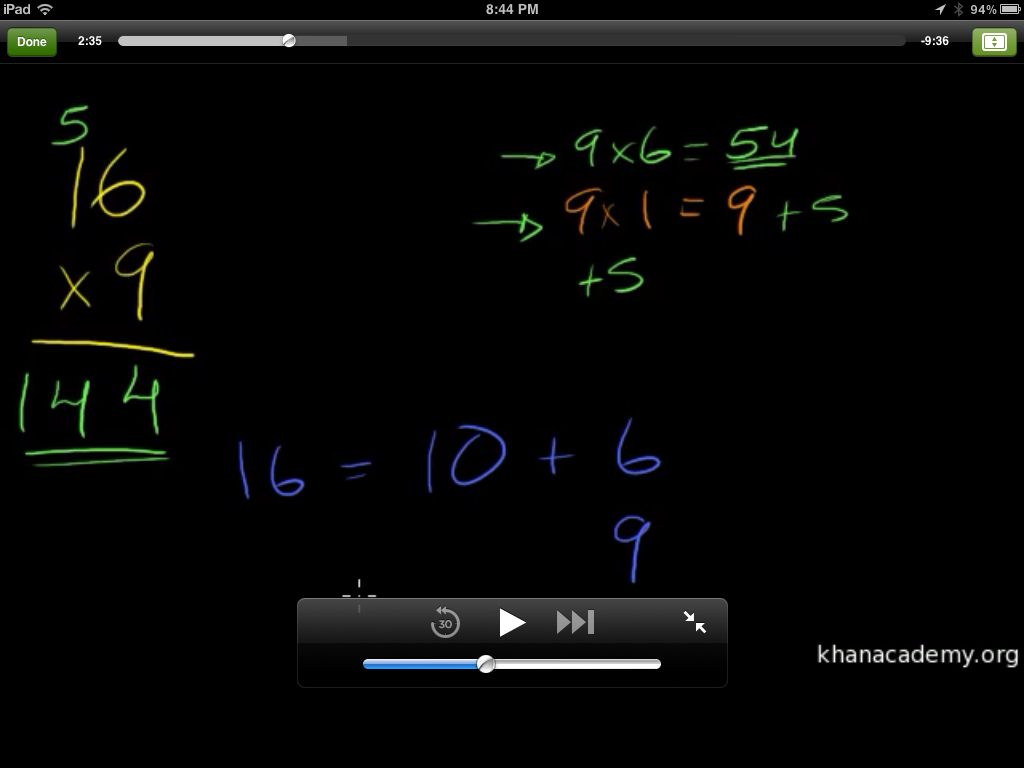
One of the neat features that I didn’t realize right off the bat, was that the video is not limited to the small screen seen above in the main interface– although what’s there is still clear. With the swish of multiple fingers, the video can expand to full screen like below:
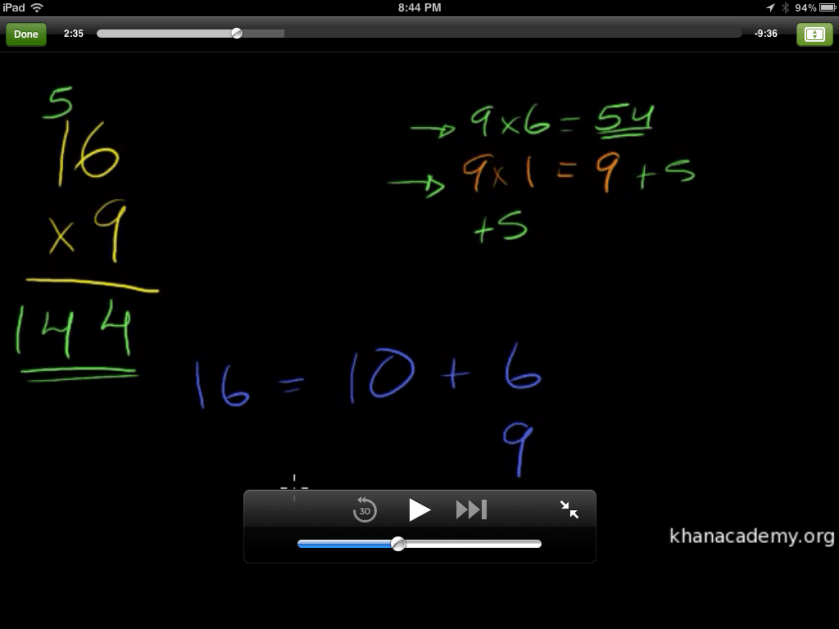
I was glad of this feature, not only because that way, the learner can see things better, but with the full-size, larger interface, it gives the experience a homier feeling, like someone sitting down next to you with a set of colored markers and paper (albeit black paper, but hey, I’m fine with that.)

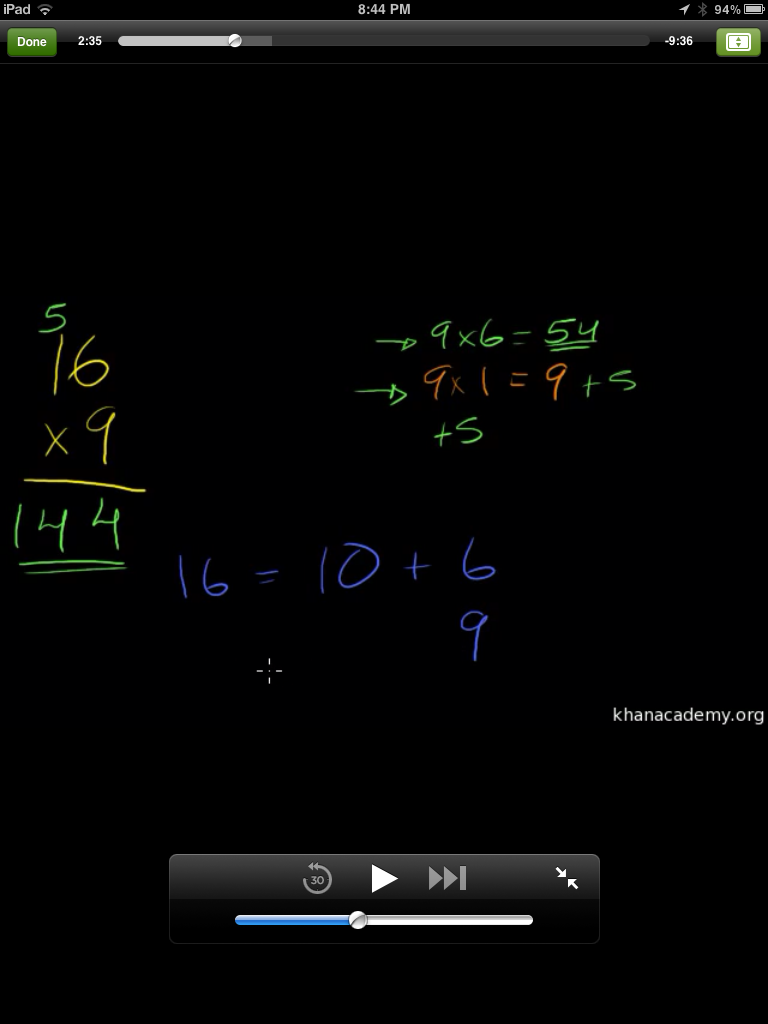
I looked at the display through a portrait view, and it looked like this:

(Sorry it’s a little smaller– the larger size image was TOO big.) You can see that the menu list is gone, but the video screen and transcript are still in place. When expanding the video in portrait format, it looks like this:
It’s still legible, and clear, and has that same comfort level as when it was in landscape mode. The screens adjust quickly between the landscape and portrait modes, which is good.

I won’t review the videos, as that’s been done before. I took this multiplication course, as it’s information that I’ve been reviewing with my son, but I also took a history lesson on Allende and Pinochet in Chile, and I thought it was well done. Sal does not show any bias towards one or the other, but does a pretty good job of presenting the facts, and actually invites the learners to draw their own conclusions, ask their own questions about the historical information. That is real teaching, my friend. A true authority will never admit to knowing it all, but will admit to being incredibly well informed, and always willing to invite curiosity, which is what Sal is doing here. He really does an excellent job.

Now, you may ask, what does this have to do with mobile learning? LOTS. Khan Academy is a rising star in e-learning right now, and by creating an app for iPad makes the courses even more accessible than ever. And just to play devil’s advocate, I accessed the Khan Academy through my iPhone’s Safari browser, just to see if everything would be teeny weeny and a waste of my time, but since all the videos are saved on YouTube, it’s very accessible. In fact, on the Safari browser, the site switched to a mobile browser version of the site, provided the same main menu of topics and videos, and upon choosing the video I wanted, I could still view the same videos pretty clearly. So even if a student didn’t have an  iPad or computer at home, if they or one of their parents had a smartphone, they could still access the information fairly easily.

So, is there a wrath of Khan? Not really. The only wrath that Salman Khan might have is what motivated him to start his non-profit academy in the first place– a passion to be able to provide basic (and not so basic) educational information to masses of learners all over the world by an easy means of communication at an affordable rate. (Who can’t afford free? Only cost is the computing device used, and many have access or have one.)

And isn’t that what mobile learning is supposed to be about? Easy access to easy to understand education information? I encourage anyone reading this to look into the Khan Academy. The firm is full of movers and shakers in the e-learning world that are dedicated to a higher purpose. It’s the kind of firm I would LOVE to work for, if given the opportunity. (Sal, call me!)