Posted in Uncategorized

One Morning with Google Glass Was Enough for Me!

Here I am with my Google Glass package, sad that the experience wasn't more, and the price was significantly less.
Here I am with my Google Glass package, sad that the experience wasn’t more, and the price was significantly less.

As disappointed as I was that I’d have to return my Google Glass because it really wasn’t in the budget, I knew there was a 30-day trial to use Glass, so my husband suggested that perhaps I should give the trial a whirl, and if I still liked it, I could purchase it again later when the price goes down. I wasn’t keen on the idea because I was afraid that if I liked the product enough, I’d be reluctant to return it. Despite his encouragement to try Glass first, my husband didn’t help the cause, as he’d constantly be emailing me negative articles about Glass.

Nonetheless, I decided that I’d forge ahead and give Glass a try. I didn’t even last one morning.

Upon receipt of my Google Glass, the Glass didn’t have enough charge to even set up my account on the device out of the box, so I had to charge it overnight. Even with an overnight charge, it was only at 88%. Something’s not right with that. You’d think that with such a small device that a) there would be just enough charge in it to set it up, at least, and b) that charging it overnight would put it at 100%. So, not a good start, but by the next morning, 88% was enough power to be able to set the device up.

Now, I hate to compare apples to oranges, but I couldn’t help but make mental notes of how much the experience was nothing like dealing with an Apple mobile device. Yes, I know that Glass is not a smartphone, but it does connect to one’s smartphone, after all. I’ve done the set-up of my son’s Android smartphone (and I will admit, I’m no Android expert) and set-up 4 iPhones and 2 iPads over the years, so I think I have a good idea of what a good out-of-the box experience should be.  I’m also fairly adept at figuring out new technology, and have been the “tech person” in my family for decades, even before digital technology was mainstream. Add to those credentials that I am a technical communicator, so figuring out how to set a digital wearable device should be par for the course.

When I used an iPhone for the first time, I could figure out everything instantly. Apple walks you through set-up directly on the device, and nothing extra has to be done on another device paired up to it. Google Glass had some directions in the viewing screen (for lack of a better term), but it took me a while to set the device up so that it could connect to my phone and read the QR code that the app had to read to connect and activate the account. I had also read the Google Glass online help files on my laptop as I was doing this. It’s not a good sign, to me, if I have to read the website simultaneously while setting the device up. Even then, the directions weren’t that great. It assumed that everything would go smoothly, so set-up would be a snap. However, mine was not, and I couldn’t find any answers to problems I had.

Eventually, I did figure out how to get Glass set-up. I was connected to my Google account, and ready to go. It was early in the morning, and I decided to try it out, let me son see how it worked, and my husband was curious to see how it worked, too, even if he was the naysayer against it.  Because I didn’t want to accumulate too much personal content on the device, I tried to be careful about not taking video or photos, as I needed to learn how to download apps and manuever the device first.  My son liked what he saw, and I had him do the instruction, “OK, Glass, Google Minecraft,” and it did. He liked it. But, being that he is a rambunctious 12 year old boy, I didn’t want him wearing this expensive device for long. It was then my husband’s turn.

polish-chicken-11
This is a Polish chicken. And this is what my hair looked like that morning (more or less).

Before I could try to instruct him on how to manuever the device, my husband decided that he already knew how to use it based on viewing the Saturday Night Live skit from a while back. I scolded him for just trying to do things randomly, and I wanted him to give them back to me if he wasn’t going to give me a chance to explain how to use them properly–based on my limited knowledge at that point. The next thing I know, he proclaims, “OK, Glass, take a picture.”  In full glory, in my rumpled NJIT pajamas, angry face, and Polish chicken hair because I had not gotten ready for the day, he had a photo of me. I was not happy about that. He then asked, “If I wanted to send this, what would I do?” At this point in the story, he and I differ on the account, but since it’s my blog, I’m telling it my way.  He started to say, “Would you say, ‘OK, Glass, send an email…’?” and when he realized that he’d actually be sending an email, it opened up to THAT PHOTO.  “Oops!” he claimed, and tried to back out of it. He did say, “Cancel,” a few times, but nothing happened. But somehow, the photo did get sent, and it was sent to the first person listed on my Google + list, whom I don’t know personally! How embarrassing! I had to get on my laptop later, and send a note to her in Google+ explaining the situation, that I wasn’t sending a photo of a crazy, angry bag lady on purpose, etc.  By that time the Glass was confiscated,  that was enough to get me on the wrong foot with the device even further.

After everyone had left for school and gone off to the office, I had a little time to myself to try to figure more about this. One of the biggest flaws I saw with this device is that it’s not intuitive. As I mentioned, the set-up was not smooth at all. I found that I couldn’t figure out for the life of me how to delete the photo or the Google search from the Glass unless I reset the device back to factory settings. That can’t be right.  Additionally, I couldn’t figure out how to get to a screen to add apps. Again, that doesn’t make sense. So, I went back to the Google Glass Help online to try to figure that out. I couldn’t find any instructions on how to add apps. Additionally, I saw that there were less than two dozen apps available at all! Geez, that doesn’t seem like a lot. I know that this is a product that’s still in development, but you’d think that after a year, Google would have more apps than what I saw.

So, when I took into account how the product wasn’t intuitive, had very few apps, had no ability to delete things (I was able to delete the photo in my Google account via my laptop, but shouldn’t be), plus the exorbitant price, I succumbed to what my husband had been telling me all along. It wasn’t right for me.  So, I called Google to ask for the return labels so I could send it back and get my full refund.

Believe me, I was really frustrated with this product. Although my family thought it was cool, they also felt that it wasn’t so easy to figure out how to use it seamlessly, and we’re all fairly technical–even my son. But for something that was the price of two new iPad Air devices or laptops that had much more functionality, I had one funny pair of electronic eyeglasses that didn’t do a whole lot.  The experience was disappointing, and I didn’t want to pursue it further–that’s how frustrating it was in one morning.  To quote my husband, “If Apple had come out with these instead of Google, it would be cheaper and it would be a completely different experience.” This is coming from a guy who’s very reluctant to use Apple products in the first place, and he even came to this conclusion. The sad thing is, he’s right. When watching that SNL skit again after this experience, my experience wasn’t too different, except the character in the skit got apps on his Glass, at least. The scary thing is, that skit was done a year ago, and nothing has changed since that time!

Despite this less than stellar experience with emerging technology, I think if the price came down significantly, the intuitiveness of the product was better–including understanding how to delete content and add apps, and there were more apps to use, then I’d definitely reconsider getting Glass again in the future. The product isn’t ready for primetime, in my opinion. Even the iPhone had more features on it when it first came out in the first year than this has.  I initially got interested in Glass after seeing my friend, Marta Rauch of Oracle, using them, and seeing her presentations about the product’s many capabilities. I wouldn’t have rushed to purchase the product and have a chance to use them if I didn’t believe that there was a true potential in the product. I think Marta has more of a chance to play with them and see the potential because she uses them professionally as well as personally. Part of her job is seeing how Glass can be integrated in projects and products that she’s working on at Oracle. I don’t have any such projects or products I’m trying to develop.  And as I said, I do think there is potential for a wearable smart device.

I don’t think Google Glass in its current state, however, is the product for me right now. Once some of these issues are fixed, I’ll see about giving it another try. Believe me, I’m really disappointed, but at least I can get my money back, and Google is being fairly cool about me returning it. And yes, I’ve given them this feedback–twice.

Do you think I didn’t give it a chance? Do you think I was crazy to even try it in the first place? What do you think about such devices? You can put your response in the comments section below.


Posted in Uncategorized

2014 eLearning Conference 3.0 at Drexel University – Slides!

Today was a bit of a new achievement for me.

I broke out of the tech comm mold a little bit, and actually did an e-learning, or more specifically, an m-learning presentation today at the e-Learning Conference 3.0 at Drexel University in Philadelphia today. I was totally out of my comfort zone, because while I love to talk about and share what I know about m-learning, I’m not an m-learning professional, meaning this is not something I do everyday like the rest of the attendees. I also had never been in front of such a large group (there were 50+ people in the room! New record for me!), and among those who DO use e-Learning everyday. I was grateful that I had people come up to me and tell me they liked my presentation. I was glad that at the end of my presentation, I was able to get a conversation going in the room about m-learning practices.

Not bad for a content strategist, eh? 😉

Due to popular demand (okay, some attendees asked for it), here are the slides that I used. If they don’t make sense for some reason, feel free to ask questions in the comments, or email me directly.

Enjoy!


Posted in Uncategorized

TechCommGeekMom’s TechComm Predictions for 2014

sarahjane-crystalball
Sarah Jane Smith of Doctor Who is gazing into her crystal ball, trying to figure out why the 3rd Doctor and the Master aren’t going at it with more mobile tech.
Happy New Year! Welcome to 2014!

I had set several goals for 2013, and for the most part, I achieved many of them.  Due to finally having a job this past year, I was able to pay for my new kitchen outright (okay, we saved on labor costs because my multi-talented husband installed everything–and I mean everything–except the Silestone countertops), so I have a new kitchen that I love.  I definitely travelled more, as I visited Atlanta for the first time in 21 years due to the STC Summit, and I got to visit Portland, Oregon again for Lavacon.  I didn’t get to go to the UK, however. And I still don’t look like a supermodel yet.

My 2014 goals are still fairly ambitious, I think. I would like to build upon my web publishing experiences at work, and figure out how to become a content engineer, rather than merely a content manager. I’m hoping that attending the Intelligent Content Conference in San Jose, CA this February and attending this year’s STC Summit in Phoenix, AZ will with help with that. I’m not sure if I’ll be able to make it to Lavacon again until later in the year. I still want to go to the UK, but I think I may have to wait a little longer for that. If there’s a way to combine a vacation and a conference there at the same time, perhaps I can pull it off later in the year instead of going to Lavacon (just to vary things up a bit).  I had hoped to become a certified Muse expert last year, and that didn’t happen. Perhaps I can try this year. I also got the “WordPress for Dummies” book this year, which has inspired me to become more expert at using WordPress. I currently use the version hosted by WordPress itself, but I think it might be helpful to understand how the independently managed version works, too. If I can achieve some weight loss in the process during all of this, I will consider 2014 a success. 😉

As for predictions for 2014 in tech comm, I decided that I would be a little more analytical about it. Two years ago, it seemed that the push in tech comm was that we needed to think more carefully about content management reuse of content, and think in terms of mobile content.  This past year, that was extended to translation and localization of content, taking it a step further. So with those concepts in mind, what’s the next step? In my mind, it’s implementation of all of these with more vigor. Some companies are on top of this, but it wouldn’t be surprising to me if many companies–even large, global companies–are not on top of any of this yet, or on top of it in an effective way. I think about companies that I’ve worked for in the past, and how, despite their size and availability of resources, these companies wouldn’t be cutting edge in distributing content for desktops or mobile, and regional sites were not as localized nor standardized as they should be. So, in my mind, this is the year of implementation.

googleglassAnother thing to consider is technology changes. Over the past few years, we’ve been adapting not only to desktop or laptop interfaces, but we’ve also been adapting to more mobile devices like smartphones and tablets.  Marta Rauch, a technical communicator friend of mine who is part of the Google Glass beta testing, pointed

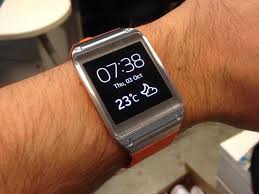
samsungwatch

out that 2014 is due to be a year in which even more portable, wearable mobile devices will become relevent. These devices would include something like Google Glass or similar products, but it also would include devices like Samsung’s wristband device or devices that are synchronized with car components. She’s got a point. Components are getting smaller, and technological portability is becoming more and more mainstream all the time. How do we decide what content is most user-friendly, reuseable, streamlined, and pertinent for these kinds of mobile devices? It’s something we need to start thinking about now.

riker-commbadge
“Riker to the Tech Comm community–are you there?”

So there you have it. At least in my mind, if we aren’t all wearing Comm Badges like in Star Trek by the end of the year, I don’t know what this world is coming to. 😉 But it’s hard for someone like me to figure out where the future is going. I’m grateful there are those who are on the cutting edge that can help me figure that sort of thing out, and can educate me on the latest and greatest so that I can bring it to my own workplace, as well as talk about it here on TechCommGeekMom.

I’m sure that there will be plenty of surprises coming up in 2014. As I said, I have three conferences that I’ll be attending in the first half of the year, and I know with the continuation of this great work contract I have, I will probably be learning a lot of new things through that opportunity, too. My philosophy is to never stop learning, and I plan to continue to learn a lot more going forward in the coming year.

What are you predictions for the coming year? Am I on target, or off-base? What did I forget to mention? Let me know in the comments.

Posted in Uncategorized

Death of the Desktop and Gaming as We Know It

deathofthedesktopIn the past week, I’ve made two observations about how technology is going through an advancement surge. What I mean by that is that there are big changes happening, and it seems like it’s happening incredibly quickly–at least in my eyes.

The first occurrence was last week. My dad called  us because he knew my husband and I had something he didn’t have–more computer knowledge than him. I found it a little ironic, my dad was my first computer teacher in the early 80s when Apple II first came out. My dad, being an educator, was progressive enough to know that these were going to be the wave of the future, and in some respects, he was an e-teacher–an early computer teacher. But here was my first computer teacher asking for help. He admitted that he had let his skills lag, and he was now “a dinosaur”, and didn’t have a clue what he was doing anymore. His desktop had died, but he wanted to retain a lot of information that was still on his old hard drive. My husband declared the desktop was indeed dead,  and suggested that if my dad bought a new desktop, we could probably install the old hard drive as a secondary hard drive in the new computer, and that way he could still access the information.

I took my dad to the local Best Buy and Staples to do some comparison shopping. What struck us both is that there were next to no choices at either store for desktop models. Almost everything was either a laptop, a tablet, or one of those sleek all-in-one units. Considering that my dad wanted and needed one of those BIG desktops–not one of the compact ones, the choices were even more limited.

The irony was that once we brought the desktop back to my house to see if we could install the old hard drive into it, we discovered that it didn’t have a bay inside the casing to accomodate it, but it also essentially only had a motherboard, a power source, a fan, a Blu-ray disk drive, and the hard drive inside. That was it. It was a LOT of wasted space for something that was fairly powerful. The machine also came with the “blessed” Windows 8. I’ve had my hesitations about upgrading to it myself, but my dad had no choice, and the poor chap has been using only Windows XP and Windows 2000 up until now, so he was REALLY behind. Our solution to the hard drive issue was that my husband bought a contraption that you can enclose the old hard drive in a special case, and it turns it into a USB-connected external hard drive. So, that part of the problem is solved.

The Windows 8 solution is not. Dad is struggling to figure it all out, and is perplexed at how Windows 8 works in general. He’s not up to speed with the idea of using cloud-based apps for anything, or even using cloud-based storage.  Since my husband and I are still using Windows 7 (and we’re safe for now), we can’t advise him on how to use it, even though we can give him some advice on apps and cloud-based apps in general. What’s frustrating for my dad is that my mother is even less computer literate than him (she’s been condeming computers for thirty years now), so she’s REALLY thrown by how to use Windows 8. I sent Dad some online resources including an e-book on how to use Windows 8, and he bought another book, so hopefully he’ll be the expert soon enough.

The second indicator to me that things were changing technologically was the closing of our local GameStop store. Now, to be fair, I live in a very small town–one that’s small enough that I questioned why we even had a GameStop in our town to begin with. We liked that store better than the one at the local mall because we got more personalized service, and we liked the staff there. I was only surprised to see that it had disappeared almost overnight the other day when I passed by the shopping center where it was located. I’m sure the store didn’t get enough traffic to warrant it to stay open, so that wasn’t a surprise. I was just surprised that it was done without a lot of fanfare. Related to that, since the store wasn’t there, my son was itching to get a new game for his Nintendo 3DS, and we ended up looking online for choices. Granted, my son is fussy about what games he likes and doesn’t like, so choices seemed slim. But even from my own tastes, it seemed like there weren’t a lot of choices. Here was a portable gaming system that didn’t have many games, even though it’s the most current Nintendo portable gaming system on the market. That didn’t make sense to me. As I later found out, Nintendo is working more and more on putting out games that can be accessed through the 3DS’s wi-fi connection–in other words, accessed through cloud services, and saved on the device’s flash drive or on the SD card that you can install. THAT’S where all the new games were!

As I thought about my dad’s predicament in catching up to the 21st century and my son’s need for more games, it occured to me that more and more access to media of any kind is becoming dependent on mobile services and cloud services.  Really–think about it. As I was finding out from my dad, he could only install or update his Microsoft Office if he subscribed to Office 365–the cloud service. Microsoft has adopted cloud services to deliver its services, as has Adobe. Subscription services are pretty much the main way–and soon the only way–one can get access to this software and applications. It’s rare that anyone gets DVDs to install software anymore–it’s downloaded off the Web now. The same thing was happening with my son. He had better access to games for his device through Nintendo’s cloud services than if he paid for a micro-disk.

These are only two of several observations I’ve made lately that we’re going through a technology surge of sorts that are making what we’ve known and loved for years are quickly becoming obsolete.  Tablets, smartphones, and laptops are pretty much the standard now, pushing mobile to the forefront even more. Touch technology is becoming more prolific, even for the all-in-one desktop computers that are out there, putting it on the same level as its mobile counterparts.  Even the gaming world is getting the clue, with more games downloaded to smartphones and other mobile devices rather than buying the software.  Who buys DVDs or Blu-ray disks anymore when we can download movies and other videos from Netflix or iTunes?

Cloud-based and flash-memory based technology seem to be taking over! Soon enough, DVDs, CDs, and SD cards are going to obsolete like the 5 1/2 inch floppy disks, VHS tapes, tape reels or punch cards! Seriously–think about it–in a year or two (okay, maybe a little more than that), all those things might be GONE.

It’s great that technology is advancing in leaps and bounds like it is. No one is more excited about these advances than I am, in most cases. But I wish I could keep up sometimes! It makes me feel bad for my dear dad, who is getting left in the dust by these advances.  I’m sure he’s not the only one.

Posted in Uncategorized

Mobile First or Content First? Yes.

What alien argument is this?
The 10th Doctor questions, “This argument still? This is centuries old by now.”

My latest entry on the STC Notebook is now up! It addresses a question that seems to me to be a hot topic of discussion at all the events I’ve been to so far, as well as in social media discussions and articles.

Here’s the link:

Villegas Views: Mobile First or Content First? Yes. 

What do you think? Feel free to weigh-in on the topic below.