
Via Scoop.it – M-learning, E-Learning, and Technical Communications

A great game player has all the good characters that schools desire to see from their students. What elements of gaming can we harness for educational purposes?
Via Scoop.it – M-learning, E-Learning, and Technical Communications
A great game player has all the good characters that schools desire to see from their students. What elements of gaming can we harness for educational purposes?
Via Scoop.it – M-learning, E-Learning, and Technical Communications
Whether you realise it or not, you’re designing every day. Whether it be be a simple document, an updated resume or a presentation, you’re…

Today, I was very excited to rush home from my part-time job to get to my laptop in time to attend a webinar. I’ve decided that part of the way that will help me get ahead in the m-learning world is that I have to do a lot of listening in order to learn myself. My graduate courses have covered a lot of ground, but they haven’t covered everything, so I might as well take advantages of free resources that are readily available to me, and do some of my own additional m-learning and e-learning.
Anyway, I just wanted to say…I was disappointed. I’m not going to name the specific webinar or who was hosting it to protect the innocent. I’m sure this host has put out plenty of good webinars, but this one wasn’t that great. Was I benchmarking this against others I had attended? Well, sure, who wouldn’t? When I attend a seminar in person or a webinar online, I’m just another student or learner like anyone else. I want to come out of that hour feeling that I learned something, or gained some new perspective on topics that I already know. That really didn’t happen here. Now, again, I’m not going to totally “diss” the presenter. It was obvious that the presenter knows his/her field well, but it was evident that he/she was asked to speak about one aspect of the field when that person was more familar with another supporting aspect of the field. I was bored by the PowerPoint slides, the information covered was not explained clearly, and the person was clearly rushing at the end, because he/she had several slides still to go and 2 minutes left on the clock. I was bored, but I stuck with it until the end because I hoped to gain some little nibblet of information that would be new to me. Now, I’ll give the presenter the benefit of the doubt, that perhaps he/she was nervous, or was jumping on slightly unprepared, or perhaps even just rushed out of one meeting into this webinar and didn’t have a chance to switch mental gears well and it just got out of sorts. That happens. But still, I was watching the numbers for the participants start very strong, and dwindled down very quickly in the last quarter of the alloted time, and that can’t be a good sign.
I happened to see that another tech comm acquaintance of mine was commenting on Twitter about the same webinar (again, not naming names to protect the innocent), and it was interesting when we started speaking through direct messages–offline to the rest of the world–that we were having the same experience. I had attended webinars with this other person, so I know that he/she had other similar experiences as I had. I was just glad it wasn’t me, but that maybe the presenter had not done his/her homework, and really wasn’t addressing the right audience.
I mentioned my disappointment briefly on Twitter, but chose to include no details. I had another acquaintance direct message me, and his/her reply was that many people will come online claiming to be experts, but really aren’t, and it can be a letdown. He/she continued by saying to me that some people are “knowers” and some are “do-ers”, and sometimes being a “knower” isn’t enough to be an expert and be doing presentations like that. I couldn’t agree more.
I’ll be straight-up. Look, I’ll admit that right now, I’m more of a “knower” than a “do-er”. I’m not in denial about that, and hopefully I’ve tried to make it clear while I’ve been writing this blog that I am–in many respects–still a newbie. I was in the e-learning world many years ago, before I became a mom and tried other things, so in that respect, I was a do-er at one time, and I’m trying to become a do-er again. For now, I am mostly a knower, but I will never admit to being a know-it-all. This is why I know I have a lot to learn. This is why I attend webinars, and read blogs, and keep up with all the great articles that other e-learning, m-learning and tech comm professionals are posting on Twitter or elsewhere. I’m hoping that by the time I finally get the chance to DO the job of working in the e-learning and m-learning field, I will be able to DO my job even better. But will I be an expert? No, and frankly, I don’t think there’s truly anyone on the planet that know EVERYTHING about a given topic, even the foremost authorities on a given topic. Being the daughter of an educator and being a lifelong learner, I think I will always be a learner, because the world is moving very fast, and there’s always something new to be discovered. I am knowledgeable and competent in many things–some topics more than others. I am always more than happy to share what I know well with others, and learn from others as well, and have healthy debates and dialogues on topics. That’s true learning and teaching.
Anyway…back to the webinar. Even with this webinar, I felt like basic e-learning principles weren’t being followed. Nothing about the instructional design of the webinar engaged me as a participant. I have been in webinar where I felt like, “Wow, it’s done already?” but this was not one of them. I was waiting for it to be done. I left it feeling that I didn’t really learn anything, and that, heck, even being a newbie I could do a better job with that webinar. I am not boasting when I say that or being conceited. I try very hard not to be that way. But, I felt that the main topic was approached with too much detail, and didn’t get to the meat of the topic. It gave me the feeling that if I wanted to do a webinar, or had to do online presentations and stuff, I couldn’t do any worse that this person.
As I thought about it more, I’ve given presentations to people anywhere as young as a Cub Scout to high-level executives in my career, and in the end, the message is the same– know what your audience expects, deliver on the expectations or do better, and like any good technical writing, keep it short, clear and concise, yet engaging. Heaven knows how many times I had to get up in front of my Cub Scout den to teach a bunch of little boys some dry subject that was required by the Boy Scouts of America, and I had to make it interesting for them. Same thing goes for grown-ups too– you’ve got to keep it moving, and even take the driest topics and make them interesting.
Nowadays, part of the drive with m-learning is that content and formatting addresses these same topics of keeping it short, clear, concise, and engaging. With technology available today, we don’t need boring PowerPoint presentations! Even Powerpoint has the ability to include video, audio and animation. There are free programs available on the web like Prezi to make presentations even more lively, animated and interactive. Presenters need to think of how they would be sitting in the audience of their own presentation. Do you think it’s good? Would you be interested in learning more after hearing it? What would make the presentation more interesting to you?
I’m looking forward to still watching and participating in future webinars as I learn more and more about m-learning and e-learning. I know that m-learning is growing so rapidly that it’s hard to keep up, but applying the same best practices of m-learning into webinar presentations will go a long way in keeping the caliber of the field high–and keeping my interest.

April 2nd is World Autism Awareness Day. It’s a big day in the autism community as it reminds those who haven’t been affected by this condition that it still exists, and the number of those affected with the condition rises all the time. On April 2nd, many major world landmarks are even lighting up with light blue lights, to celebrate and remind us of the day, and to mark the start of World Autism Awareness Month.
What does any of this have to do with m-learning? EVERYTHING.
In the last year or two, it’s been mobile devices–especially iPads and other tablets–that have proven to be excellent tools and teachers for autistic kids. Unlike other devices of the past, today’s tablets have proven to be more affordable and learner friendly for autistic kids. Did you see the segment on 60 Minutes months ago where they showed children who they didn’t think had an understanding of language use iPad apps to “speak” and show that they comprehended language better than had been thought? This is a major deal, because this would enable autistic people to truly have a voice, even if they couldn’t physically speak. Communication is a huge part of life, and this helps them communicate. This is major stuff!
Additionally, higher functioning autistic kids often needs help with their homework and schoolwork, and need something more tactile and something that provides instant feedback even faster than a computer would. More than even a typical kid (“normal” is a relative term in the special ed world, because, what is truly “normal”?), autistic kids don’t necessarily like being stuck in front of a computer sitting still. Working in an environment that is comfortable helps with producing a productive learning environment, and even a laptop can’t pull that off well sometimes.
But the use of smartphones and tablets? Autistic kids LOVE them! They have the bling of a video game with the general conveniences of a desktop or laptop. Apps are affordable, and there are so many for special ed educators to use with autistic children, and get a positive response. If the best in special ed elearning is applied to mobile devices, I’m sure that large strides can be made for the betterment of these children. Portability–or rather mobility–of the device is key.
I think there’s a big market and opportunity in creating mobile learning apps and texts for people with autism. As mentioned, it seems that the population is growing due to better diagnoses over time, so early intervention with the right tools are essential, and those involved in mobile learning have a huge opportunity to make a difference!
If you don’t create learning apps or software for kids but would like to donate your time to help, check out the Hacking Autism site, which is sponsored by Autism Speaks, and I believe in prior years was also sponsored by HP.
Why do I take such an interest in this? As you may have guessed by now, autism is a big part of my daily life. My almost 11 year old son was diagnosed at age 9 as being on the cusp between having Asperger’s a syndrome and high functioning autistic, being so high functioning that he eluded many people who tried to diagnose him earlier. He was categorized as high functioning autistic in the end as he had speech problem when he was very small that required a lot of speech and occupational therapy, even though his speech issues have been resolved. (In fact, much like his mother, he often doesn’t stop talking now.)
I look at the capabilities of what apps on an iPad can do that I wish it had been around when he was smaller. While he is a “digital native”, and he has been around computers all his life due to two parents in the IT/e-learning world , he is most smitten with my iPad. Granted, it’s so he can mostly play Angry Birds in Space right now, but since he has an interest in physics and science, I’ve put a lot of games that are oriented around the use of physics, and he responds. When he has writing assignments, he likes being able to type either directly on the iPad or using my wireless keyboard to write his homework. Just the other day, I showed him the entry from the Khan Academy about the odds of winning the MegaMillions, and he thought it was cool. I could show him all these things right from my iPad, and not have to drag him to my laptop or his desktop. He loves interactivity and loves to watch videos, as he’s mostly a visual learner.
I foresee more and more uses coming about with the use of smartphones and iPads for kids and adults with autism as time goes on.
Oh, and one more thing. Through my son, we’ve figured out that I, most likely, am also on the autism spectrum as well, most likely a high-functioning Aspie. Imagine figuring that out in your early forties! While most who have known me even for most of my lifetime would say, “Really? How is that possible? You are so NORMAL!” I would contend that I had many of the same social and learning issues as my son, but to a lesser degree than him, as a child. I still have problems understanding some social signs, and it’s like mental gymnastics when I get overwhelmed with things even now. My brain just shuts down. As a result,I understand it when my son gets frustrated too. (Imagine my poor husband, when he has to deal with both of us having meltdowns of various degrees!)
I find that part of the reason that learning instructional design comes so easily to me is because I’ve had to figure out–the hard way–through my life how to actually learn. I had to figure out how to retain information, and how to figure out how to make study skills become a natural action. Since it was harder for me to learn how to learn, the information and those skills I did attain have stayed with me longer. I can look at content from the eyes of the end user as well as the author, knowing that if a certain desired response is being elicited, then the right word choice or presentation of information needs to be done. The digital age has helped me open up and find my voice and my ability to write effectively, when I thought, as a child, I was not a writer at all, and had major difficulties doing so. Having this “natural” ability with instructional design and a passion for technology are what have helped me in my career, and what will hopefully propel me forward as I continue to pursue an e-learning/m-learning career. In the end, it’s not about metrics and logistics of e-learning or m-learning, but the actual LEARNING that’s most important to me.
Autism is a big part of my life, and it’s a big reason why I’m so passionate about m-learning. It’s not just the wave of the future for typical learners, but the wave of the future for ALL learners.

KHAAAAAAANNNN!!!!
←No, not that one.
I first heard about the Khan Academy from my husband. My son, who is a high-functioning autistic, had fallen behind in his math skills because of problems with his classroom teacher (that’s a long story, I won’t get into it). Needless to say, a kid who had been doing fine in standard third grade math was still doing third grade math, and we were trying to find solutions to figure out how we could get him to catch up in a way that might interest him. My husband, in his quest to find something online, had found the Khan Academy, and had explained to me the history of the site. It sounded like a great idea, so I took a look at a couple videos on some of the simpler math concepts. It was great! I mean, what’s not to like, and why didn’t I come up with this idea myself? I liked the concept of what Salman Khan was doing, and it was easy to follow, and interesting to watch. While we didn’t introduce it to my son as we got sidetracked with other things (again, long story), I never forgot what the Khan Academy was about, and hoped that it would do very well in years to come.
Well, much to my happy surprise, it’s caught on like wildfire. It’s actually built up to a little business, and is now a leading standard in reverse classroom or “flipping the classroom” techniques. What’s the reverse classroom, or how do you flip a classroom, you may ask? (It’s okay– I didn’t know until about a week ago or so myself.) This concept is where at night, student would study and learn the new concept, and then do the homework at school. The idea is that kids would learn a new concept on their own, and then use class time for putting what they learned on their own the night before into practice with exercises, and the teacher would spend the time helping reinforce the ideas and helping to clarify what wasn’t clear. When I read what the idea of the reverse classroom was, I thought, “Brilliant! Why didn’t they do that when I was a kid in school?” I can see a lot of subjects where that would come in handy, and to hear that Khan Academy was one of the leading online resources for such learning, my main thought was how cool that had to be, and how much more fun learning would be. (Yes, even for those subjects you hated.) The CBS program, “60 Minutes” even just did a piece on Salman Khan and Khan Academy, which you can see here.
Now, like the “genius” character from Star Trek who appeared and then reappeared for a movie of epic proportions, Sal is back with a new way to distribute Khan Academy information, namely with a newly minted iPad app. It seems only natural that something like this had to be next, especially in light of the mobile learning movement that’s starting to take hold. I downloaded the app, and figured that I would review it here for you.
I looked at two courses within the program. It appears that all the content– and then some, that’s currently available on the Khan Academy website is available through the app. Now, I started tonight to keep track of what I looked at, and logged into the site. Login is either through Google (which makes sense, since Google is one of Khan Academy’s benefactors) or through Facebook. I chose to sign in through my Facebook account, and it only took basic information, nothing more, which is good. (I wish more apps that you sign into from a social media site only did that!) Anyway, the design was slick and simple. In landscape mode on my iPad, videos were listed on the left from a menu, and the video was found at the right. One feature on the iPad, you will notice in the screenshot image I have below, is that there is also a transcript of what Sal is saying in the video. I suppose this is good if you speak English but are not a native speaker, and you want to understand what he’s saying. (He speaks clearly for native English speaker, just so you know.) It also helps as a table of contents of sorts, so you can always say, “Oh, at this timestamp…” or “When he said….”, a person can find it within the video. I found that at first, the scrolling of the transcript wasn’t working too great, but the longer I left it going through the lesson, it eventually synched up.

One of the neat features that I didn’t realize right off the bat, was that the video is not limited to the small screen seen above in the main interface– although what’s there is still clear. With the swish of multiple fingers, the video can expand to full screen like below:
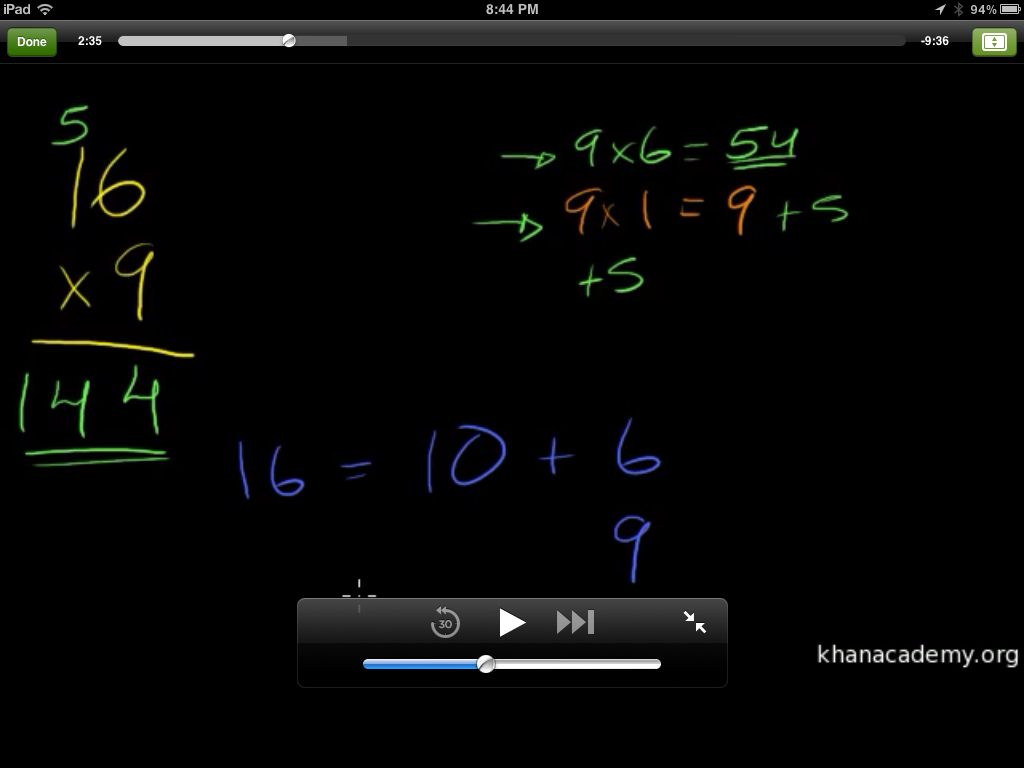
I was glad of this feature, not only because that way, the learner can see things better, but with the full-size, larger interface, it gives the experience a homier feeling, like someone sitting down next to you with a set of colored markers and paper (albeit black paper, but hey, I’m fine with that.)
I looked at the display through a portrait view, and it looked like this:

(Sorry it’s a little smaller– the larger size image was TOO big.) You can see that the menu list is gone, but the video screen and transcript are still in place. When expanding the video in portrait format, it looks like this:
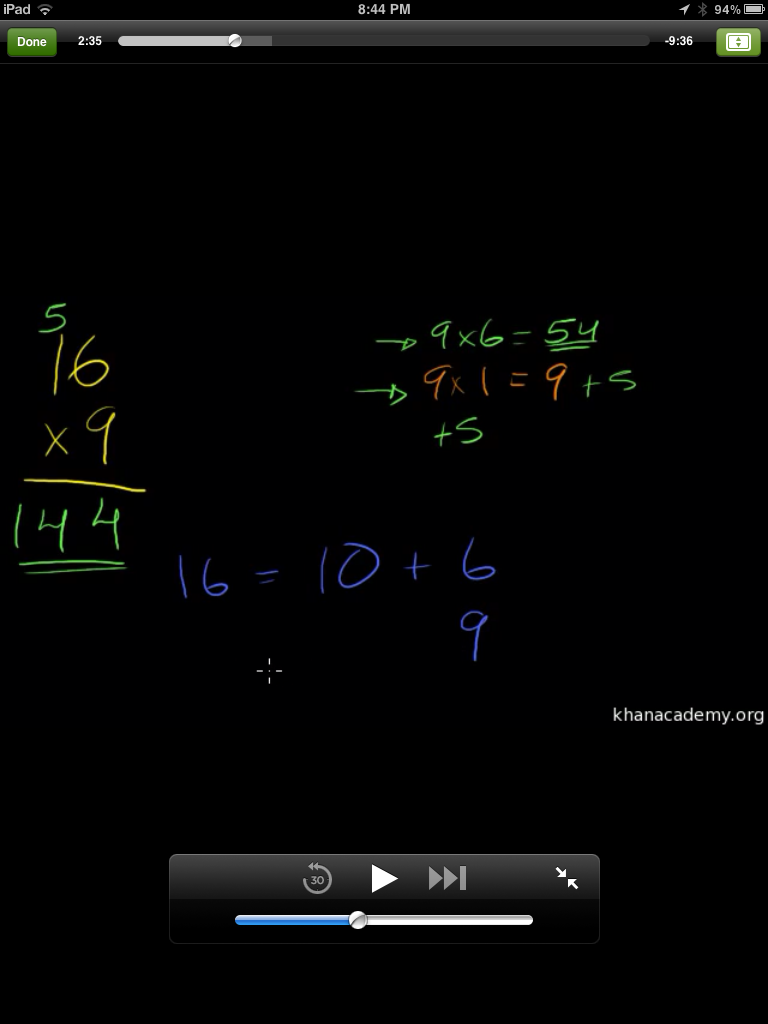
It’s still legible, and clear, and has that same comfort level as when it was in landscape mode. The screens adjust quickly between the landscape and portrait modes, which is good.
I won’t review the videos, as that’s been done before. I took this multiplication course, as it’s information that I’ve been reviewing with my son, but I also took a history lesson on Allende and Pinochet in Chile, and I thought it was well done. Sal does not show any bias towards one or the other, but does a pretty good job of presenting the facts, and actually invites the learners to draw their own conclusions, ask their own questions about the historical information. That is real teaching, my friend. A true authority will never admit to knowing it all, but will admit to being incredibly well informed, and always willing to invite curiosity, which is what Sal is doing here. He really does an excellent job.
Now, you may ask, what does this have to do with mobile learning? LOTS. Khan Academy is a rising star in e-learning right now, and by creating an app for iPad makes the courses even more accessible than ever. And just to play devil’s advocate, I accessed the Khan Academy through my iPhone’s Safari browser, just to see if everything would be teeny weeny and a waste of my time, but since all the videos are saved on YouTube, it’s very accessible. In fact, on the Safari browser, the site switched to a mobile browser version of the site, provided the same main menu of topics and videos, and upon choosing the video I wanted, I could still view the same videos pretty clearly. So even if a student didn’t have an iPad or computer at home, if they or one of their parents had a smartphone, they could still access the information fairly easily.
So, is there a wrath of Khan? Not really. The only wrath that Salman Khan might have is what motivated him to start his non-profit academy in the first place– a passion to be able to provide basic (and not so basic) educational information to masses of learners all over the world by an easy means of communication at an affordable rate. (Who can’t afford free? Only cost is the computing device used, and many have access or have one.)
And isn’t that what mobile learning is supposed to be about? Easy access to easy to understand education information? I encourage anyone reading this to look into the Khan Academy. The firm is full of movers and shakers in the e-learning world that are dedicated to a higher purpose. It’s the kind of firm I would LOVE to work for, if given the opportunity. (Sal, call me!)




 TechCommGeekMom
You must be logged in to post a comment.