I broke out of the tech comm mold a little bit, and actually did an e-learning, or more specifically, an m-learning presentation today at the e-Learning Conference 3.0 at Drexel University in Philadelphia today. I was totally out of my comfort zone, because while I love to talk about and share what I know about m-learning, I’m not an m-learning professional, meaning this is not something I do everyday like the rest of the attendees. I also had never been in front of such a large group (there were 50+ people in the room! New record for me!), and among those who DO use e-Learning everyday. I was grateful that I had people come up to me and tell me they liked my presentation. I was glad that at the end of my presentation, I was able to get a conversation going in the room about m-learning practices.
Not bad for a content strategist, eh? 😉
Due to popular demand (okay, some attendees asked for it), here are the slides that I used. If they don’t make sense for some reason, feel free to ask questions in the comments, or email me directly.
Some updates have been made to my Tech Comm Educational Resources list. There are two new additions.
First, there is a new Master’s degree in Social Media–and it’s an online course of study–available through the University of Florida. I’ve checked out the program and talked briefly with a rep for the program, and it sounds like a great program.
The second new addition is a new Master’s degree in Technical Communication from Arizona State University, which already has a great Bachelor’s program. This ASU program is so new that the first class will start in Fall 2014! I’ve looked at the curriculum of this program as well, and it also looks very good.
For more information, look for the Technical Communications Education Resource List on this blog by either clicking on the ID/TC Education Resources tab above, or by clicking here.
If you are interested in Instructional Design educational resources, you can click on the same links for the Instructional Design Education Resource List.
If you know of a related program that I don’t have listed for either category, please let me know, and I’ll be happy to add it to my lists!
The Times Square New Year’s ball drop has landed…it’s a new Adobe Technical Communication Suite!
As of TODAY, Adobe is releasing five new tools for technical communication professionals everywhere! Technical Communication Suite 5.0 (TCS5), FrameMaker 12 (FM12), FrameMaker XML Author 12 (FMXA 12) and RoboHelp 11 (RH11), and FrameMaker Publishing Server 12 (FMPS12) are now available.It’s been about eighteen months or so since the last big Adobe tech comm release, so you can imagine there are some new and enhanced features included.
I was privileged to be among a group of tech comm professionals who were invited to get a preview of the products before their release, and I have to say, there were so many new and improved features that it was difficult to squeeze all the information into one press conference! But I’m going to give you the highlights, and I’m sure you’re going to find that there’s something new for you.
In the last release of TCS, namely TCS4, there were several big overhauls of the product, namely that the Technical Communications Suite concentrated on providing tools that supported structured authoring, integrated interactive content, and could support the creation of content for mobile devices while providing searchable, personalized, socially enabled content in a way that would yield bigger results with less resources. It was a major step to enhance these tools, especially in regards to adding mobile and interactive abilities to content. Adobe has continued to build on those major changes with the new features in version 5.0.
The foundation of the Tech Comm Suite has always been FrameMaker and RoboHelp. With the release of TCS5, FrameMaker 12 and RoboHelp 11 have been released with big enhancements that appear to concentrate on making these tools more user-friendly and efficient for the technical writers using them.
Image courtesy of Adobe.
For FM12, the first obvious enhancement is the interface. Adobe has improved the user interface to include colored icons and larger icons that look cleaner and sharper in HD. If you like things “old school” in the original smaller, monochromatic colors, that choice is still available as well. There is also more flexibility in customizing your interface. A new “pod” allows the user to access all the currently opened files in one place, from which you can save and close multiple files at one time, while still viewing the unsaved files. There are also enhanced abilities to drag-and-drop to empty areas of the interface, close pods or panels more easily, double-click on empty areas to minimize or expand pods, and searching capabilities have been expanded. These seem like minor details, but when using a product as often as many technical writers use FrameMaker, these finer details can make a big difference! FM12 includes three samples of unstructured content and one DITA-based content sample with the product.
FM12 is not all about a new façade. Adobe has enriched the authoring process with new capabilities. The first thing that caught my attention is that FM12 can generate QR codes now! They can be created for URLs, SMS texts, emails, or to initiate phone calls. QR codes are taking over these days, so it’s great that these can be both created and integrated into FM documentation. Background color enhancements allow uniform height background color and options to specify paragraph boxes. The addition of a new customer-requested feature is the support regular expression coding.
Single-sourcing has been a hot topic in the last few years, and this has been addressed with new enhancements. FM12 gives users a new way to work with conditional text, by using a new conditional tag pod which provides check-box mechanisms with multiple conditions to allow the user to do more complex filtering with conditional text enhancements. It truly simplifies the entire process, that even a newbie should be able to figure it out easily.
Productivity enhancements have also been included in FM12. A searchable smart catalog function allows the user to filter choices based on the valid choices available and phrase typed by the user, while the user can continue to use the keyboard shortcuts as before. There is also a new capability to open all files from the user’s last session in one click, including the last documents and pages in focus, workspaces such as pods, panels and palettes, among others.
Adobe has also taken care to add great collaboration enhancements in FrameMaker. Native connections to any webdev content management system (CMS), such as Documentum, SharePoint, and Adobe CQ are available. Users can now view entire CMS tree layouts, and can access several key CMS functions, such as checking out documents, editing documents, and searching within document, all from FM12. PDF review commenting has been made more flexible. The most proactive steps towards subject matter expert (SME) reviews is that reviews can be done on PDF reader apps on mobile devices, and can also be used on those same devices using cloud technology such as Dropbox for both internal and external reviewers. As mobile devices become more commonplace replacing desktops and laptops, this is a great step forward!
Image courtesy of Adobe
Publishing abilities have gotten a boost on FrameMaker as well. It used to be that if you wanted to create certain types of digital output, such a ePUBs, for FrameMaker content, you would have to export it to RoboHelp, and have RoboHelp publish the document. Now, that step is no longer needed for PDFs, Webhelp, ePUBs, Kindle docs, Microsoft HTML Help, responsive HTML5, or Web help! That’s a big deal, as it allows FM12 to be more efficient by skipping that step of exporting and publishing in RoboHelp. Publishing can also be done through the Web now, too, for multiple users using a FrameMaker server, allowing multiple users to publish simultaneously and automatically to multiple channels and devices. That’s a practical efficiency improvement right there!
Image courtesy of Adobe
With this release, Adobe is introducing a new FrameMaker product for those who don’t need the full version of FM12, but are mostly concerned in having a tool to do structured XML authoring. FrameMaker XML Author is a tool that has been created especially for the structured XML market. Those wanting to use unstructured content will still need to use the full FM12 version. The XML Author is fully standards-compliant for content creation, and supports the most popular XML technology for single-sourcing. It is not FM12 “lite”, but it is a streamlined, easy-to-use version that supports structured authoring without the bulk of the FM12 features that aren’t needed for structured content, yet still integrate-able with the full version of FM12 and available at a lower price. I’m sure that having this tool will be highly beneficial to many companies who are looking for a way to cut costs (it is priced at 40% the price of FM12 “full”) while still reaping the benefits of having a powerful XML authoring tool.
Another customer request that has been granted by Adobe is the integration of MathML, to allow MathML equations to be imported, created, edited, and published with FrameMaker. Adobe is even including 30-day trials of MathFlow (MathML editor from Design Science) with the shipment of FM12 for those who are interested in trying it out. There are several other features that are also included, along with 55 bug fixes, improved performance and launch time for FrameMaker, but I’d end up writing a book at this point!
Of course, with all these big changes to FrameMaker, we can’t forget RoboHelp 11, which also has had a big overhaul.
Image courtesy of Adobe
RH11, like FM12, has a new UI look as well. Based on customer feedback, RH11 has a new color scheme and a more modern interface that looks more pleasing to the eye. It’s a step in the right direction. Adobe has said that further UI improvements are in the works, but this current new UI is the first step in a long overdue makeover for the interface.
The more important feature enhancements with this new release of RoboHelp include advances with HTML5 publishing, printed document enhancements, and collaboration and single-sourcing enhancements.
The HTML5 publishing enhancements are from the perspective that mobile publishing is central, so new single responsive layouts for all devices are available “right out of the box” when downloading RH11. This new single layout feature will work seamlessly across all devices, can be easily customized, will allow for real-time previewing based on the browser size, and can be published with one click. There is a new wizard-based layout editor available to help with this process that shows the added responsive HTML5 output options. You can also preview layouts, and the customization is great because no coding in CSS needs to be done, as you can use the editor instead. To me, this is true single-sourcing creation at its best while simplifying the process! This is a big deal!
Printed documents have not been ignored. Users can now customize headers and footers of printed documents by defining them in the master pages. Headers and footers can also be imported from Word. There is also the ability to specify different headers and footers for the cover, and even and odd pages for different sections of a document. This is great for consistency within branded documentation.
In terms of collaboration and single-source improvements, cloud integration and topic sharing for SMEs has now been included. RH11 now includes a Resource Manager tool that synchronizes folders using Dropbox, Google Drive, or Microsoft SkyDrive as shared locations, and includes filtering for specific folders. This allows the user to manage linked resources within files used in real time across projects and geography.
Image courtesy of Adobe
The Technical Communication Suite 5.0 includes FrameMaker 12 and RoboHelp 11, but it also includes the updated products of Acrobat Pro XI, Captivate 7, and Presenter 9 to complete the Suite. You will notice that Illustrator, which was included in the TCS4 version, is not included. This was a step, Adobe said, to help lower the price. Additionally, from the way I see it, it makes sense, because both Illustrator and Photoshop–another product that used to be included in prior TCS versions–are now affordably available as part of the Adobe Creative Cloud subscription. I know that I personally have a CC subscription, and I’m guessing that many active technical communicators do too, so this saves us from spending twice for the same product, which makes a lot of sense. TCS5, FM12, RH11, FM XML Author, and the FMPS12 will also be available both as a subscription and through perpetual license as well. There is separate pricing for the FM XML Author and FM Publishing Server software.
The updates made to FrameMaker and RoboHelp are extensive, as there are many more features, but I think you get the idea. Adobe is taking steps to try to stay on top of technological changes that have taken root in the past couple of years, such as mobile and cloud technology, and is working to continue to make a more robust and user-friendly products for technical communicators.
My recommendation is that if you are looking to try TCS5 or any of the TC products out, or are interested in upgrading your current TCS package or individual products, click on the Adobe advertisement in the upper right corner of this page, or visit Adobe’s TCS product page for more information.
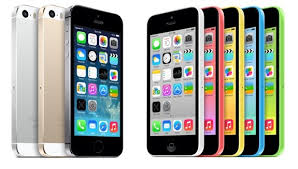
I, along with the iOS faithful, waited with bated breath yesterday to hear all about the new iPhone 5C and the iPhone 5S. Considering that the last time I upgraded my phone was for the 4S, I was looking forward to seeing what my upgrade options (that were not Windows or Android-based) were.
I was excited for both models, as I could see these as upgrades. Part of the big upgrade for both will be iOS7, as it is promising to be a more streamlined user experience. While we’ve known about this new upgrade to the OS for a few months, now that it’s close to its release, the excitement can really build up. There will be more accessibility to the Cloud, more multi-tasking features, easier ability to share data, and a better camera functionality, among other updates. Siri searches are even improved, as it draws more data from Wikipedia and social media now. Maps are improved. Just the OS update alone will make things better for mobile sharing of information. The iWork suite is going to be free, available on the Cloud as well. This is a big boost to creating and editing content, whether it be text, graphics, spreadsheets or video. My first reaction to this was, “Gee, I spent some good money on getting all those apps a while ago. Do I get a refund now?” I’m sure I don’t, but thinking about this from an educational perspective, this is a big boost. I did use the cloud-based iWork to work on some items while it was available via beta, and I found it to be a great solution for me to work on various documents on both my iDevices and my laptop–and my laptop is Windows-based! I could access it via my iCloud account on my browser, and then work on it later on my iPad or iPhone. It’s a great boost, and I’m sure it’ll help some classroom situations save some money.
But these new tools–because that’s what these new phones are, new tools–look awesome. The iPhone 5C and iPhone 5S do open up some new doors to not only use this new OS to the maximum, but they offer new opportunities for mobile learning.
While the iPhone 5C has all the pretty colors now available, the new structure of using a polycarbonate plastic foundation is going to make a big difference. First of all, I’m sure some people are thinking, “Oh my gosh, that thing will crack so easily because it’s plastic, even if it has that silicone case around it.” If you don’t know much about polycarbonate plastics, then you’d need to learn, because you would be wrong. Polycarbonate plastics are often used for children’s eyeglasses because of their strength and rigidity. The same plastic is used for sports goggles and sports eyewear for the same reason. (Being a mom who has a child with glasses, and I own a pair of prescription swimming goggles, I know this.) This plastic is safe enough to protect one’s eyes, even in extreme conditions, as they don’t break easily nor do they scratch easily. So if it’s safe for your kids’ eyes, it’s probably going to be safe for your phone. It’s reinforced with the steel frame that doubles as an antenna, so I think one shouldn’t have any worries if the device is properly cared for, in general.
The 5C will take advantage of all the new functionality of iOS7, which is good, but I think the biggest part of all of it will be its price point. The 16 GB model–it’s “smallest” storage model–will be US$99. For a brand new phone with this kind of functionality, that’s pretty cheap! And because of that price point, people who were buying Android and Windows phones as alternatives because of the price points of those other brands might now be able to afford an iPhone now. iPhone is known for its customer services, its ease of use, and its ability to have access to more apps than imaginable, so this accessibility will allow it to become a more dominant player in the mobile phone game. I can imagine schools being more apt to buy some of these smartphones or encouraging or subsidizing these phones around the world, because the price point is half of what the “fancy” model is worth, but it still packs a punch.
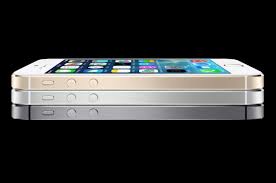
The 5S device, however, has more bells and whistles. While it does have new colors to its line-up, it’s more about how powerful the device is. It’s really a true microcomputer in the palm of your hand. The 5S is the first smartphone to have a 64-bit processor. How long ago was it that we had 64-bit desktops and laptops? That’s amazing! The CPU performance is now twice as fast as the iPhone 5, including super faster graphics. There is also a second processor in the 5S known as the M7, which is a motion co-processor. It works more accurately with the compass, accelerometer and gyroscope, so it’s going to spawn more use for health and fitness apps. Who ever thought you might use your iPhone for gym class? All this data can help assess the user’s surroundings more. Imagine using those features for a science class or history class? The 5S also has an upgraded camera called the iSight camera with a dual-LCD flash with better sensors. In combination with the iOS7 software, it will allow for more accurate photography. There is also a slow-motion video feature and a burst mode on the camera (taking 10 frames per second on the shutter). The camera alone is pretty cool!
The other big feature is the TouchID, which is a fingerprint scanner on the home button. It’s done for security purposes, but I could see this taken to a higher level, in time, for personalization for access. You know how one can use separate user names and passwords to access a shared device? The TouchID uses a fingerprint to identify a person, and multiple fingerprints can be approved and saved. What if that was used for personalized learning? So, one student would swipe his/her fingerprint, and only certain apps or information would appear. Another student would do the same, and different apps or information would appear. This could work beyond security, and again, I see this as something that could be a money saver for schools. A device could be numbered, and Bobby and Susie could share Device #8 of 10 in a classroom during different periods, and yet have access to different information. The software might not be quite there yet, but that might be the next step, and it’s a feature that could be on future iPads as well.
I think these are great innovations moving forward with both phones.
However, I did see commentary on some social media outlets by some that they were disappointed by the new phones, stating that the new phones were not “innovative” enough. RJ Jacquez was definitely very vocal on his Facebook page, stating, “Absolutely NOTHING innovative from Apple at today’s event. Disappointing! Google is now clearly in control of the Mobile Revolution!”
But I think there were two comments to his Facebook posting in response that caught my eye that I think summarizes these upgrades well. (Yes, I asked their permission first before posting.)
Stefan Gentz, who is a well-known technical communications speaker, responded to a naysayer by replying,
Hey, they just introduced the first 64 bit smartphone in the world! It has a fingerprint sensor that opens up a whole new level of online shopping convenience and security, a new global LTE chip with a whopping 13 LTE bands (which is especially great for continent hoppers) and a superb camera with an aperture of ƒ/2.2 which is even dramatically better than my professional Sony digicam (3.5), even better than most professional DSLR and it can still take 10 pics/sec. And the new motion chip M7 knows when you’re walking, running, or driving. For example, Maps switches from driving to walking turn-by-turn navigation if, say, you park and continue on foot. Not to mention the new iOS7. And this all in a 7.6 mm, 112 g sexy, high-precision case.”
Stefan followed up by stating that all these features don’t add up to nothing!
Paulo Castro, another technical communicator, followed up on Stefan’s comment with the following:
Innovation is not the only thing that matters in a new product. Sometimes you just have to take what you have and make it better, stronger, faster, more reliable, etc. Stefan (above comment) makes a good point in terms of new features.As long as nobody else comes up with something significantly better in terms of new hardware, software, or OS, then Apple may still have a good standing in this competitive market.
I, too, wish we could see an eye-opening product everytime Apple announces something, but the truth I would prefer to have an extremely efficient device at a good price, with high reliability, security, and functionality, rather than a new gizmo with stuff I don’t even need.
I have to agree with both gentlemen. There’s a lot going on with the upgrade of the device itself, as Stefan said. Even Lance Ulanoff of Mashable said of the 5S, “Its new look combined with this more powerful phone and some of the landmark features –- iSight camera, Touch ID –- should make the iPhone 5S feel less like an upgrade and more like a reboot.” But I think Paulo makes a great point as well, which is that in the end, I, too, would prefer to have an extremely reliable and efficient device. The 5S that I plan to buy will be the third iPhone that I’ve chosen to purchase. I could’ve easily upgraded to a Windows or Android-based phone a while ago, but I chose not to do so. I would be a rich woman if I had a dollar for every time my son or my husband had to forego using their Android phones, and we relied on my iPhone for something. I’ve never had my phone crash, and I can only think of once when I had to reset the phone and start all over again. Once in about five years, and it was probably five years ago when I was getting adjusted to it? That’s pretty good.
When it comes to mobile devices, there’s no question that I favor iDevices. The new iPhones have a lot to offer, and I can’t wait to order mine!
PS – In case anybody cares to know, I would love to have Lance Ulanoff’s job, or something a lot like it. Doing social media coverage and blogging about events like this and the tech scene would be a dream come true! 😉





 I, along with the

 TechCommGeekMom
You must be logged in to post a comment.