Posted in Uncategorized

What Hurricane Sandy Taught Me About Mobile Technology and Social Media

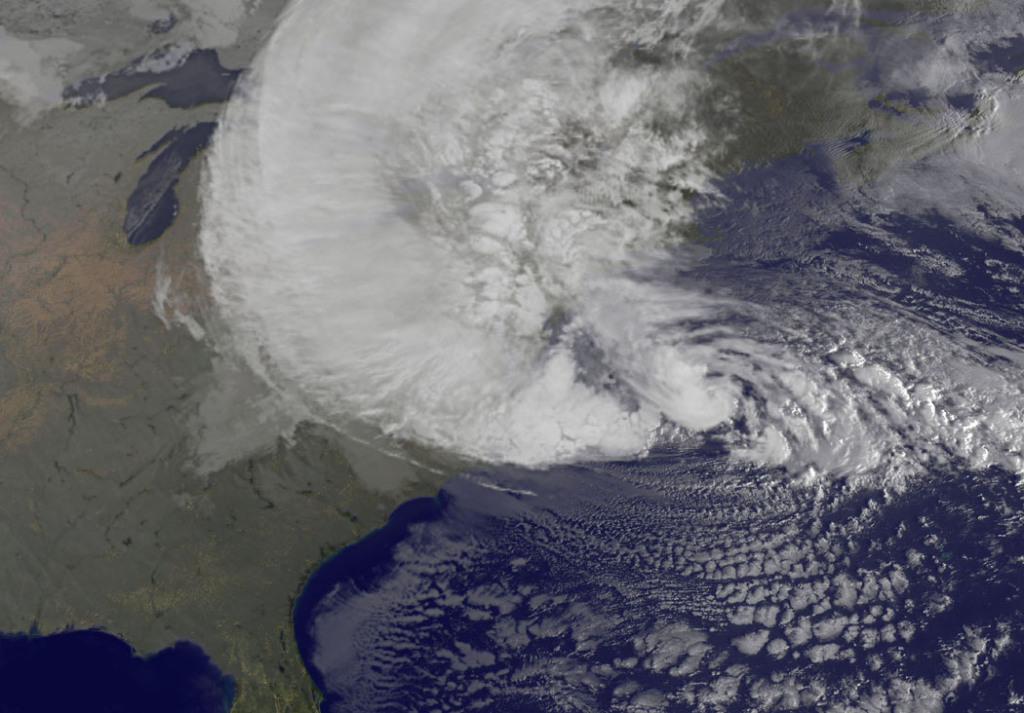
Hurricane Sandy satellite photo as it hit New Jersey

Hello all, and excuse my absence of late! If you hadn’t heard (ha!), Hurricane/ Superstorm Sandy hit the eastern coast of the United States, and headed straight for the state of New Jersey in particular. That means it hit where I live.

I initially started to write this while I was sitting in my car, writing on my iPad while my iPhone was getting recharged using the car battery, but I’m finishing it up on my laptop almost a week later. Hurricane Sandy hit my home, and we were without power for almost four days. A tree fell on our house, but fortunately not through the roof. There was a state of emergency in my town for a couple of days whereby no one was allowed in or out of town. Unless you were emergency personnel, you were not allowed to drive the streets. While we were lucky to get power within a few days (especially with very cold weather setting in), there are still thousands without power where I live, and even those who have lost their homes entirely. I was actually one of the lucky ones. So, you can understand why I might have had other things going on this week. 😉

My house the day before the storm.

Originally, I really struggled with an idea of what to write about this week, but this hurricane made some things very clear, and they are things that needs to be strengthened as a global necessity, not just as a local necessity. This storm made the following very evident to me: mobile technology and social media are critical in this day and age.

I only knew what was happening in the “outside world” and was able to make connections with my cell phone–a smartphone. Granted, the 4G network was incredibly slow, especially in the beginning, because everyone locally was doing the same thing. Something was better than nothing. Since I didn’t have power for my TV or radios, my phone was everything. It made me wish I had a MySpot mobile wifi connection created from my cell phone so that I could transmit the wifi signal to my other devices, but having at least the 4G did the job.

My house after the storm.

In the end, everyone who knows us had a way of knowing that we were okay. Between my husband and I, we texted my brother-in-law, my father-in-law in Ecuador was able to call my husband, and I had sent notes on Twitter and Facebook to let people know we were okay. There wasn’t much more that I could do. Until we had full power and Internet capabilities, I could only recharge my phone on a car recharger and send out the occasional note to update our status on social media. Saving battery life was essential to make sure that we could always be able to communicate. So writing up a blog entry was less important than making sure that our loved ones knew what was going on around us.

We were without electrical power for almost four days, and they were four of the longest days and nights I can remember. You have to remember that I live in a first-world country, where having constant supplies of electricity not only for powering things is commonplace, but it also runs things needed for basic survival, such as keeping perishable foods cold, and providing heat on cold nights (and we had some very cold nights). At my house, having had some Scouting training (I was a den leader for my son’s Cub Scout group for almost 5 years), and just even having a fireplace, we had some advantage. We had done some preparation so it wasn’t so terrible–just terribly inconvenient. There are others, such as my sister, who didn’t have power for more than a week. (She stayed with my parents who had power restored quickly.) There are still work crews from all over the Eastern Seaboard and the MidWest who have come in and have worked around the clock, and continue to do so to still get the rest of New Jersey power again. It is still not done. We’ve become a society that is dependent on its electricity, for sure. But we also have become a society that mostly depends on the power of internet connectivity and having means of communication powered by electricity.
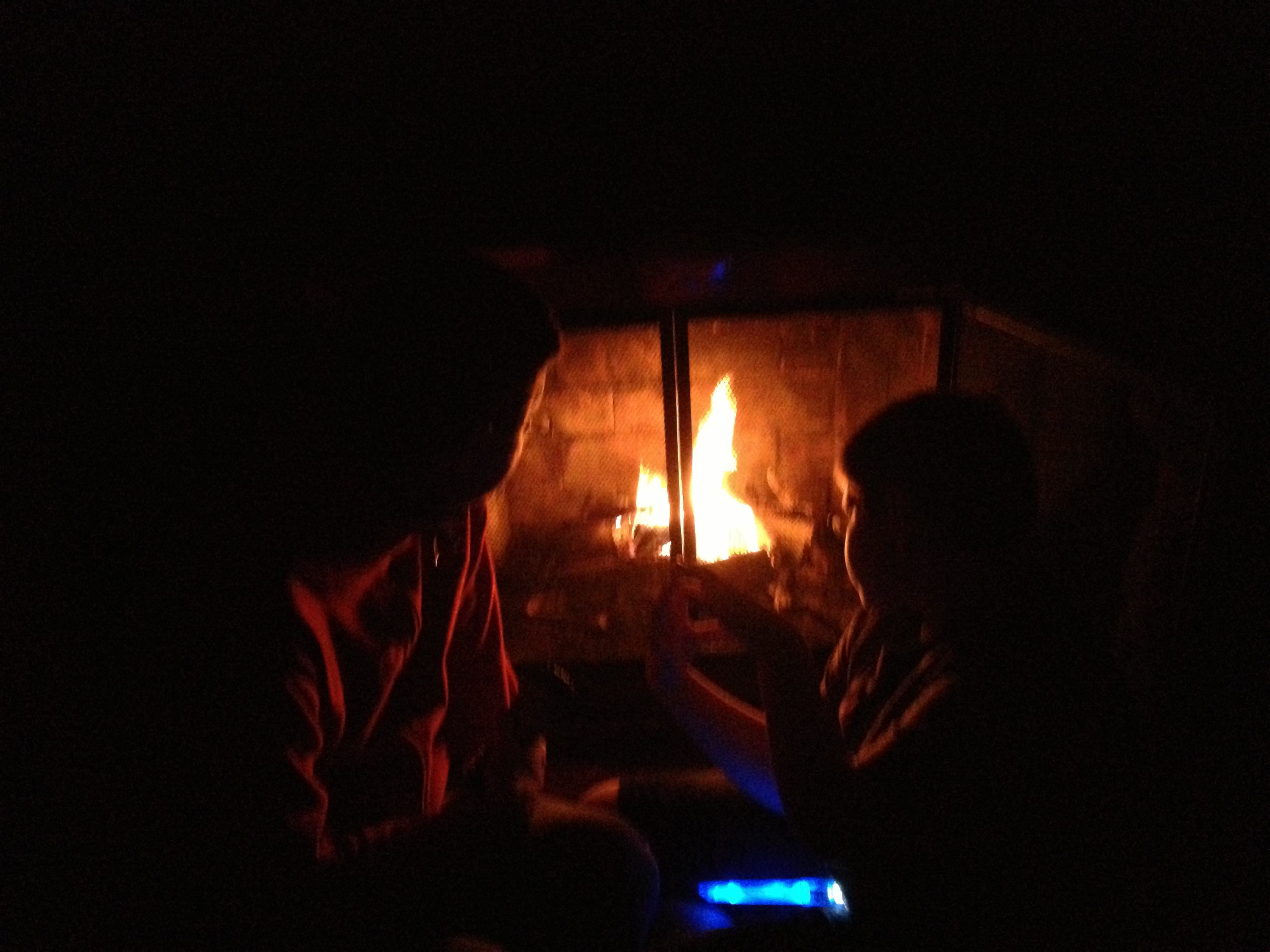
My husband and son keeping warm by our fireplace while we had no power.

Every day that we’ve had with power since it’s been restored, I’ve tried to remind myself about the many people in my state who have lost their homes and/or still don’t have power. I was greatly inconvenienced, but in the end, even with the tree falling on my house, I was still blessed and one of the lucky ones. My town, overall, didn’t sustain the kind of damage that other towns did. The big pond/lake and our town was drained before the storm in order to prevent flooding, and that worked. We didn’t have the water damage or flooding that other places did. Most of the damage we had was due to wind damage, so there were a lot of downed trees that took down power lines. Once trees began to be removed, and crews fixed the wires, then things started to get back in order. As I write this, there is still gas rationing in part of the state, which people need for their cars or even for generators to power their houses until regular service is restored. We’re not quite back to “normal,” but we are fairly close. Schools are starting to open back up for classes tomorrow after a week’s absence, many are returning to work, and shops are opening up again. New Jerseyans may have never been through something like this, but we are a resilient group of people. There is an expression that was often said well before the storm of “Jersey Strong.” That, we are.

But during this storm and its aftermath, I’ve had a lot of time to think about the importance of mobile technology and social media. Through SO much of the storm, my mobile phone was my lifeline to the outside world. Not only could we tell people that we were okay, but if we had been in serious trouble, it was our lifeline out. We would get messages and updates from friends and other resources through our phones. Was the storm over? I could track the storm either through the Hurricane Red Cross app or the Weather Channel app. Was it safe to go out? I’d receive text messages and emails from my town government to let us know what roads were blocked due to downed trees or wires. Where were there shelters if we needed heat, a warm shower and a solid meal? I could find that out as well. What markets had reopened after the storm for food, which gas stations were open with shorter lines, and where could we recharge our devices so we could continue to stay in touch and know what the news was? Different friends who had ventured out told me through social media. Having mobile devices and connectivity made knowing all that information possible. When we needed to have the tree removed from where it was leaning on our house, my husband called up our local tree guy, and his crew was out the very next day.  And in a totally 21st century way, having mobile devices kept us entertained at night, as I had loaded up some old episodes of our favorite television programs on my old iPad for my son, and on the new iPad for me. (During the day, we’d be cleaning up our yard and doing other things that would take advantage of the daylight.) Without these modern technological conveniences, it would have been a lot more difficult to get through those days.

But it also got me to thinking about how that technology could have been even better, and where greater improvements could be made. Two things from the technological side were apparent to me. First, connectivity could be improved on a global level, not just at a local level. More communications infrastructure and stronger communications infrastructure are needed to create reliable wireless hotspots. While 4G connectivity was available, it was spotty, and not always reliable during the storm. My husband does not have 4G on his phone, although I have it, so we were solely dependent on my phone for information. A secondary but equally important problem was, however, that using 4G exclusively drained the battery of my phone quickly, especially when the 4G service was very slow. In a stressful and possibly dangerous situation like this storm, that’s a bad thing.  I know there are several cities that have wifi service throughout the town, such as Philadelphia. We have many wifi hotspots, but they are not well connected between them, and they don’t reach to households around here. I found, once we had power and connectivity restored, that wifi connectivity on my phone or other mobile devices did not devour battery power on my mobile devices as much as the 4G did.

I started to think of places far, far away from me–and realized this is a global need. How are children in remote places supposed to get electrical power, more specifically battery power for a smart device? And even if there are miraculous power sources for these devices (which there are not at this time, especially in certain regions of the world), how would these children connect to the rest of the world?  Both improving battery life/power sources for mobile devices and improving the infrastructure for internet communication are key. It all needs to be set up in such a way that it doesn’t cost a fortune, is readily accessible, and can literally weather anything. It should be similar to using a radio–we can still get AM and FM signals, but we need a wifi version of this. I know that the network services in our area, especially AT & T and Verizon, said they were doing their best to provide and repair the 4G and LTE services damaged from the storm. Okay, I understand that. But in the US, as well as everywhere else globally, we need to start thinking about how to step up the technology so that getting wifi signals are as common as getting an FM signal on a radio. I’m sure that this is technology that is being worked on, but I feel like this storm proved that point very much. Perhaps the internet access providers needed to get ready for the storm by temporarily increasing the network bandwidth and boosting those wifi signals already present. I’m sure that I will be charged an arm and a leg for the amount of data I did use during this time, and the provider companies won’t be giving any storm discounts of any kind under the circumstances.

The other thing that became highly apparent was the importance of social media during this time. It was one thing to receive text messages and emails from my local government (I signed up for emergency messages), loved ones and friends, and to have access to a tiny web browser on my phone, but social media, especially Facebook and Twitter were essential! It was an easy way for me to check in with everyone who needed to know how my family was doing, but also for me to know how all my friends and family were faring as well. Even now, those family members and friends who are still without power are posting status updates letting us know that they are safe, with family or friends with power, or if they are toughing out another cold night. As I mentioned earlier, it was through social media venues that I could see the scale of the storm, through various messages posted on a continual basis. We found out that our local supermarkets were open through Facebook with fresh food, warm place to stop, and outlets to recharge our devices. It allowed communities to come together–multiple communities–to help each other. As I write this, it continues to be working. Posts on Twitter and Facebook are still working to gather supplies for those who are in more trouble than us, provide information for those who seek a safe shelter until their home is habitable again, and moral support, too, for each other. The power of social media is incredible.

When I took my social media class last spring, there were several purpose categories in which social media communications fell, namely broadcasting the self, the netizen, participatory culture, or how social media related to work/labor. To me, there were instances were all these purposes were used during this storm. Social media users broadcast about themselves, providing status updates on their well-being. The netizens were the local governments and other information providers such as internet news agencies, or even Twitter feeds of local government leaders (like Newark mayor Cory Booker) who kept apprised of his city’s situation by staying in constant contact through Twitter to help citizens who had extra needs. All social media users who got through the storm were part of a participatory culture, namely, they were part of the group of “storm survivors” that grouped together. It related to work because we could see how the power companies and other service companies were keeping their customers informed about the progress they were making with restoring power, and would ask customers for feedback on which areas needed more help. Even if one barely posted anywhere on any social media outlet, one could easily understand the breadth and width of this storm’s impact merely by reading the feeds coming from these outlets. I had more information that my husband at any given time because I was looking at all of this and absorbing it, whether it was for personal safety or just for information. It was invaluable, and truly emphasized the importance of social media not only now, but going forward.

Mobile technology and social media were essential in helping my family get through this storm, and it benefitted millions of others through this storm as well. Both of these things continue to be vital as the job is not done in recovering from the storm.

As technical communicators, I think you can see my point, but there is yet another point in which technical communicators are vital in pushing our agendas in our field. That is, helping to provide concise, cogent, correct, and clear information for our end users. One of the problems that I encountered with various apps and communications was that they were so poorly written and explained that sometimes it was difficult to understand the information being provided. This is part of why social media was so vital–there was more of a conversation among users to clarify what a website said, or what a communication said. So many who were providing the information were clearly not writers or natural communicators, and this in itself could be dangerous in certain situations. I’m hoping as we recover from Hurricane/Superstorm Sandy, as a technical communicator, I can try to push the agenda that experienced social media writers and technical writers are needed so that information is provided in a clear way that all people can access it easily, whether there’s an emergency or not.

I hope that technologists are working to make the means of communication stronger with stronger internet connectivity that doesn’t require much power, and that smart devices available can have stronger battery power so that recharging as often isn’t necessary, especially when needing to rely on those communication networks for information. I think social media has proven itself as a strong communication tool during this storm, and it has reinforced the notion to me that I need to continue to stay tied to it, because it’s not only connected to my career livelihood, but my livelihood at large.

Right now, I just have to try to recover and try to get life back to “normal.” Appreciating mobile technology and the power of social media make me glad to live during a time when we have these available to us. Now, I need to get back into the swing of being more technologically immersed after being mostly “off the grid” for almost a week.


Posted in Uncategorized

My response to RJ Jacquez’s question: Will Tablets replace PCs?

Recently, due to the upcoming release of Microsoft’s Surface machine, RJ Jacquez released two blog posts promoting the idea that tablets, in time, will indeed replace the PC as we know it, and that Microsoft is going in the wrong direction with this Surface device. Between his post titled, “For the sake of ‘Mobile’ I hope Microsoft Windows 8 and the Surface Tablet fall short” and Tablets Will Replace PCs, But Not In The Way You Think, he says that he feels that Surface is not taking us forward because it embraces the idea of adapting our devices to old software, instead of moving forward with mobile devices and rethinking how to create new productivity software for these new tablets that can make users more productive.  After paraphrasing several articles that have been out in the press that claim that productivity apps such as Microsoft Office, Photoshop, and Final Cut Pro (to name a few) are items that need to be addressed by the tablet industry, he counter argues,

Personally I think that most of these articles miss the bigger point, namely the fact that most people think that Tablets replacing our PCs will require a 1:1 task-replacement approach. I don’t buy this argument….In other words, we are currently shaping our mobile tools and soon these amazing devices, along with the incredibly creative apps that accompany them, will shape us and redefine every single task we do from here on out, including learning design, image editing, web design and yes every productivity task as well.”

I understand what he’s saying. If I’m interpreting him correctly, his argument is that devices like Surface should not be adapted to run bloated “power” software that needs the extra storage and peripherals to work, thus making the devices less mobile, but rather software should be streamlined to become more efficient so it can run in a tablet like an iPad which doesn’t need extra storage because it relies on the Cloud nor does it need any other peripherals to function. Some of the other “power” apps that RJ mentioned that critics think would need PC power include Photoshop, Microsoft OneNote and Avid Studio.

Well, I do have to agree with RJ insofar as I think that mobile is the future, and it is forcing us to really look at software and its limitations, and it’s making us think about how to streamline processes and our needs. mLearning is in the midst of a huge revolution due to that mindset right now. And actually, there are tablet versions of Photoshop, MS OneNote, and Avid Studio available for tablets that cover most of what users need. So it’s not like these kinds of software can’t be adapted for most people’s uses.  The average user does not use Word or Excel or Photoshop or other apps the same way as a power user, so streamlined apps are fine.

However, I think there may be a need–at least for a little while longer–for PCs to still exist for other kinds of “power” uses. The first thing that comes to mind are apps that are not as mainstream as the ones mentioned so far. Tech comm apps like Framemaker, RoboHelp and Flare are the first ones that come to mind. Now I know that Adobe is working to put just about all of their major software products on the cloud, so that’s a move in the right direction. I have no idea if Flare or the other leading tech comm productivity software packages are moving that way as well. The same thing with e-learning software…again, Captivate is part of Adobe’s cloud-based Technical Communications Suite 4 right now, but what about Lectora or Articulate or other instructional design software packages?  These are all software programs that aren’t quite ready for tablet use yet, but for the sake of mobile productivity, it might not be a bad idea to move in that direction. But for now, staying as desktop apps is probably fine.

There’s an app called Cloud On that has the right idea. It’s an app that’s available for both iOS and Android use, and essentially it provides a means of accessing full versions of Microsoft Office on tablet devices, and then saving documents in a Dropbox, Box or Google Drive account. No short cuts here! Full functionality of the software, on the go!

So, why aren’t the all the big software companies jumping onto the bandwagon with this? Apple already has by creating tablet versions of their iWork and iLife apps, but what others? Some companies have taken baby steps, or are working on it, and others…well, I think they are not keeping up, or are in denial that having a lean version of their software is needed.

I can say, as I mentioned, that I’ve used Cloud On, but I’ve also used my iPad’s Notes app. I used the Microsoft OneNote app on my iPad heavily last year during grad school, as I would start my homework assignment on my iPad during my lunch hour, and then sync it in my SkyDrive account so I could access it from my laptop at home to finish an assignment. I recently used Photoshop Touch on my iPad when I was too lazy to power up my laptop one night to fix a photo for a friend.  When I’ve made movies or did any digital photography projects, they’ve been done more on my iPad than on my laptop due to more affordable choices that meet my basic needs for editing.

So, my answer to RJ’s question is that I feel there will still be some apps that will need a PC to do much bigger jobs. Desktops and laptops are our workhorses right now, and you wouldn’t ask a pony to do the work of a Clydesdale horse. The PC isn’t going away anytime soon, and it will remain the hub of business and other work for some time to come. But, I agree with what RJ said, that in looking forward to the future, we need to continue to think mobile and how we can make it work so that much of these workhorse products can be made more lithe and flexible to our needs.

One last thought to put the mobile/tablet point in perspective–if you are a Star Trek fan like I am, you will have noticed that everyone carries portable devices–the size of a tablet, e-book or smartphone– to access huge databases and information, and to do much of the “heavy” information lifting for anyone aboard a starship. This was depicted on the shows well as much as 25 years ago, before the advent of tablet devices and smartphones. Think about how the various characters on the show used their devices. They would tap into a main computer device on the ship–much like we would access a network or the Cloud–to obtain information and make various calculations as needed.

It would seem to me that we are getting closer to that kind of scenario in reality, but we’re not quite there yet. We’re getting close, though!

Posted in Uncategorized

Is iPad Mini the “Fun-Size” tablet, or does it mean business?

As the end of October approaches, so does Halloween. And with Halloween, most people would think of ghosts, witches, vampires and other monsters along with other spooky stuff. As for me, I think of trick-or-treating and the all important CANDY. Mind you, the candy usually given out is not full-sized candy bars, but rather “fun-size” candy–usually miniature versions of the tastes we know and love.

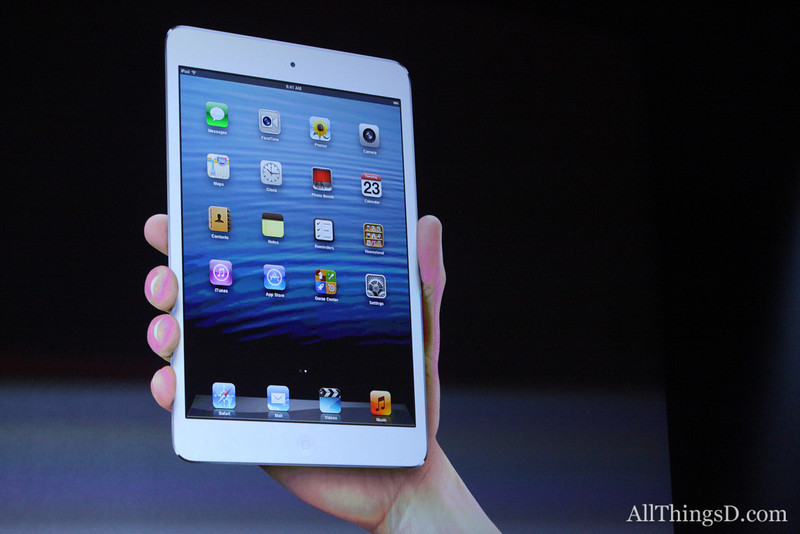
Apple decided to provide us with a new fun-sized item just in time for Halloween–the iPad Mini. It was highly anticipated, and naturally, I sat and watched the announcement. The iPad Mini appears to be about the same size as the most popular e-reader/non-iPad Mini devices, such as a Kindle Fire HD or a Nook. It is small enough to fit in one’s hand, and Apple claims that it’s a new design–and stressed that it’s not a shrunken iPad, but rather a concentrated one. It has all the same features of the iPad 4th generation (which was also introduced during this event), but it’s as thin as a pencil and as heavy as a pad of paper. The screen size is significantly larger than its competitors even though the device is of comparable size. I’ll leave out most of the other details, but needless to say, it performs the same as the new 4th generation iPad also introduced today, and runs all the same iPad only apps. The nice thing that Apple stressed about development for iPad Mini is that it doesn’t change from what is done for iPad–what works on iPad works on iPad Mini. NICE. Everything is faster and more powerful than before, and that makes for a great experience.  Its flash storage is the same as a full-sized iPad as well, coming in 16GB, 32 GB and 64 GB. That’s great in itself too.

Photo from AllThingsD.com

So, is it fun-sized? It sure looks like it. Am I getting one anytime soon? No, I don’t have a need for one, considering I just got my cool new iPad 3rd generation not too long ago, and am very happy with that.  But I can see a lot of benefits for the iPad Mini, especially for m-learning and use in schools. Sure, having all those cool new features alone make it great, but knowing that it has the same functionality as its full-sized counterpart, there are two features that will make it really great for education and schools.

First, it’s the smaller size. The smaller size will make the device even more portable than a standard sized iPad for students. It’ll be easier to fit in a backpack, or even to use in a classroom or on a field trip. For the elementary school students, the size will make it easier to use for smaller hands. I’m sure that typing with littler hands will be facilitated more easily on a smaller devices. It’s almost as if iPad Minis were MADE for the elementary school crowd! The size also makes reading e-books more like reading from a competitor’s device, in that it’s not much bigger than a paperback novel. The device itself allows for even more mobility than its larger counterpart. It seems to me like this will be a winner in these respects.

The second feature is the price. At a starting price of $329 for the 16GB Wi-Fi version of the iPad Mini, that’s a savings of $150 over the 16GB Wi-Fi version of the full-size iPad. Multiple that $150 many times for all the students that would be given iPads at schools… incredible savings, and maybe more iPad Minis to be bought!

Now, I’m not knocking the full-size iPad. It’s been revolutionary since its introduction two years ago. Tim Cook of Apple spouted off a lot of incredible statistics about iOS downloads and upgrades that were staggering, like 200 million devices upgraded to iOS6 in the past month, and the 100 millionth iPad was sold two weeks ago! (I wonder if it was mine? Ha ha!) Apple stressed their role in education not only with the introduction of iPads and their impact on schools, but also the impact of iBooks as well. (There is a new upgrade of both iBooks and iBooks Author available today as well). iPad full-size will always have a place, just like full-size writing pads have not gone away just because smaller writing pads can be made. There are advantages to full-size iPads, especially when doing larger scale work. Having more screen to view is easier on the eyes in that respect.  Like I said, I personally wouldn’t give up my full-size iPad even if given the opportunity to trade it for a smaller one. That’s just me.

But then I think about my middle-school aged son. Having his own iPad Mini would be perfect for him. Not too big, not too small, and at a relatively affordable price, and he’s still get all the features found in the full-sized one. Or for someone who isn’t an avid computer geek, but wants something that’s more beefed up than the Android tablets and e-readers, this is an excellent choice.  Or, someone who’s been wanting an iPad but couldn’t afford one, now they can in a “concentrated” size.

I think this means that the iPad Mini is both fun-sized, AND means business!

Now, will the next one be available in chocolate with nuts, caramel and rice crispies?

Posted in Uncategorized

Adobe Day at LavaCon 2012 Roundup!

This post is just a quick summary of the Adobe Day at LavaCon 2012 series from this past week. As you see, there was so much information that it took six posts to try to summarize the event!

Being in Portland, Oregon was great. It was my first trip there, and being a native Easterner, my thoughts pushed me to that pioneer spirit of moving westward in this country. Once there, I saw a hip, young, modern city, continuing to look towards the future.  The information I gathered at Adobe Day was general information that was endorsement-free, and practical information that I can use going forward as a technical communicator, and that by sharing it, I hope that others in the field will equally take on that pioneering spirit to advance what technical communications is all about, and bring the field to the next level.

To roundup the series, please go to these posts to get the full story of this great event. I hope to go to more events like this in the future!

As I said, I really enjoyed the event, and learned so much, and enjoyed not only listening to all the speakers, but also enjoyed so many people who are renowned enthusiasts and specialists in the technical communications field and talking “shop”. I rarely get to do that at home (although it does help to have an e-learning developer in the house who understands me), so this was a chance for me to learn from those who have been doing this for a while and not only have seen the changes, but are part of the movement to make changes going forward.

I hope you’ve enjoyed this series of blog posts. I still have many more to come–at least one more that is inspired by my trip out to Portland, and I look forward to bringing more curated content and commentary to you!

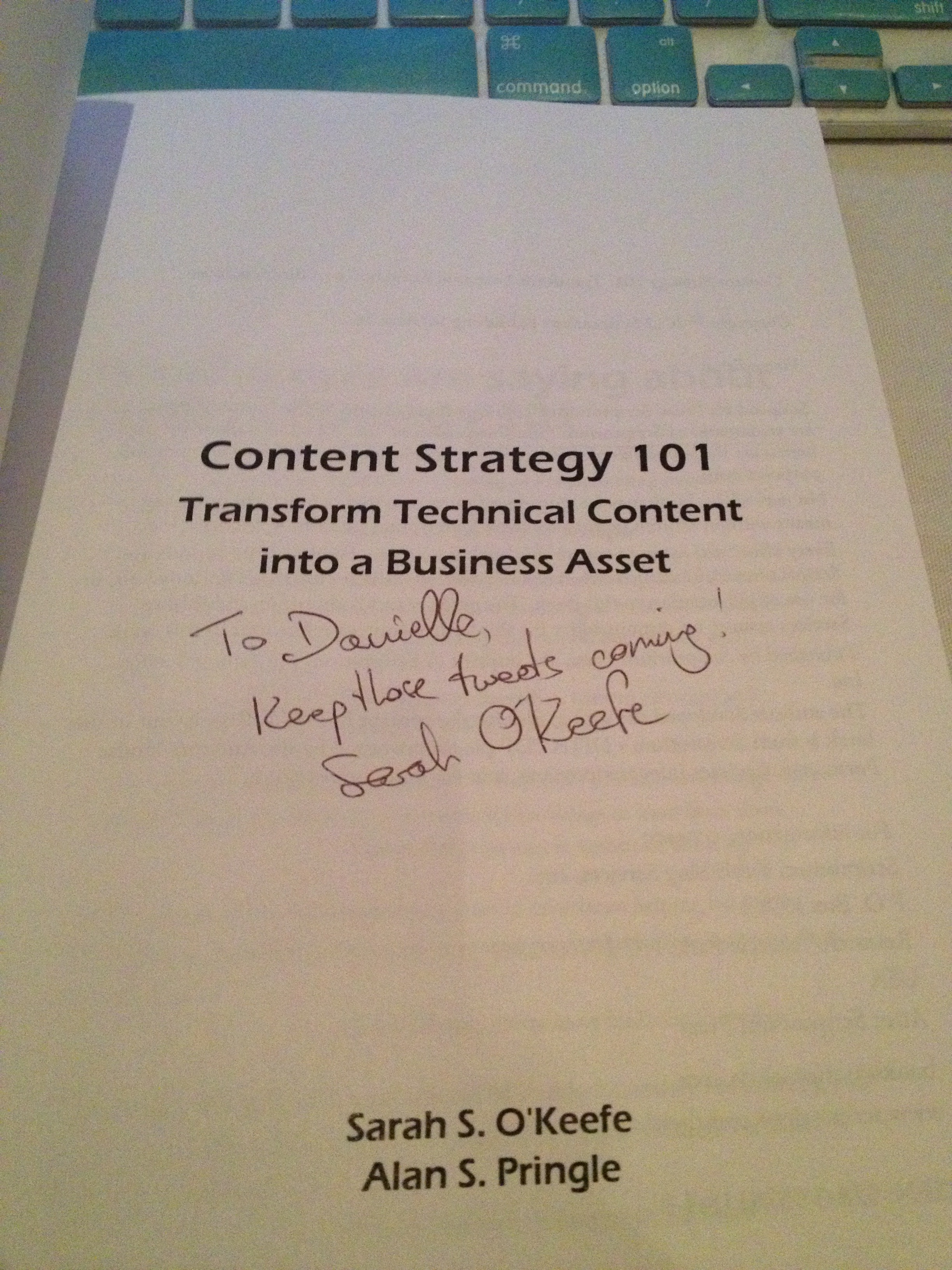
The autograph from my copy of
Sarah O’Keefe’s book,
Content Strategy 101.
Awesome!
Posted in Uncategorized

Missed Adobe Day at LavaCon2012? Here’s the scoop…

One of the “Three Sisters” mountains
outside Portland
(don’t know which one–took this from
my airplane seat coming home!)

As I write this, I am still recovering from quite the whirlwind of a weekend! I flew out to the West Coast on Friday night, and returned to the East Coast on Sunday.  I met SO many people who are not only leaders in the technical communications field in one capacity or another, but they are also nice and SMART people in the field. You couldn’t help but be inspired or feel smarter once you walked out!

Now granted, this was the first time I ever attended a conference-type event within the tech comm field, so I was excited to be there and soak everything in as much as I could. This is not to say that I’ve never been to a professional conference or travelled to this type of event; I just never have done it with the tech comm crowd.

Like I said, for me, at least, as the “new kid on the block”, I didn’t know exactly what to expect of the event, the topics, or the people I would encounter, and I’m glad to say that everyone was very welcoming to me, and I felt included as a fellow technical communicator very quickly. It was a little surreal in some instances, because many of the people I met were those whom I had only met online through Twitter or Facebook–Twitter mostly, so to be among such a collection of established tech comm thought leaders could have been a lot more intimidating, but it was not that way at all.

There was so much great information that came out from the morning that I will be splitting up my report over the next few days. Each day going forward will have my summary about each speaker at the event. And I have some photos as well!

So, let me get started into the Adobe Day event itself –with some photos!

Saibal Bhattacharjee (@saibalb79) from Adobe setting up.

The Adobe Day event started with an introduction from LavaCon organizer Jack Molisani welcoming everyone to the event. Jack, thanks for organizing and running LavaCon! Although I’m missing the main conference, I’m hearing awesome stuff about the speakers on Twitter, so I think you deserve some kudos for helping to assemble all of it!

Jack Molisani

Jack was followed by a short introduction and welcome by Maxwell Hoffmann, who is one of the key players of Adobe’s Technical Communications marketing team. If you’ve ever attended any Adobe Tech Comm webinars, more than likely you’ve heard Maxwell moderating the webinars. He is also one of the bloggers for Adobe’s Tech Comm blog. Having worked with him while creating my own webinar for Adobe, I can say that he does a fantastic job at what he does.

Maxwell Hoffmann of Adobe

One thing I’d like to mention, before continuing, is that the nice thing about Adobe Day was that is wasn’t actually about Adobe or promoting Adobe products. I don’t recall during the entire duration that any speaker promoted any Adobe product or the brand other than possibly to thank the company for the opportunity to speak. All the speakers spoke broadly about technical communications as a whole, so whether one supported Adobe products or not, everyone could benefit from the information being provided.  This really was a collective presentation of the best and brightest in thought leadership, and an opportunity to network and learn from those who are considered top in the technical communications field.

Now, for this post, I’m actually going to start this Adobe Day series going backwards in the day’s event, starting with the panel discussion that was at the end of the morning.

The panel topic at the end of the Adobe Day event was titled, “The Decade Ahead: Opportunities and Challenges for Technical Communications Professionals.” Scott Abel, who is also known as “The Content Wrangler,” moderated the panel.  The panel included several of the leading thought leaders in the tech comm industry. The panel consisted of Joe Gollner, Beth GerberBernard Aschwanden, Joe Welinske, Val Swisher,  Sharon Burton and Joe Ganci.

Adobe Day Panel.
L to R: Joe Gollner, Beth Gerber, Bernard Aschwanden, Joe Welinske,
Val Swisher, Sharon Burton, and Joe Ganci

As far as the opportunities in tech comm right now, Sharon Burton said it best when she exclaimed, “We are in the Wild West!” meaning that the field is still so very wide open that anything done right now would be in the pioneering spirit. Another point that Sharon summarized was that 99% of the content consumers are not happy with the tech comm content they are receiving, and so a revolution is brewing. It was agreed by all that so many new ways to deliver content are out, such as using audio, video, shared content, personalized content and mobile content. The choices are limitless and there is so much to explore that there is room so that we can all contribute! Interactivity and structured content will be key to communicating information as well.

That said, the group presented the challenges ahead, which included providing technical communicators with an education on understanding all the available possibilities, combating management’s misperception of cost, the general resistance to progressive change, business models still tied to old metrics, and too many tech comm specialists instead of tech comm generalists. An additional challenge mentioned dealt with the relationship that technical communicators have among themselves as well as to the rest of the world. It was suggested that technical communicators are not creating appropriate relationships with other business departments, and need to be proactive in business affairs to prove the value of tech comm as a whole and how it integrates with other business needs, thus providing a good ROI (return on investment). When the panelists were asked what skills were needed to go forward, they replied that the need to create communities to support each other and learn from each other was key, which could be done through such activities like participation in branding and discussion on the Twitter website with other technical communicators.  Bernard Aschwanden did comment, “People are not lazy enough!” which elicited a laugh. However, his point was that in this day and age, people just want more direct route to complete tasks, and community building was part of that.

Nolwenn Kerzreho, another attendee at Adobe Day, noted on Twitter during the discussion  that “[T]ech writers need to change, have to get an education in structured writing and writing for a global audience…Key is that needs to be promoted…everywhere!” Good point that I missed noting on Twitter myself, Nolwenn!

In other words, the panel felt that while this is a time with a lot of changes due to technological advances with plenty of opportunity to use different kinds of content to deliver information, there are still obstacles in the way that prevent those opportunities from coming to fruition. However, those obstacles aren’t anything that can’t be conquered over time. A big part of making these opportunities happen will be adopting the use of structured content and community building.

Now, if this was the caliber of the discussion just for the panel at the end of the Adobe Day event, then you can only imagine that each of the presentations before this were equally great as well, and why I’ve come back with renewed enthusiasm.

I’ll also just add here that I had the chance to meet SO people that I had only met through social media or featured in various technical communications media. It was like a parade of tech comm stars to me, and I was a little in awe to be among them! I enjoyed meeting so many people who really enjoy what they are doing and trying to make a difference in this field.

Waiting for Adobe Day to start!
Me and Kyle Johnson of Rocket Software
(photo courtesy of @barriebyron, also of Rocket Software)

I also have to say that in addition to Maxwell Hoffmann, I met others from the Adobe team as well, including Saibal Bhattacharjee, Ankur Jain (the Robo(Help) Cop!) and Tom Aldous. They did an excellent job putting this event together, and I appreciated their kindness and support in having me there to attend. I felt so welcomed! I was really happy to meet them in person after so many months of corresponding through Twitter or email.

I’ll be going through each presentation given prior to this panel in the next several posts over the next week, and I know you will find the information as educational as I did.

Next post: Adobe Day Presentations: Part I – Scott Abel and Structured Content.

PS– To anyone featured in this post or who attended this event, please let me know if I need to append or correct anything featured in this summary or in the future posts on the presentations. I am working off my “notes” that I tweeted during the event, so my recollection may need some tweaking. 😉