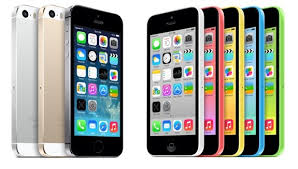
 I, along with the iOS faithful, waited with bated breath yesterday to hear all about the new iPhone 5C and the iPhone 5S. Considering that the last time I upgraded my phone was for the 4S, I was looking forward to seeing what my upgrade options (that were not Windows or Android-based) were.
I was excited for both models, as I could see these as upgrades. Part of the big upgrade for both will be iOS7, as it is promising to be a more streamlined user experience. While we’ve known about this new upgrade to the OS for a few months, now that it’s close to its release, the excitement can really build up. There will be more accessibility to the Cloud, more multi-tasking features, easier ability to share data, and a better camera functionality, among other updates. Siri searches are even improved, as it draws more data from Wikipedia and social media now. Maps are improved. Just the OS update alone will make things better for mobile sharing of information. The iWork suite is going to be free, available on the Cloud as well. This is a big boost to creating and editing content, whether it be text, graphics, spreadsheets or video. My first reaction to this was, “Gee, I spent some good money on getting all those apps a while ago. Do I get a refund now?” I’m sure I don’t, but thinking about this from an educational perspective, this is a big boost. I did use the cloud-based iWork to work on some items while it was available via beta, and I found it to be a great solution for me to work on various documents on both my iDevices and my laptop–and my laptop is Windows-based! I could access it via my iCloud account on my browser, and then work on it later on my iPad or iPhone. It’s a great boost, and I’m sure it’ll help some classroom situations save some money.
But these new tools–because that’s what these new phones are, new tools–look awesome. The iPhone 5C and iPhone 5S do open up some new doors to not only use this new OS to the maximum, but they offer new opportunities for mobile learning.
While the iPhone 5C has all the pretty colors now available, the new structure of using a polycarbonate plastic foundation is going to make a big difference. First of all, I’m sure some people are thinking, “Oh my gosh, that thing will crack so easily because it’s plastic, even if it has that silicone case around it.” If you don’t know much about polycarbonate plastics, then you’d need to learn, because you would be wrong. Polycarbonate plastics are often used for children’s eyeglasses because of their strength and rigidity. The same plastic is used for sports goggles and sports eyewear for the same reason. (Being a mom who has a child with glasses, and I own a pair of prescription swimming goggles, I know this.) This plastic is safe enough to protect one’s eyes, even in extreme conditions, as they don’t break easily nor do they scratch easily. So if it’s safe for your kids’ eyes, it’s probably going to be safe for your phone. It’s reinforced with the steel frame that doubles as an antenna, so I think one shouldn’t have any worries if the device is properly cared for, in general.
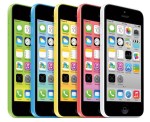 The 5C will take advantage of all the new functionality of iOS7, which is good, but I think the biggest part of all of it will be its price point. The 16 GB model–it’s “smallest” storage model–will be US$99. For a brand new phone with this kind of functionality, that’s pretty cheap! And because of that price point, people who were buying Android and Windows phones as alternatives because of the price points of those other brands might now be able to afford an iPhone now. iPhone is known for its customer services, its ease of use, and its ability to have access to more apps than imaginable, so this accessibility will allow it to become a more dominant player in the mobile phone game. I can imagine schools being more apt to buy some of these smartphones or encouraging or subsidizing these phones around the world, because the price point is half of what the “fancy” model is worth, but it still packs a punch.
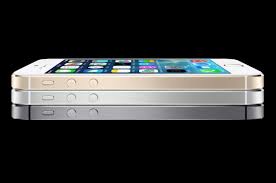
The 5S device, however, has more bells and whistles. While it does have new colors to its line-up, it’s more about how powerful the device is. It’s really a true microcomputer in the palm of your hand. The 5S is the first smartphone to have a 64-bit processor. How long ago was it that we had 64-bit desktops and laptops? That’s amazing! The CPU performance is now twice as fast as the iPhone 5, including super faster graphics. There is also a second processor in the 5S known as the M7, which is a motion co-processor. It works more accurately with the compass, accelerometer and gyroscope, so it’s going to spawn more use for health and fitness apps. Who ever thought you might use your iPhone for gym class? All this data can help assess the user’s surroundings more. Imagine using those features for a science class or history class? The 5S also has an upgraded camera called the iSight camera with a dual-LCD flash with better sensors. In combination with the iOS7 software, it will allow for more accurate photography. There is also a slow-motion video feature and a burst mode on the camera (taking 10 frames per second on the shutter). The camera alone is pretty cool!
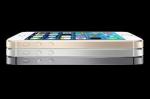 The other big feature is the TouchID, which is a fingerprint scanner on the home button. It’s done for security purposes, but I could see this taken to a higher level, in time, for personalization for access. You know how one can use separate user names and passwords to access a shared device? The TouchID uses a fingerprint to identify a person, and multiple fingerprints can be approved and saved. What if that was used for personalized learning? So, one student would swipe his/her fingerprint, and only certain apps or information would appear. Another student would do the same, and different apps or information would appear. This could work beyond security, and again, I see this as something that could be a money saver for schools. A device could be numbered, and Bobby and Susie could share Device #8 of 10 in a classroom during different periods, and yet have access to different information. The software might not be quite there yet, but that might be the next step, and it’s a feature that could be on future iPads as well.
I think these are great innovations moving forward with both phones.
However, I did see commentary on some social media outlets by some that they were disappointed by the new phones, stating that the new phones were not “innovative” enough. RJ Jacquez was definitely very vocal on his Facebook page, stating, “Absolutely NOTHING innovative from Apple at today’s event. Disappointing! Google is now clearly in control of the Mobile Revolution!”
But I think there were two comments to his Facebook posting in response that caught my eye that I think summarizes these upgrades well. (Yes, I asked their permission first before posting.)
Stefan Gentz, who is a well-known technical communications speaker, responded to a naysayer by replying,
Hey, they just introduced the first 64 bit smartphone in the world! It has a fingerprint sensor that opens up a whole new level of online shopping convenience and security, a new global LTE chip with a whopping 13 LTE bands (which is especially great for continent hoppers) and a superb camera with an aperture of ƒ/2.2 which is even dramatically better than my professional Sony digicam (3.5), even better than most professional DSLR and it can still take 10 pics/sec. And the new motion chip M7 knows when you’re walking, running, or driving. For example, Maps switches from driving to walking turn-by-turn navigation if, say, you park and continue on foot. Not to mention the new iOS7. And this all in a 7.6 mm, 112 g sexy, high-precision case.”
Stefan followed up by stating that all these features don’t add up to nothing!
Paulo Castro, another technical communicator, followed up on Stefan’s comment with the following:
Innovation is not the only thing that matters in a new product. Sometimes you just have to take what you have and make it better, stronger, faster, more reliable, etc. Stefan (above comment) makes a good point in terms of new features.As long as nobody else comes up with something significantly better in terms of new hardware, software, or OS, then Apple may still have a good standing in this competitive market.
I, too, wish we could see an eye-opening product everytime Apple announces something, but the truth I would prefer to have an extremely efficient device at a good price, with high reliability, security, and functionality, rather than a new gizmo with stuff I don’t even need.
I have to agree with both gentlemen. There’s a lot going on with the upgrade of the device itself, as Stefan said. Even Lance Ulanoff of Mashable said of the 5S, “Its new look combined with this more powerful phone and some of the landmark features –- iSight camera, Touch ID –- should make the iPhone 5S feel less like an upgrade and more like a reboot.” But I think Paulo makes a great point as well, which is that in the end, I, too, would prefer to have an extremely reliable and efficient device. The 5S that I plan to buy will be the third iPhone that I’ve chosen to purchase. I could’ve easily upgraded to a Windows or Android-based phone a while ago, but I chose not to do so. I would be a rich woman if I had a dollar for every time my son or my husband had to forego using their Android phones, and we relied on my iPhone for something. I’ve never had my phone crash, and I can only think of once when I had to reset the phone and start all over again. Once in about five years, and it was probably five years ago when I was getting adjusted to it? That’s pretty good.
When it comes to mobile devices, there’s no question that I favor iDevices. The new iPhones have a lot to offer, and I can’t wait to order mine!
PS – In case anybody cares to know, I would love to have Lance Ulanoff’s job, or something a lot like it. Doing social media coverage and blogging about events like this and the tech scene would be a dream come true! 😉

 Some updates have been made to my Tech Comm Educational Resources list. There are two new additions.






 TechCommGeekMom
You must be logged in to post a comment.