Posted in Uncategorized

Welcome to TechCommGeekMom’s First Advertiser!

Just a quick note to have you notice something new on the right-hand column of my blog. It’s an ad for our first advertiser, Adobe!

I’m very excited to have this relationship with Adobe, who have been just huge supporters of TechCommGeekMom.com since the blog first started. Please be sure to click on the ad and check out the Technical Communications Suite 4! I did a review of TCS4 back in July which has been received very well, so here’s your chance to check the product itself out!

Hopefully this is the first ad support of many more to come.

If you, someone you know, or your business is into technical communications, education or e-learning, and are interested in advertising on my blog, let me know!

I am an equal opportunity blog here, and I would like to be able to help present the best products on the market when I can, and I’m off to a great start.

Thank you, Adobe!

Posted in Uncategorized

What are you so afraid of?

It seems to me that lately there have been a lot of articles posted around the Web about higher education being afraid of using technology.  I suppose that since I received my recent Master’s degree entirely online from an accredited university, I’m somewhat oblivious to that fact, but I can see why that would be thought, based on the various arguments made.

Bringing technology into the classroom, let alone have distance learning via e-learning or even m-learning, is still a bit of a foreign thing even now, despite the fact that Steve Jobs and Bill Gates were working on getting computers into classrooms as much as 30 years ago. (Time flies!).  Part of the problem is that there are many educators who are a little intimidated by technology. Yes, computers–as just mentioned–have been available in the classroom for decades in one form or another, but not everyone has learned to take advantage of that.  Why?

One of the obvious reasons is cost.  Computers–whether desktops, laptops, tablets, or even smart devices (like an iPod touch, NintendoDS, etc.), are not cheap. Trust me–we have at least one of each of those types of devices in my house, and I know how much we spent to have them.  Even with the movement to promote BYOD (Bring Your Own Device), not everyone can afford to have the latest and greatest gadget. Technology, these days, evolves very quickly, so it’s hard to keep up with the latest devices and tools. (This is why I’m always happy to hear of endeavors made to try to supply simple computing devices that are made cheaply to supply to children in far flung places in Africa, South America and Asia where such resources are scarce.)

Even so, I think the reason that many in higher ed and other educational levels don’t use more technology to teach is basically because they don’t know how.  I’ll give you an example.

My father was the first one to introduce me to computers a little bit more than 30 years ago when I was a kid. The Apple II had come around, and my father–a lifelong educator–found himself trying to support a family with four kids (me being the oldest of them) and having a very difficult time finding a job due to budget cuts happening left and right.  He found computers interesting, and realized that if computers were to become prolific, then maybe he could segueway his teaching skills into teaching adults how to use VisiCalc and basic word processing programs in business. In other words, he would move into the training and development business. But once he got a job back in the traditional educational field, while he did stay involved in computers, and even got to a point where he was not only a curriculum administrator but teaching night courses as well–he’d teach computing for a while, but it was never major advances. To this day, he’ll call up either me up or talk to my developer husband if he has computer issues. I don’t think other than teaching computing for a short time, that he really ever used technology in the classroom much. Sure, “Oregon Trail” was used, and maybe “Where in the World is Carmen Sandiego?“, but beyond that, even when he was officially retired and teaching history courses at the local community college, beyond the use of email, I don’t know that he necessarily used technology for those courses.  History classes can be very dry subjects (I ought to know, being a history major as an undergrad), but so much history is available online to make it come alive–with video and images alone.

Even in my own online grad courses, I could see where the staff knew things to a point, but then some would show their limitations of what they knew of the outside world and what tools were available to them, and this was a group that was generally more willing to use technology as well. One professor posted all the coursework on Moodle in one folder instead of using the features to the fullest to disseminate information. He may as well just have photocopied everything, stuck it in a manila folder, and handed the materials out willy-nilly instead. I see these as hugely missed opportunities for both my dad and this professor.

My taekwondo teacher taught me something years ago, which I know has been repeated elsewhere: the best way to learn is to teach.  From my own experience, this is not only true in taekwondo, but also for just about anything else in the rest of the world. Teachers–whether they be training specialists at a company, or preschool teachers, or anyone else in the educational field in between–need to continue to learn and grow themselves in order to be effective teachers, especially in this day and age. Technology is a lot less scary and more intuitive than it was 30 years ago, or even 10 years ago, and people forget that very quickly.  If teachers are expected to help turn out students who can contribute towards future growth, how can they do that if they don’t keep up? Yes, there are some older tried-and-true methods that still work and will always work.  But to create a future where everyone from the littlest preschooler to the adult learner contributes in a way that pulls us all forward–teachers need to keep up.

Mobile learning provides a fantastic and easy opportunity to do this, no matter what subject a teacher teaches, or what level. Tablets and smartphones are more prolific these days than even desktops or laptops, so whether a school district provides those tools, or a student brings it from home, it’s a portal to a world of opportunity. The use of whiteboards in the classroom make a huge difference–I know I remember hearing that my son enjoyed and seemed to respond better in classes if whiteboards were used.  As it’s been mentioned many times before, education is undergoing a bit of a revolution, because 19th century ways of teaching aren’t working well in the 21st century.  Life and business are conducted very differently and on a grander global scale than even 100 years ago, or even 10-15 years ago.  Social media and Web 2.0 tools are changing how we communicate and work with each other, especially in real-time.  And yet, having these tools can enable all of us as students of the worlds to learn more.  I guess I don’t know why some are so afraid of trying out the many technologies or applications out there that can work to advance our common knowledge.

You see, in my head, I can imagine how all these different subjects can use mobile technology or other e-learning tools.  You have a Social Studies class? How about asking students to find online newspapers to look at the world in other countries? Or using online libraries or resources to find information? What about doing a short project about looking up records on Ancestry.com to learn about World history and how their families may have come to this country? Science–so many scientific journals out there to access. English language and grammar? Many blogs and websites covering those topics, as well as many works of literature have been converted into videos or movies. Math? Check out Khan Academy or similar sites, and see if a flipped classroom curriculum works more. Physical education? Plenty of websites about sports, health, fitness out there. Foreign languages? Watch Japanese TV, Mexican soap operas or Italian news on YouTube. Google, Bing and other search sites are your friend as well as your students’ friend.

There is one last resource for teachers of higher ed or other educational institutions to learn more, and it harkens back to my taekwondo instructor’s words. Learn from your students. They are usually more up to date on what’s going on with all the devices. Why not ask them for suggestions, or learn how to use tools from them? Recently, I remember showing a professor of mine how to use hashtags on Twitter to start getting more involved in topics that she was interested in researching and find other Twitter users that shared common interests on that outlet. While she understood the concepts behind Twitter, she didn’t know that one could search by hashtags within Twitter, and so she learned how to use a social media tool that she was familiar with in a different way. I was glad that I was able to show that to her, and I’m sure going forward that it’s something she may pass along to her other students and colleagues as well.

Also, don’t be afraid of asking colleagues who are tech savvy as well. If they are enthusiastic about using technology in the classroom, they are usually more willing to share those ideas with someone else who shares that enthusiasm.

In the end, we can all benefit from each other in helping each other learn technology, but educators need to take special attention because in helping themselves learn about technology and using technology, they will help their students as well.

So, what are you so afraid of? Start looking in the App Store, You Tube and Google, and see what you can find. You might be surprised. Every little bit of knowledge helps to advance you and your students.

Do you agree or disagree? Let me know in the comments below.

And if there are any teachers (on any level) that would like some extra help…let me know.

Posted in Uncategorized

e-Learning – A Growing Field For Technical Writers | Immerse CMS

Read this article:
e-Learning – A Growing Field For Technical Writers | Immerse CMS.

This great little article makes a point that I’ve been trying to make on my own quest to find an e-learning positions. In no way am I putting down instructional designers, but as a trained technical communicator, I know that technical writers have the right stuff to be effective in writing for e-learning. Technical writers most often create user documentation and training manuals. With some creativity, imagination, and some quick learning of the basics of instructional design, technical writers can be quite capable of writing up e-learning content.

Now, with the advent of m-learning, the skills to be able to curate content and whittle it down to comprehensible, short yet clear information for smartphones and tablets will be vital. Technical writers are used to working with a mountain of information, and paring it down to the essential information needed to learn how to make something work or take a next step. Isn’t that a valuable skill to have as an instructional designer?

As more e-learning and especially m-learning programs expand, technical communicators are truly going to be needed to help bring things up to speed quickly to keep up with constantly emerging new mobile technologies.

So, if you are looking for a new instructional designer, think about giving a technical writer a chance. I’m sure there are plenty of them (including me especially) who would jump at the chance to write training materials in a new and exciting way, and technical writers already have most of the skills needed. The instructional design will come…most of the essential concepts aren’t that difficult. Give technical writers a chance!

Posted in Uncategorized

Hurrah! The ID/TC Education Resources Page has been updated on Techcommgeekmom.com!

Hello everyone!

It feels like it’s been a long time since I’ve posted here, but it’s only been a week. I do try to post something original here at least once a week as best as I can.

But right now, I’m mentally wiped out, so it occurred to me that now is a great time to update some of the pages here as best as I can.

So, for easier reading, I’ve updated the Instructional Design/Technical Communications Education Resources Page (otherwise known as the ID/TC Education Resources Page). If you click the link above in the navigation, that will take you directly to that page.

Now, upon first inspection, it will look pretty much the same, with the same links to helpful articles.

But now after a few additions and some reorganization, all 158 credentials are listed and organized by credential. Specifically, they are split up between Bachelor’s degrees, Certificates, Specialist degrees, Master’s degrees, and finally Doctorates.  I’m hoping that this reorganization will help anyone who is looking for that next avenue themselves. Many of these programs are online too, so be sure to check them out. Even my own alma mater, NJIT, is listed in the Master’s programs. 😉

As always, if you have a suggestion for a higher ed program related to technical communications, e-learning or m-learning, please let me know so I can add it to the list!

Enjoy, and thanks for continuing to support techcommgeekmom.com!

Posted in Uncategorized

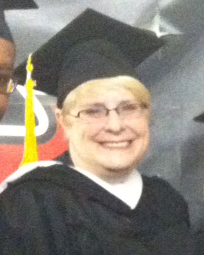
The Meaning of Graduating with a Masters in Technical Communication

Techcommgeekmom
NJIT MSPTC Class of 2012

Today was a big milestone day in my life. Today, twenty-two years after I received my Bachelor of Arts in History from the University of Mary Washington (Mary Washington College back then), I received my Masters of Science in Professional and Technical Communication from the New Jersey Institute of Technology (NJIT). Let me tell you, if you had talked to me at the time of my Bachelors degree and told me that a) I’d be getting a Masters degree and b) it would be in a program that involved computer related stuff and technical writing, I would have thought you were insane.

I put two and a half years of my life into this degree. There was blood, sweat and tears that were involved now and then (literally, in some cases!). My husband was a weekend widower for most of that time, and my son understood that Mom had to do her homework too, and it was way more than he had because she was anywhere from in the 17th-20th grades (compared to him being in 5th grade).

I started this program because I was unemployed. I was being laid off from a job that had certain aspects I liked, namely editing and the use of instructional design. I also had some e-learning and some instructional design from a prior job that I liked, so I decided to “work the system” in seeing if I could find some sort of coursework that would help to update my skills as job retraining through the state’s re-employment programs. By a miracle, there was an ad on Facebook–of all places– for NJIT’s MSPTC program and the grad certificates in technical communications essentials. When I looked at the curriculum, it was exactly what I was looking for, and so many of the electives that I wanted to take! I was able to complete all the paperwork and convince the state to pay for my tech comm certificate. I started with that, because I figured that it was a shorter commitment, I would still get some significant training out of it, and if I didn’t like it, I wasn’t stuck in it for the long haul. And if I did like it, I could always transfer the credits straight into the Masters program.

Well, you guessed it– I ended up loving it. The state ended up paying for my first three courses until I got a job that allowed me to pay for the rest of my education myself, which was an incredibly expensive investment.  I took as broad a range of subjects as I could, but found myself always gravitating towards e-learning and m-learning just the same. I oriented many papers to cover e-learning and m-learning topics over time, yet kept my options open so that I had more opportunities to not only expand my own knowledge base, but provide opportunities in other areas I liked in case the e-learning direction didn’t work out the way I wanted.

And now…I have a Masters degree. I think there was a point in my career that I knew I wanted a Masters degree, and that perhaps a Masters degree would help with my career– but doing what? The problem was that the kind of degree I wanted to do wasn’t around the way it is now when I first got my undergraduate degree. Creating websites was strictly for computer developers and programmers, and I wasn’t that. I wasn’t an English major who specialized in creative writing or journalistic writing either. Not that there’s anything wrong with those majors–not at all, but they weren’t me, or at least not quite me. Discovering the world of technical communication when I did and finding an educational resource when I did was purely fortuitous timing, if nothing else, but I’m glad it’s become part of my life.

I seem to recall that the advisor for the program said something about me in reference to this program to the effect of it being something where I learned about my own voice. I think this is definitely true. Growing up, and even through my undergrad years, I thought being a good writer had to do with being a “flowery” writer, someone who always included all these incredible details in their works. I couldn’t do that. Part of the reason that a History degree appealed to me was that I just had to collect and re-churn out facts in a cohesive manner. Even with that, I didn’t understand that I could do that well until my senior year of college, when my favorite professor motivated me to write some of my best work of my college career. Some of the papers I did for him that I thought were horrible were ones that he thought were my best. When I re-read them years later, I realized what he was saying– they were good. Maybe I really was someone who could write decently.

I think the understanding that I could write well was developed more as I winged my way through my professional life, but it really didn’t become clear until I joined this program. I did find my voice, and I could express my opinion, and…people listened. People understood my message. And people thought I explained myself well, and liked the work that I did.  I sometimes am still surprised that I was able to pull this off. But yes, I found my voice, and I found what makes me excited in the working world, and that’s technical communication with an emphasis on e-learning and m-learning the most. (But get me started on editing “International English“, UX or content strategy as well, and my engines get revved up as well!)

Today is a big day. Today is a day I realized that I can make a big contribution to global society just being myself and truly doing what I love. I know that even with a Masters degree in my hand, I still have SO much more to learn to realize my full potential in the e-learning and m-learning world, and I’m doing my best to take what I’ve learned from my MSPTC program and move forward. And I don’t mean just academically, but what I’ve learned about myself from the experience as well.

In my last post, I talked about how important it is right now in the technical communications world to keep up with skills and teach yourself new things. The world is moving SO fast that it’s hard to keep up, even with a brand-spanking new graduate degree in hand! Even as I write this, while it might seem like I’m done, I’m far from done. I’m trying to take some online tutorials in Adobe Tech Comm Suite 3.5 software, and I’m throwing myself into an instructional design project. I need to get my feet wet in the real world, and I have to keep it moving or else I’ll miss out or fall behind quickly.  Even if your goal is not getting a Masters degree, I highly encourage you to challenge yourself with something new. The ID/TC Education Resources link above is a list of programs that I curated to help others to find additional education to help further their careers as well.  I found that NJIT’s MSPTC program fit my needs at the time I started, but I’ve since learned of some other great programs that are listed on that page.  You might learn some new skills, but you might also learn more about yourself in the process.

Other than teaching myself more software, are there plans to continue with, say, a doctoral degree? While I would love to be known as “Dr. Villegas,” I think I need some time and space to still fully realize this MSPTC degree. It hasn’t sunk in that I have it. It still seems a little surreal.  I also need time to figure out, if I do go on with further education, if it only is a matter of getting another graduate certificate, or if a PhD or EdD is what I want to do. And then…in what, and how? Perhaps, like 22 years ago, the program I want or need isn’t out there yet, so biding my time will help.

Tomorrow is a new day, and a step towards a new future as a master of technical communication. It’ll be interesting to see what happens next!