Posted in Uncategorized

A TechCommGeekMom Milestone: A baby blog is now a toddler

WOW!

10KCelebration_041913

I think my little blog just grew up a bit. I not only reached the 10,000 all-time hits mark, but even passed it. For a niche blog that’s 13.5 months old, I think that’s pretty amazing! I’m a proud TechCommGeekMom!

Thank you to every person who’s a regular reader, who just popped in once in a while, or who came only once for a visit. 10,000 all-time hits is a lot! Now, I know of blogs that have definitely had more traffic than me, mostly because they are much more hyper-focused on a particular segment of technical communications, like everything you want to know about a particular type of software, everything you want to know about a particular strategy, or else they’ve been around for a long time, so they’ve built up a following after a while. I do not begrudge these people, as they are my inspiration, and in some ways, they have contributed to this blog too through curated content now and then. TechCommGeekMom wants to be like those blogs as it grows up!

I trust that you enjoy what you read, and that you keep coming back for more. I’d like to think that the variety presented here, mixed with my own eccentric flair, brings about a lot of different perspectives of what technical communications is and what it can be. As I’ve said in the past, this blog started out very small, as a grad school project to build a community via social media, and I chose to work on building my tech comm/e-learning/m-learning community. I’m guessing that perhaps–just perhaps–I may have achieved my goal of creating a TechCommGeekMom community, and yet I hope the family will continue to grow. If you have any suggestions or ideas of things you’d like to see here, or if you’d like to contribute a guest post, please let me know!

Many thanks from the bottom of my heart for helping me reach this milestone! This blog is a labor of love, and it has opened so many doors for me, which I hope continue to open! I truly appreciate the support!

Posted in Uncategorized

Word Up! ain’t just a Cameo song: A TechCommGeekMom book review

Cameo-Word_Up!Being that I came of age in the late 1980s, my immediate thought when I hear the words, “Word Up!” is the Cameo song playing with all its funkalicious glory.  But now, “Word Up!” has a new meaning for me as well.

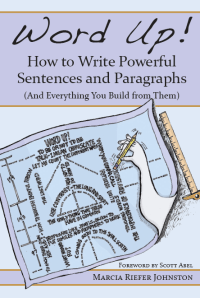
I’ve just completed reading an advanced copy of the book, Word Up!: How to Write Powerful Sentences and Paragraphs (And Everything You Build From Them) by Marcia Riefer Johnston. Marcia and I met back at the Adobe Day event at Lavacon last October, and since then we’ve bonded over several interests, including our love of writing. I had first heard that Marcia was in the process of writing this book during the Adobe Day event, so when she asked me to read and possibly review the book, I was thrilled that she considered me as someone who could provide a constructive critique. When she sent me the copy, she stipulated, “[Please write] any kind of review you feel inspired to write: short, long, thumbs down, thumbs up. Or write nothing. No expectations, no strings.”

WordUp-cover-AFTEROkay, Marcia, I’m going to take you on your word about that!

So, I prepared to truly dig in to see if I could pick this book apart, and to find reasons why someone should read this book and have it in his or her library of writing resources.

Unlike most readers, I do have the advantage of knowing the author, so I found myself reading the book in her voice. Even if I hadn’t heard Marcia’s voice in my head, the casual, jovial tone and language she used throughout the book sounded very natural to me. Someone who has never met Marcia will enjoy this book very much as well, and would read it the same way I did. I enjoy her casual approach to this formal subject, and her sense of humor was infused into each chapter!

Marcia wrote in her chapter titled, “Mastering the Art of Knowing Your Audience”,

“…I find it satisfying to write for a reader whom I can imagine fully and accurately. Writing for someone I know–someone real or imagined, someone just like me in many ways or in few–is like making a gift for a friend. While I’m working on it, whatever it is, I confidently imagine the recipient opening it and saying, “Yes!”

I am happy to say that I had this “Yes!” response she described as I read this book. I write as if I’m talking to friends that share the same passions as I do, so to read that Marcia composes her words in the same way as I do was a revelation, and I was glad to see she made this recommendation.

Throughout the book, Marcia addresses common sticking points in writing as well as some that are not quite as obvious. One of the difficulties in reading any style guide is that the information can be rather dry since it is very factual. Dry and factual can be boring. Fortunately, Marcia doesn’t do this. With each chapter, she paints each new layer upon the last one, slowly building upon each topic so that the reader can see the big picture that writing is full of color and light. She uses everyday and personal examples which illuminate the point she’s making for a particular chapter much more apparent. In the process of reading this book, I ended up learning several tips that have helped me fine-tune my own writing.

Word Up! starts with a section that addresses common grammatical errors that just about everyone uses in one way or another.  Once those details are conquered, the second section of the book takes the basics up to an intermediate level, where further common grammatical errors, sentence structure, and paragraph building are addressed. The last section of the book ties everything together, teaching the reader how to be his or her own editor, and learning the fundamentals of technical writing, even for a creative writer. The last chapter itself shows Marcia dissecting one of her own essays apart using all the tools provided in the book. (Sorry for the spoilers!)

I’ll give you an example. How often, either in speech or writing, do you use the word, “just?” I have to admit, I do it ALL the time. It seems like a catch-all to emphasize the immediacy of an event’s occurrence. Marcia shows the reader how to avoid using the word as often as possible. Some other themes covered in the book include the proper use of metaphors, how to use contrast in a sentence, how to avoid the verb “to be” and most of its conjugations whenever possible, writing for one’s audience, and the importance of continually revising one’s content.  While these topics are just a sampling of what Marcia covers, there is so much more!

As you may or may not know, I teach a technical writing class on behalf of World Learning to students from various Microsoft offices in Asia. While I was reading Word Up!, I kept thinking that this would be a great book to recommend to my students. My students are often technical managers who are seeking some help to sharpen their business and technical writing.  World Learning has provided me with a great curriculum that I have found to be very thorough, and actually ran parallel to the information that Marcia provided in Word Up!. In fact, Word Up! provides more information in a compact volume than I do over the weeks that I teach the course.

I’m definitely going to add this book to the resources list that I provide at the end of the course. I know it will supplement the classwork effectively in a highly approachable manner that will be easy for my students to understand.  Having the reinforcement of the material in a relaxed, humorous, and informative way will help the students retain the information much better than remembering my lectures alone.

So, as you build your writing resources library to include copies of the Chicago Manual of Style, Strunk and White‘s Elements of Style, and Fowler’s Modern English Usage, be sure to add this new book to the collection. I guarantee you will find it an incredibly accessible writing resource, and I suspect it is destined to be one of the classic style guides in years to come.

The book will be released on April 27, 2013, which is also National Tell A Story Day, and available through Amazon and other fine book retailers. Click on the title below to find out more information about how to order this fine tome.

Word Up! How to Write Powerful Sentences and Paragraphs (And Everything You Build from Them)
ISBN: 978-0-9858203-0-5
Publisher: Northwest Brainstorms Publishing

**Disclaimer note: I did not receive any compensation for writing this review, and did my best to provide an unbiased review even though I know the author. **

Posted in Uncategorized

Adobe Day is Back– STC Summit Style! Don’t be Tardy for the Party!

KZ-ATLOne of my favorite indulgences offline is watching reality shows on the US cable channel, Bravo, and one of my favorite shows is the Real Housewives of Atlanta. During a past season, one of  the Housewives, Kim, decided that she was going to be a singing star, and recorded the song, “Tardy for the Party.” It was a minor one-hit-wonder song, but it still sticks with me, just because it’s a fun song, and it makes me think about fun in Atlanta.

So, as I start thinking about the upcoming STC Summit in a month, lo and behold, I receive news about a tech comm celebration. Adobe is having another Adobe Day–this time in the ATL!  Adobe is hosting another one of its fabulous free networking and thought leadership Adobe Day events in Atlanta, GA (USA) on 5th May 2013 (Cinco de Mayo!), from 8:00 AM-1:30PM.

If this Adobe Day is anything like the one that I attended at Lavacon in Portland, OR, then we are in for a treat and a good time! You can access the details for this event and register by accessing the event microsite.

The thing that is really great about these Adobe Day events is that they are free (I can definitely afford that), and the talks presented are not a long-winded infomercial for Adobe products. The talks are about the leading trends going on in tech comm right now.

I was SO glad that I was able to attend the one at Lavacon, because the information I learned at that Adobe Day actually helped me get my job. No, seriously. Because the Adobe Day talks gave me a better understanding of current trends in content and mobile strategies, I was able to speak competently about these topics when I had my interview for the content strategy job I have now. It really helped! That’s how good this event is.

At the Lavacon Adobe Day, I met some of the top movers and shakers in the tech comm industry, and was blown away by all of them. It was an incredible experience for me.  For the STC Summit Adobe Day, the speaker line-up looks fabulous. I met or saw at least half of them at the Lavacon Adobe Day, and they were all creative, smart (and friendly) people who had great information to pass along. I’m looking forward to hearing them speak, as well as meet and listen to some experts I haven’t seen before.

One of the highlights that should be exciting is that the “father” of Framemaker himself, Charles Corfield, is scheduled to speak. How cool is that? I mean, Framemaker is a long-time standard in tech comm software, so to hear about its origins and what he has to say about the tech comm industry now? That’s going to be a treat in itself. And yet, there will be so much more!

It should be a great time! So, don’t be tardy for the party! You don’t even have to be attending the STC Summit to attend Adobe Day. You just have to be sure to register on the event website.  If you are in the greater Atlanta area, and want to attend, or you are attending the STC Summit and can come into town early, it’s definitely worth the trip. I’ll be going for sure! I’ll be blogging and tweeting about the event, so keep your eyes peeled for that as well!

NeNe Leakes
My favorite of the Real Housewives of Atlanta,
Nene Leakes

If you do attend, please make sure to thank the Adobe TCS team members present for such a wonderful opportunity to learn, and then make sure you say hi to me, too. I’ll be the one with the Nene Leakes haircut. 😉

Posted in Uncategorized

Happy 1st Birthday, TechCommGeekMom.com!

One year ago today, I took steps that would change my life. I started this blog.  Its purpose was two-fold. First, I was encouraged by my friend, fellow grad student, and technical communicator, Shay Shaked, to write a tech comm blog. He insisted that I was a good writer and that I had some interesting insights to technology, tech comm, and m-learning, and that I should just start writing some of this stuff down. I thought he was a little crazy, but I had done blogging before, so it seemed like a natural thing to do.  At the same time, I was taking a fantastic social media class for my last semester in NJIT’s MSPTC program with Dr. Andrew Klobucar, and one of our assignments was to start a blog that centered on creating community for a particular topic. Since I was already about to start writing a blog upon Shay’s encouragement about tech comm issues, Dr. K had no problem with me continuing on my own with this, as long as what my end product produced, along with building up my social network through Twitter and Facebook (and any other outlets) also showed that I was immersing myself into my community and participating in that community.  So, a little tech comm blog, with the goal of just having a niche audience in tech comm, e-learning, and m-learning was born. I never expected many people to notice my blog, or at most, it would be very, very small.

Boy, was I wrong! TechCommGeekMom.com has changed my life! It has opened many doors that I would have never expected, and has become a bigger blog than I ever expected. Sure, it’s still a fairly small blog with a small niche following, but even so, it exploded from my perspective.

As of this writing, since the first words were published on this blog a year ago, TechCommGeekMom has received 8800 hits, with my best day having hit 112 hits. It has been read in 107 countries. 107! I have about 634 registered followers of the blog as well. All this was accomplished through 306 posts (this is number 307) and 996 tags of both original and curated content. I pulled in content that I thought was interesting, and even had the aforementioned Shay do a guest post, but otherwise I just wrote about what I was going on in my mind. Little did I know that others had similar thoughts, or enjoyed my writing. I made sure to promote my little blog through my TechCommGeekMom Twitter account, which I had started shortly before the blog, and on my Facebook and LinkedIn accounts as well. Getting exposure is all about marketing yourself, especially if you’re out of work, and looking to graduate soon and find a tech comm job, as I was at the time.

My efforts definitely started working. The number of Twitter followers I had went from a mere 20 followers to 100 within a few weeks. Now, I have about 600 followers. Again, as compared to the major players in tech comm, that’s not a lot, but to have gone from 20 to 600 in about a year–that’s a pretty big jump! I started seeing people retweeting the links I was posting to my blog posts, and that was exciting! I think one of the biggest thrills for me was when I saw my tweet promoting my blog post about the m-learning Whitepaper that I wrote re-tweeted by one of the leading m-leading experts out there, and he was even one of my references in the paper–WHOA! I was even thrilled that another one of my references in the Whitepaper was actually my editor, too. I mean, who gets that kind of help? I also have enjoyed talking one-on-one with many of these experts through social media, and glad that so many have become not only mentors, but friends as well.

My big “break” was, as regular readers know, due to Adobe. I had written the post about wanting to know more about tech comm software, and of all the software companies that I mentioned, Parth Mukherjee of Adobe’s TCS marketing group actually responded. I really never expected ANYONE to respond to it. It was just a frustrated, ranting post, and yet here was someone from a major software company contacting me.  So thanks to Parth, to whom I’ll forever be grateful, he helped me gain greater exposure, offering me a chance to do a Thought Leadership webinar when I was still a graduate student (I delivered it a month after graduation–see the link on the right sidebar), and between him and his team, have provided me with many great writing opportunities. This relationship has grown, which is evident from the advertisement that you see in the top right corner from them. (Do click it!) Through Adobe, I had the chance to go to their pre-conference event at Lavacon this past October, and meet other movers and shakers in the tech comm industry who truly are the ones who are moving this profession forward. It’s very cool to say that I was yarn shopping with about half the presenters at the Adobe’s pre-Lavacon event, and I continue to keep in contact–or at least keep up–with most of the people I met there even now.

This also helped open doors through the STC. I started making connections locally and through those I had met both through Twitter, my blog, and meeting at the Adobe event. Long story, short, this created some notice within STC that my local chapter asked me to do some articles for their newsletter.  Also, after attending a webinar by the STC, the moderator recognized my moniker, and asked if I would be interested in writing for them! You’ve been seeing the result of that collaboration most recently with my “First-Timer’s Summit” posts, which will be continuing for a little while.

I also received fantastic mentions by TechWhirl.com and Tech-Tav.com, who have also been great supporters, as well as the professors and fellow MSPTC’ers, for continuing to be a source of support. Couldn’t do it without y’all too.

I just completed my first professional presentation yesterday at the STC Mid-Atlantic Technical Conference in Philadelphia yesterday. I was nervous, but happy that my talk was well-received, and I got a chance to meet some of the people whom I had gotten to know on Twitter and other social media venues in person.  I think the biggest thrill–or perhaps it was shock–that I got yesterday was that two people came up to me and asked, “Aren’t you TechCommGeekMom?” They weren’t people whom I had met before online, either. One of the attendees to my session even told me she attended because a co-worker saw that I was presenting, and told her that she should go see “TechCommGeekMom”.  For me, that totally blew my mind. I’m still (happily) freaking out over it.

So, from what started out essentially as a student project for grad school has grown into something much, much bigger.  I’m working full-time now, so it’s not as easy to keep up the pace of writing as regularly as I used to during the past year, but this is my special project, and I’m not about to stop. I have grown in so many ways since starting this blog, and when I look back on my life a year ago, so much has changed, and changed for the better. I finally did get a job, and part of it was that they liked not only what I had to say in my interview and liked my e-portfolio, but they liked what I had to say in my blog. There was an interview that I got (although I didn’t get the job) in which the hiring manager actually included me for the interviews because he said he was intrigued by what I had to say about mobile learning in my blog.

It appears that when one feels insignificant in the world, just another number in a huge statistic, she can still have a voice, and I found mine in the past year. I’m just incredibly grateful, more than words can actually describe, that people who have read this blog appreciate my voice.

I’m excited to see where the next year is going. TechCommGeekMom is not going away. I feel like I’m just getting started! I love meeting all the wonderful people that I have in the tech comm and e-learning/m-learning fields. I’m not going to stop writing about either topic, and I will continue to try to write and curate articles that I think are important or have any kind of impact on others, or just feel that it needs some sort of commentary. Ironically, second article that I wrote for this blog, written immediately after the first one, was a small rant about how iWork documents for iPad wouldn’t be saved in the iCloud. Ha, how things have changed. The presentation that I did yesterday was done on my iPad
(me, still promoting mobile!), and it has a backup in the iCloud. Oh yeah.

Two Boys and a Girl (8-12) Blowing Out Candles on a Birthday Cake

If you would like to help me celebrate, be sure to refer my blog to others, and feel free to look at past posts over the past year, and let me know if you’d like to see me write or comment on anything in particular! I am always open to suggestions, and it helps me bring together the TechCommGeekMom community that I hope I’ve created. Helping this blog grow would be the best present ever.

Posted in Uncategorized

Instant Mobile Apps? Not quite.

MP900441051Last week, I was in contact with one of my former professors at NJIT‘s MSPTC program. We talked about several things going on, and in the process of the email conversation, she mentioned that she is starting another semester of the PTC 601 (Advanced Professional and Technical Communications) classes, and she asked me a question about mobile, because she wanted to add a new component to an assignment.

I remember doing the assignment well just three years ago. Essentially, the student is given a manual for a fictitious coffeehouse franchise’s espresso machine, and the student has to rewrite the manual into a quick reference guide, preferable something that included visual images that could the learner/user can learn from it or refer to it as needed. Conceptually, it’s an easy enough assignment (or at least it was to me), but creating it with the tools I had at the time proved challenging, even if I did pull it off.

Adding a mobile component to this assignment makes a lot of sense to me. This is a perfect example of what m-learning is, what it looks like, and what it can be! Taking a simple how-to manual and creating a mobile app for it is highly logical, especially in this scenario. I mean, think about it…how often do people whip their smartphones out of their pockets to look up any kind of information, let alone have a how-to app on their phones? So having a special app that could be downloaded and instantly used as a reference guide for that newbie coffee barista would be ideal!

I was happy to hear about this addition to the assignment. The professor knows how enthusiastic I am about promoting mobile solutions, and I was thrilled to hear that she is making an effort to include mobile solutions in the MSPTC curriculum. So, she asked me if I knew any software programs that could convert text into some sort of mobile output. The first thing that came to mind was Adobe’s Technical Communications Suite 4, especially with Framemaker and Robohelp. But, the school doesn’t have a copy of that for students yet (they are working on it), and even with the short trial, there’s a big learning curve for an assignment that would be due fairly quickly.

So, I began to do a little research to help the professor out. There were a few things–a few parameters–that I had to keep in mind as I looked for a tool for her to use. It has to be easy to use for someone who didn’t have too much or negligible programming skills. It has to be free or at the barest minimum of cost. And it had to have an easy ramp-up to have a project done on it in a week or so. I knew, from experience, that people from all walks of life come into this program, with a true mix of web expertise. I remember helping some of my fellow classmates by providing a crash course in HTML, and the quest for the free or cheap web editing software or site where an e-portfolio could be created. So, I understood the parameters well.

The sad thing I discovered was that while there are dozens of places to set up and create free or cheap websites with web editing available that anyone could use to set up a good looking site, the same can’t be said yet for creating mobile sites. There are a few sites that do help a person create a mobile app easily, but it’s not cheap. Or, if it’s cheap, it requires some programming know-how. It was tough. the other thing to keep in mind was whether the mobile app being created was for a “native” app, a “web” app or “hybrid” app. The differences between these is that a native app is saved on the mobile device and can be used offline. The web app is one that is essentially a mini website and needs an internet connection to access the app. A hybrid is…well, you can figure that out. If you’ve ever tried to access an app on your phone, but couldn’t get it to function because you didn’t have wifi or 4G, then that’s a web app. If it only partially worked, but you still needed wifi/4G to connect for part of it, it’s a hybrid. You get the idea. In the end, I gave the professor a few suggestions that I found.

The first was something called Viziapps. I think I had heard of Viziapps because I believe (just off the top of my head) that this was the software being used in an STC class on how to build mobile apps. Viziapps allows individuals to create a mobile app without knowing any or little coding, but they would have to have some idea of information architecture (which is part of the project assignment–understanding what’s important, what’s not, what comes first, content structure, etc.). It’s mostly a visual editor that allows the user to build the apps online, then publish on the web for free, provided the creator has created a web app. If it’s a native or hybrid app, then that has a price. It seems like it might be a viable choice as a tool that would allow for a quicker ramp-up for someone seriously trying to create a mobile app.

Other more creative choices would be using their mobile devices to make something. For example, there is an app called SnapGuide, in which an individual can take photos or video to demonstrate how to do something. Mobile by Conduit might be another possibility, as it’s free, and supposedly has an interface style similar to WordPress.

But then I thought about WordPress,  and I realized that might be another option. TechCommGeekMom is a WordPress website, after all, and it can be read on mobile devices. Basic WordPress accounts are free and fairly easy to use. You can create a “blog” or website on WordPress, and then there’s a setting to create a mobile interface. Here’s a little bit of info about it: http://en.support.wordpress.com/themes/mobile-themes/  It seemed to fit the criteria needed for a mobile app creator/editor, in that it’s free, it has a mobile output (as well as a regular web output), and it provides a primer for content management in the experience.  I thought that if I was still in the class, I’d create several pages on a single WordPress website for different parts of the Guide–similar to the pages and navigation I have here, and then promote the mobile access to the website. It’s not a perfect system, but for quick ramp-up purposes for a fairly small assignment, it seems like it would fit the bill.

I think my former professor appreciated the help, but we both discussed the dilemma that it posed. Why must someone have a programming degree and some cash in order to create a mobile app–whether it be a native, hybrid or web app? Depending on the app, all three formats have their positive and negative aspects to them.  But how does one learn how to use any of these mobile app writer/editor products quickly? There are some great tools out there, I’m not denying that, but for the true beginner or student on a budget who is trying to learn how to create mobile solutions skills as a technical communicator, it’s not that easy. I see a huge business opportunity here (not that I have the time, cash, or enough knowledge to start such a business), but creating a highly user-friendly software program that one’s grandma could create a mobile app for a very low cost would be a fantastic business. It would make even more information accessible to share with others.

It occurred to me later that for the average user, another possibility is another Adobe program that I’ve been using to create and maintain my e-portfolio, called Adobe Muse. It’s a cloud-based app that acts as a very easy UI interface to create websites and mobile apps. I’ve used the website editor, but I haven’t tried the mobile conversion yet there. I believe it’s about $14-15 per month, and you can set up an account at Adobe’s Business Catalyst and create your mobile site that way.  It allows those who have next to no programming skills create something that looks great, but it also allows more advanced users some nice shortcuts to create great sites without having to do all the coding–Muse does it for you.

Perhaps, as mobile solutions become more mature like editing software for desktop interface websites, this mobile app creator problem will go away, and there will be more affordable options. In the meantime, we have to wait or muddle through it all…

If you know of any easy-to-ramp-up mobile app editors, please mention it in the comments below! Share, everybody!