Posted in Uncategorized

A TechCommGeekMom Milestone: A baby blog is now a toddler

WOW!

10KCelebration_041913

I think my little blog just grew up a bit. I not only reached the 10,000 all-time hits mark, but even passed it. For a niche blog that’s 13.5 months old, I think that’s pretty amazing! I’m a proud TechCommGeekMom!

Thank you to every person who’s a regular reader, who just popped in once in a while, or who came only once for a visit. 10,000 all-time hits is a lot! Now, I know of blogs that have definitely had more traffic than me, mostly because they are much more hyper-focused on a particular segment of technical communications, like everything you want to know about a particular type of software, everything you want to know about a particular strategy, or else they’ve been around for a long time, so they’ve built up a following after a while. I do not begrudge these people, as they are my inspiration, and in some ways, they have contributed to this blog too through curated content now and then. TechCommGeekMom wants to be like those blogs as it grows up!

I trust that you enjoy what you read, and that you keep coming back for more. I’d like to think that the variety presented here, mixed with my own eccentric flair, brings about a lot of different perspectives of what technical communications is and what it can be. As I’ve said in the past, this blog started out very small, as a grad school project to build a community via social media, and I chose to work on building my tech comm/e-learning/m-learning community. I’m guessing that perhaps–just perhaps–I may have achieved my goal of creating a TechCommGeekMom community, and yet I hope the family will continue to grow. If you have any suggestions or ideas of things you’d like to see here, or if you’d like to contribute a guest post, please let me know!

Many thanks from the bottom of my heart for helping me reach this milestone! This blog is a labor of love, and it has opened so many doors for me, which I hope continue to open! I truly appreciate the support!

Posted in Uncategorized

A First-Timer’s Summit: Packing Heat—Where’s Rick Steves When You Need Him?

See on Scoop.itM-learning, E-Learning, and Technical Communications

Here’s my fourth entry in the series of “A First Timer’s Summit: Packing Heat–Where’s Rick Steves When You Need Him?” I discuss my thoughts about what to pack for my trip to the 2013 STC Summit–just a little more than a month away now!

See on notebook.stc.org

Posted in Uncategorized

A true test of mobile versus…not.

MP900435893A recent event has made me discover that I will be tested in understanding how my true use of mobile technology will really be in the near future.

How did I come to that discovery?

I recently sent in a proposal to do a presentation, and I was notified over the weekend that the proposal has been accepted! I’m really thrilled for a number of reasons. First, it’s the first time I’ve actually sent in a proposal to do a presentation, so to have it accepted on the first try is pretty good. Second, this presentation will be the first real professional presentation I’ve ever done to a large group. I’ve done presentations, but not on this scale before. Third, it’s going to be for the STC’s Mid-Atlantic Technical Conference, hosted by one of my home chapters, the STCPhiladelphia Metropolitan Chapter, in early March of this year. Less than a month and a half away from this writing! So, it’s going to be nice representing my own chapter, and being able to sleep in my own bed instead of traveling too far to do this! 😉 So, for a number of reasons, you can see that I’m actually very excited and honored to be included, especially considering that I’m still a “young” professional in the technical communications field.

But in receiving this acceptance, I realized that now I have to actually put everything together for this presentation. I have the foundation for it, which is what I forwarded to the conference’s review committee, so that’s not the issue. Now the issue is pulling it all together to be a stellar presentation. I know I can do a presentation, but I need to create some sort of slideshow or PowerPoint content that can be displayed while I actually present.

Now, I know what you are thinking. You are probably thinking, “But TechCommGeekMom, you are a technical communicator. Surely you know how to do, at least, a simple PowerPoint presentation?” Indeed, I do know how to do that, and do it well. I also know some other tools to use as well. That’s not the issue or the problem either. I have a bigger problem to figure out. The problem is whether to create the slideshow in PowerPoint on my laptop, and bring my laptop with me, OR…create the presentation in Keynote on my iPad, and bring my iPad with me. There’s always the third option of creating the presentation for both, and bringing both, but I’d like to avoid doing that, if possible.

On the one hand, using my laptop is a guarantee. We know that a laptop can generally hook up to video/VGA/ HDMI cables that most conference centers use, so that’s not a problem. But I have a BIG laptop–a big 17-inch screen one. It’s a little on the heavy side. I bought it during grad school for the big stuff I had to do, and sometimes still do, with web design, writing large papers, and for the big power-lifting tasks that one needs a laptop.

On the other hand, I am the huge proponent of using mobile devices, and having a means of creating a slideshow on my iPad presents a new option that I haven’t had in the past. I could buy a cable (or two) that could hook up into a conference center‘s video system– I don’t mind the expense of getting the necessary cables to do that–but I don’t want to be left standing with an iPad and a bunch of cables that may not be compatible with the video screen system, thus no presentation other than me and my big mouth. (I could pull that off–just a speech alone, since I remember giving presentations even in my school days before computers were even present in schools, but that’s giving away my age now…) But let’s face it–pictures and words on a screen are much more entertaining than verbal words alone in this day and age. Since I don’t know what this conference center has, I have to second guess what’s there. This is my preference, but this is not guaranteed to work.

So, here’s a crowdsourcing question for anyone who’s reading this, especially if you have done professional presentations on the road. What should I do? Should I plan on bringing the laptop and create a standard PowerPoint formatted presentation? Or, should I plan on practicing what I preach about using mobile devices, namely using my iPad, and create the presentation on that? If I should use the iPad, what extra cables should I purchase? Or, should I just plan on creating it on both, and bringing both?

I especially need the help of those who do presentations on the road often. Who has used an iPad? Who has used only a laptop? What are the advantages and disadvantages in either instance? What has worked best for you?

Let me know what your suggestions are in the comments below. I really would love to get some input on this! Thanks!

Posted in Uncategorized

My response to RJ Jacquez’s question: Will Tablets replace PCs?

Recently, due to the upcoming release of Microsoft’s Surface machine, RJ Jacquez released two blog posts promoting the idea that tablets, in time, will indeed replace the PC as we know it, and that Microsoft is going in the wrong direction with this Surface device. Between his post titled, “For the sake of ‘Mobile’ I hope Microsoft Windows 8 and the Surface Tablet fall short” and Tablets Will Replace PCs, But Not In The Way You Think, he says that he feels that Surface is not taking us forward because it embraces the idea of adapting our devices to old software, instead of moving forward with mobile devices and rethinking how to create new productivity software for these new tablets that can make users more productive.  After paraphrasing several articles that have been out in the press that claim that productivity apps such as Microsoft Office, Photoshop, and Final Cut Pro (to name a few) are items that need to be addressed by the tablet industry, he counter argues,

Personally I think that most of these articles miss the bigger point, namely the fact that most people think that Tablets replacing our PCs will require a 1:1 task-replacement approach. I don’t buy this argument….In other words, we are currently shaping our mobile tools and soon these amazing devices, along with the incredibly creative apps that accompany them, will shape us and redefine every single task we do from here on out, including learning design, image editing, web design and yes every productivity task as well.”

I understand what he’s saying. If I’m interpreting him correctly, his argument is that devices like Surface should not be adapted to run bloated “power” software that needs the extra storage and peripherals to work, thus making the devices less mobile, but rather software should be streamlined to become more efficient so it can run in a tablet like an iPad which doesn’t need extra storage because it relies on the Cloud nor does it need any other peripherals to function. Some of the other “power” apps that RJ mentioned that critics think would need PC power include Photoshop, Microsoft OneNote and Avid Studio.

Well, I do have to agree with RJ insofar as I think that mobile is the future, and it is forcing us to really look at software and its limitations, and it’s making us think about how to streamline processes and our needs. mLearning is in the midst of a huge revolution due to that mindset right now. And actually, there are tablet versions of Photoshop, MS OneNote, and Avid Studio available for tablets that cover most of what users need. So it’s not like these kinds of software can’t be adapted for most people’s uses.  The average user does not use Word or Excel or Photoshop or other apps the same way as a power user, so streamlined apps are fine.

However, I think there may be a need–at least for a little while longer–for PCs to still exist for other kinds of “power” uses. The first thing that comes to mind are apps that are not as mainstream as the ones mentioned so far. Tech comm apps like Framemaker, RoboHelp and Flare are the first ones that come to mind. Now I know that Adobe is working to put just about all of their major software products on the cloud, so that’s a move in the right direction. I have no idea if Flare or the other leading tech comm productivity software packages are moving that way as well. The same thing with e-learning software…again, Captivate is part of Adobe’s cloud-based Technical Communications Suite 4 right now, but what about Lectora or Articulate or other instructional design software packages?  These are all software programs that aren’t quite ready for tablet use yet, but for the sake of mobile productivity, it might not be a bad idea to move in that direction. But for now, staying as desktop apps is probably fine.

There’s an app called Cloud On that has the right idea. It’s an app that’s available for both iOS and Android use, and essentially it provides a means of accessing full versions of Microsoft Office on tablet devices, and then saving documents in a Dropbox, Box or Google Drive account. No short cuts here! Full functionality of the software, on the go!

So, why aren’t the all the big software companies jumping onto the bandwagon with this? Apple already has by creating tablet versions of their iWork and iLife apps, but what others? Some companies have taken baby steps, or are working on it, and others…well, I think they are not keeping up, or are in denial that having a lean version of their software is needed.

I can say, as I mentioned, that I’ve used Cloud On, but I’ve also used my iPad’s Notes app. I used the Microsoft OneNote app on my iPad heavily last year during grad school, as I would start my homework assignment on my iPad during my lunch hour, and then sync it in my SkyDrive account so I could access it from my laptop at home to finish an assignment. I recently used Photoshop Touch on my iPad when I was too lazy to power up my laptop one night to fix a photo for a friend.  When I’ve made movies or did any digital photography projects, they’ve been done more on my iPad than on my laptop due to more affordable choices that meet my basic needs for editing.

So, my answer to RJ’s question is that I feel there will still be some apps that will need a PC to do much bigger jobs. Desktops and laptops are our workhorses right now, and you wouldn’t ask a pony to do the work of a Clydesdale horse. The PC isn’t going away anytime soon, and it will remain the hub of business and other work for some time to come. But, I agree with what RJ said, that in looking forward to the future, we need to continue to think mobile and how we can make it work so that much of these workhorse products can be made more lithe and flexible to our needs.

One last thought to put the mobile/tablet point in perspective–if you are a Star Trek fan like I am, you will have noticed that everyone carries portable devices–the size of a tablet, e-book or smartphone– to access huge databases and information, and to do much of the “heavy” information lifting for anyone aboard a starship. This was depicted on the shows well as much as 25 years ago, before the advent of tablet devices and smartphones. Think about how the various characters on the show used their devices. They would tap into a main computer device on the ship–much like we would access a network or the Cloud–to obtain information and make various calculations as needed.

It would seem to me that we are getting closer to that kind of scenario in reality, but we’re not quite there yet. We’re getting close, though!

Posted in Uncategorized

Is iPad Mini the “Fun-Size” tablet, or does it mean business?

As the end of October approaches, so does Halloween. And with Halloween, most people would think of ghosts, witches, vampires and other monsters along with other spooky stuff. As for me, I think of trick-or-treating and the all important CANDY. Mind you, the candy usually given out is not full-sized candy bars, but rather “fun-size” candy–usually miniature versions of the tastes we know and love.

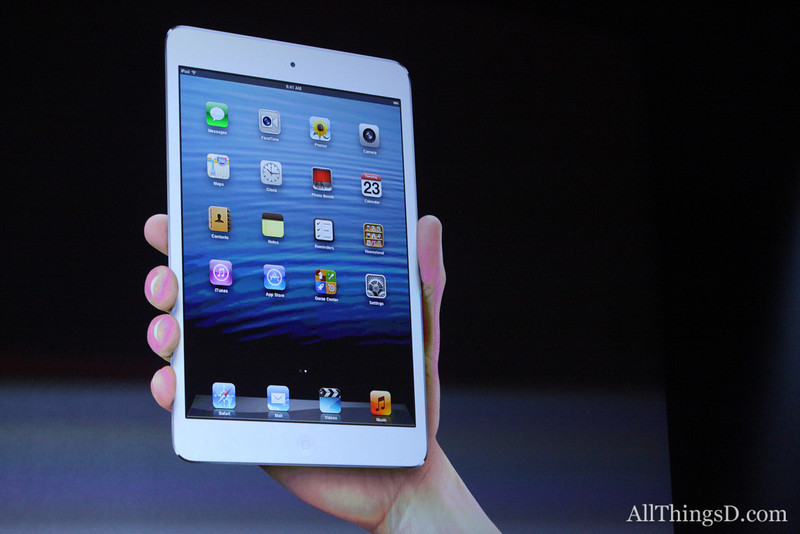
Apple decided to provide us with a new fun-sized item just in time for Halloween–the iPad Mini. It was highly anticipated, and naturally, I sat and watched the announcement. The iPad Mini appears to be about the same size as the most popular e-reader/non-iPad Mini devices, such as a Kindle Fire HD or a Nook. It is small enough to fit in one’s hand, and Apple claims that it’s a new design–and stressed that it’s not a shrunken iPad, but rather a concentrated one. It has all the same features of the iPad 4th generation (which was also introduced during this event), but it’s as thin as a pencil and as heavy as a pad of paper. The screen size is significantly larger than its competitors even though the device is of comparable size. I’ll leave out most of the other details, but needless to say, it performs the same as the new 4th generation iPad also introduced today, and runs all the same iPad only apps. The nice thing that Apple stressed about development for iPad Mini is that it doesn’t change from what is done for iPad–what works on iPad works on iPad Mini. NICE. Everything is faster and more powerful than before, and that makes for a great experience.  Its flash storage is the same as a full-sized iPad as well, coming in 16GB, 32 GB and 64 GB. That’s great in itself too.

Photo from AllThingsD.com

So, is it fun-sized? It sure looks like it. Am I getting one anytime soon? No, I don’t have a need for one, considering I just got my cool new iPad 3rd generation not too long ago, and am very happy with that.  But I can see a lot of benefits for the iPad Mini, especially for m-learning and use in schools. Sure, having all those cool new features alone make it great, but knowing that it has the same functionality as its full-sized counterpart, there are two features that will make it really great for education and schools.

First, it’s the smaller size. The smaller size will make the device even more portable than a standard sized iPad for students. It’ll be easier to fit in a backpack, or even to use in a classroom or on a field trip. For the elementary school students, the size will make it easier to use for smaller hands. I’m sure that typing with littler hands will be facilitated more easily on a smaller devices. It’s almost as if iPad Minis were MADE for the elementary school crowd! The size also makes reading e-books more like reading from a competitor’s device, in that it’s not much bigger than a paperback novel. The device itself allows for even more mobility than its larger counterpart. It seems to me like this will be a winner in these respects.

The second feature is the price. At a starting price of $329 for the 16GB Wi-Fi version of the iPad Mini, that’s a savings of $150 over the 16GB Wi-Fi version of the full-size iPad. Multiple that $150 many times for all the students that would be given iPads at schools… incredible savings, and maybe more iPad Minis to be bought!

Now, I’m not knocking the full-size iPad. It’s been revolutionary since its introduction two years ago. Tim Cook of Apple spouted off a lot of incredible statistics about iOS downloads and upgrades that were staggering, like 200 million devices upgraded to iOS6 in the past month, and the 100 millionth iPad was sold two weeks ago! (I wonder if it was mine? Ha ha!) Apple stressed their role in education not only with the introduction of iPads and their impact on schools, but also the impact of iBooks as well. (There is a new upgrade of both iBooks and iBooks Author available today as well). iPad full-size will always have a place, just like full-size writing pads have not gone away just because smaller writing pads can be made. There are advantages to full-size iPads, especially when doing larger scale work. Having more screen to view is easier on the eyes in that respect.  Like I said, I personally wouldn’t give up my full-size iPad even if given the opportunity to trade it for a smaller one. That’s just me.

But then I think about my middle-school aged son. Having his own iPad Mini would be perfect for him. Not too big, not too small, and at a relatively affordable price, and he’s still get all the features found in the full-sized one. Or for someone who isn’t an avid computer geek, but wants something that’s more beefed up than the Android tablets and e-readers, this is an excellent choice.  Or, someone who’s been wanting an iPad but couldn’t afford one, now they can in a “concentrated” size.

I think this means that the iPad Mini is both fun-sized, AND means business!

Now, will the next one be available in chocolate with nuts, caramel and rice crispies?