Posted in Uncategorized

Adobe Day at LavaCon 2012 Roundup!

This post is just a quick summary of the Adobe Day at LavaCon 2012 series from this past week. As you see, there was so much information that it took six posts to try to summarize the event!

Being in Portland, Oregon was great. It was my first trip there, and being a native Easterner, my thoughts pushed me to that pioneer spirit of moving westward in this country. Once there, I saw a hip, young, modern city, continuing to look towards the future.  The information I gathered at Adobe Day was general information that was endorsement-free, and practical information that I can use going forward as a technical communicator, and that by sharing it, I hope that others in the field will equally take on that pioneering spirit to advance what technical communications is all about, and bring the field to the next level.

To roundup the series, please go to these posts to get the full story of this great event. I hope to go to more events like this in the future!

As I said, I really enjoyed the event, and learned so much, and enjoyed not only listening to all the speakers, but also enjoyed so many people who are renowned enthusiasts and specialists in the technical communications field and talking “shop”. I rarely get to do that at home (although it does help to have an e-learning developer in the house who understands me), so this was a chance for me to learn from those who have been doing this for a while and not only have seen the changes, but are part of the movement to make changes going forward.

I hope you’ve enjoyed this series of blog posts. I still have many more to come–at least one more that is inspired by my trip out to Portland, and I look forward to bringing more curated content and commentary to you!

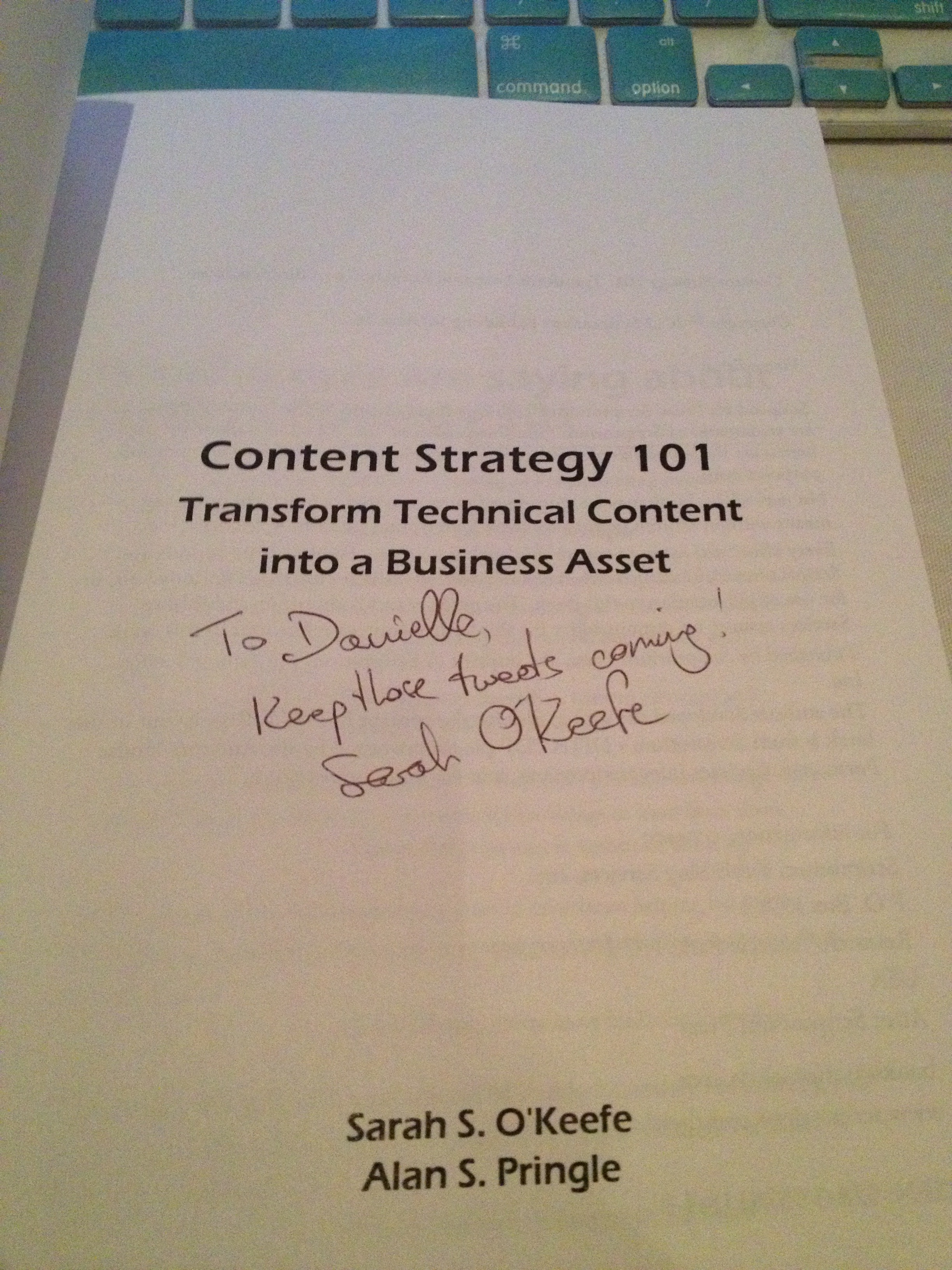
The autograph from my copy of
Sarah O’Keefe’s book,
Content Strategy 101.
Awesome!
Posted in Uncategorized

Adobe Day Presentations: Part III – Joe Welinske and Multi-Screen Help Authoring

Joe Welinske
President of Writers UA

Joe Welinske of Writers UA followed Sarah O’Keefe’s presentation on Adobe Day. I was especially interested in hearing what he had to say, because the topic of his presentation was  about “Multi-screen Help Authoring–How to Deal With the Explosion in Device Sizes.” Anyone who’s read this blog before knows that I’m very much into the mobile revolution, and while I’m usually talking about m-learning more specifically, mobile goes beyond learning, and using mobile in technical communications is connected to m-learning in many ways.

Joe explained that the device population keeps growing! Smartphones and desktops are changing; the sizes between smartphone and tablet devices, whether they be iOS, Windows or Android devices truly vary. The same content needs to be displayed on everything from large monitors to laptops to tablets to GPS to small phones–there are dozens of choices! How do you design a UI (user interface) for all these variations?

Joe explained that different devices have different dimensions, different operating systems, different user interfaces elements…lots of variations to contend with when creating content. He suggested that a “graceful, efficient adjustment is needed,” namely matching the amount of content and the type of content with a device without crafting solutions for each.  He contended that responsive design the key as it allowed for adaptive content. Responsive design would allow flexibility for different environments.

Joe mentioned that Scott Abel has touched upon this during his presentation, but Scott later clarified for me on Twitter, by saying, “That’s one way, although I question whether it is the best way…Lesson: Adapt content first, design second. Wrong content, right design = #fail.”

Joe continued by pointing out that one way to accomplish this objective included using HTML5/CSS3, tagging all objects in source code, create device-type style sheets, and including media queries in source. The end result would be a single-source content file that looks and works well on different devices. To prove his point,  Joe demonstrated how same source content looked on different devices, specifically the iPad versus iPhone in this example. Joe also showed an example of how he divides the devices by “buckets” when creating his style sheets into categories such as 10″ tablets, desktops, phones, etc. He recommended using a “parent” style sheet, then fine tuning with a device style sheet for each device type. This would help create a graceful adaptation using HTML/CSS and query to allow your content to flow automatically and intelligently. From that point going forward, a technical communicator can consider making mobile the starting point and expanding from there. Joe’s last point was that a small percentage of people from traditional technical communications are involved in mobile projects but the user experience and design skills are actually similar.

I agree with Joe that designing for mobile really does use many of the same skills as traditional design methods, but it does take a little extra time to lay out the thought process and structure needed to make the content be delivered from a single-source to multiple types of mobile devices. It’s a little tricky, but with some careful thought, it’s not really as complicated as it could be. By using single-sourcing and customizing style sheets, multiple output of content can easily be attained.  I strongly agree as well that this is the mentality that people need to adopt, whether involved in technical communications or e-learning/m-learning now.  I think this opened the eyes of many attendees in the room. Mobile really is an important consideration now in content output!

Next: Adobe Day Presentations – Part IV: Val Swisher asks, “Are You Global Ready?”

Posted in Uncategorized

A bold move into the wild blue yonder, aka the Cloud!

After my recent run-in with scammers, I’ve now come to better appreciate cloud computing and everything that is has to offer. It’s not that I didn’t appreciate it before, but in having to restore several items and back up others very recently, I was glad that I had several cloud storage accounts set up, and that much of my software could be restored easily because I had downloaded them from cloud accounts. Some of the programs on my laptop which I didn’t worry about included most of my Adobe software. Why? Most of the programs I use were downloaded through the Creative Cloud 6 subscription I have. I’m glad I made that move, instead of getting the disks. Not that the disks would be bad–they would do the job too, but at least I’d have the latest and greatest on my system, no matter what.

Well, I was just reading on Twitter from @saibalb79, @maxwellhoffmann and @AdobeTCS that the Adobe Technical Communications Suite 4 is cloud-bound! I think that’s awesome, really, and rather forward thinking. It supports mobile initiatives for some computers, like the impending Microsoft Surface, to be able to access the information more easily, but also for the rest of us as well. It appears that the subscription is offered either monthly at US$99.00 per month, or when signing up for a one-year plan, it would be US$69.00 per month. That seems like a pretty good deal if you ask me! Since I already have a copy of TCS4, I won’t need to subscribe for a while, but for those who have not upgraded yet, this seems like a great opportunity.

I think what’s also great about this is the fact that it works well with the idea of using Creative Cloud 6 apps in conjunction with the apps in TCS4. Imagine…always being up-to-date because you have subscriptions. I know that Microsoft is starting to promote this concept more as well, but knowing that Adobe is trying to stay on the cutting edge and keep up with technological needs and taking advantage of the cloud more and more is rather proactive thinking, in my opinion.

You can find out more by checking out Adobe’s website at this link: adobe.ly/Qp18q9.

Now tell me, do Flare or Doc-To-Help, or any of those other tech comm software suites offer cloud services like this? Let me know if I’m missing something…I’ll gladly present those to my tech comm readers as well, but I haven’t heard anything as of yet…

Posted in Uncategorized

Flash Technology gone in a mobile….no, wait–that’s not quite right…

In the mobile technology warsit’s been a war between the technology of Adobe Flash versus HTML 5. This has been a long going–at least in Internet years–battle royale that has been going on for a while, but it appears that a break has finally happened.

Recently, Adobe made the decision to end the support of Adobe Flash in Google’s latest Android OS, aka “Jelly Bean.” The significance of this is huge.  To some, this is a surprise. To others, it is not.

Flash has been the driving force of web animation for a couple decades now on many websites globally. It is a huge part of Adobe’s repertoire, and yet… Flash has had a difficult time making it into the mobile realm.  Just in the desktop/laptop realm, a Flash player can be rather unwieldy. There seemed to be only one flavor of Flash made for 32-bit machines, and not for 64-bit machines (like my own) which are becoming more commonplace.  Flash programming is an art unto itself as well. As much as many employers want people to have Flash backgrounds as technical communicators, I’ve also been told by developers to not bother learning it unless I really was dying to know, because it was rather complex even for the experienced developer to use, and developing Flash was time consuming.

This was all brought to the forefront about two years ago by the late Steve Jobs who said that Flash would not last, and that HTML5 was the future. He believed this so much that all of Apple’s new mobile products supported HTML5 from the get-go, but not Flash.  Aaron Silvers reminded me of this when he posted this article from Business InsiderSTEVE JOBS WINS: Adobe’s Ditching Flash, today on Twitter. It’s been a huge deal as iPhones and iPads proliferated with HTML5-friendly browsers, and didn’t support Flash, while other browsers for other tablets, like the Kindle, Nook and other Android-based tablets and phones did.

Adobe’s had a hard time with this, as far as I could see. Just for the record, I love Apple products, but I also love my Adobe products as well, so it’s been a tough debate to follow. I actually wrote a case study about it just several months ago about it, entitled, A Case Study: HTML 5 versus Flash, which discussed the history of this debate and what actions I saw Adobe–as a company–trying to make to work within this new environment that was pushing HTML5. At the time of the writing, Steve Jobs had just passed–literally within days of when I wrote my first draft and final draft of the paper–and so much was out in the media about the great Steve Jobs and how he was the mastermind that he was. I still love Steve Jobs, but after all, he was still human and fallible,  so I wanted to show how Adobe countered his attacks against Flash. In the end, the conclusion at the time was that HTML5 was the future, but it wasn’t completely NOW (or at that moment). HTML5 needed more development, and in the meantime, Adobe would adjust with the HTML5 revolution with its work on the Adobe Edge product and bringing that capability to its development products, but in the meantime, Flash was still working on most of the machines in the world, and there was no reason to stop working on that as well.

The way I saw it, Adobe’s point was that you don’t just abandon a long standing technology that’s worked so well overnight, just because the next best thing is starting to come along. It’s like abandoning DVDs just because Blu-Ray disks are out. There has to be some sort of legacy transition, and until HTML5 was more mature and used by those other than the developers at Apple, it didn’t make sense to abandon Flash altogether. But in the meantime, time needed to be taken to start working with the new medium and figure out the best way to move forward.

Fast forward to now, about six to eight months after I wrote the case study above. Mobile technology continues to explode on the market, and the race is on to be the dominant technological mobile device with new tablets and smartphones being introduced.  RJ Jacquez posted this article that came out today on Twitter: Adobe: Web standards match 80 percent of Flash features. Arno Gourdol, Adobe’s senior director of Web platform and authoring, was quoted at the Google I/O show, referring to HTML5’s capabilities at this stage, “I think it’s close to 80 percent.”  Seeing the writing on the wall, it’s obvious, after reading the rest of the article, that Adobe has been making efforts to keep up with HTML5, and make forward progress on using the web standard. Adobe’s not quite there either in keeping up, but it seems that it’s starting to make significant progress in this direction.

So, where does this leave us in the mobile learning world? As I see it, this is another means towards single-sourcing for learning. Flash has been good, there is no doubt. Some of the most interactive e-learning and m-learning sites (depending on your device’s capabilities) have been Flash driven, and so much has been Flash driven for years that Flash capabilities and interactivity are expected. In speaking with my e-learning developer husband about the topic, he said that Flash, while complicated at times, was easier to develop than HTML5, because HTML5 depended not only on new HTML5 coding, but also javascript and jquery much more than before to have content play the same way–or at least similarly–to Flash. From the sounds of things, those similarities are getting closer and closer. How soon will HTML5 be a true standard in the same way as standard HTML has been all these years? Probably sooner than later, but I see it as a big step towards that single-sourcing solution that will help eliminate the idea of problems with BYOD (Bring Your Own Device). No one will have to worry whether something will work on an Android, Windows or iOS device. It will just work because they all use HTML5.

This is an important issue to follow, because it’s not the mobile technological devices that need to be watched as much as how they will be programmed and used. Flash isn’t gone yet, but seeing what will happen with it, and where and how HTML5 progresses will be a hot issue for some time to come–so keep on top of this!

Posted in Uncategorized

TechComm Event of the Year! Please attend my first Webinar presentation!

OK, I don’t know that it’s THE techcomm event of the year, but it is to me!

Please come attend my first webinar presentation, “Transition from Content Consumer to Content Creator: Dual Viewpoints,” graciously hosted by Adobe Systems.

It’s tomorrow, 5 June 2012, from 1:00 PM- 2:00 PM US/Eastern / 10:00 AM – 11:00 AM US/Pacific.

Here’s the description for the webinar:

The technical communications world is changing quickly with technological advances. It can be a difficult transition from content consumer to becoming a content creator. If you are new to the technical communications field and trying to find some direction, how do you make that transition and learn the tools of the trade? Join technical communicator Danielle Villegas, who blogs and tweets as TechCommGeekMom, as she discusses the challenges of being a content manager, pursuing a professional course in Technical Communication, and moving ahead in a technical communications career. Danielle will concentrate on content for mobile devices while sharing her first hand experiences learning about the most desired skills. She will be discussing how visual and web design, technical writing and editing, and content management skills come together to create good technical content.

I am very excited to be doing this, and truly hope that you will attend and hear what I have to say. I’ve been working hard to create a presentation that will be . It’s merely based on my own experiences, and I hope it opens up some great discussions in the tech comm world.  Registration is free, too!

You can sign up by clicking on the link above for the title of the webinar.

See you there!

(Updated 9/17/2015 – The webinar link has now been archived, so the link in the article to the webinar has been updated.)