Posted in Uncategorized

Book Review: 8 Steps to Amazing Webinars by Sharon Burton

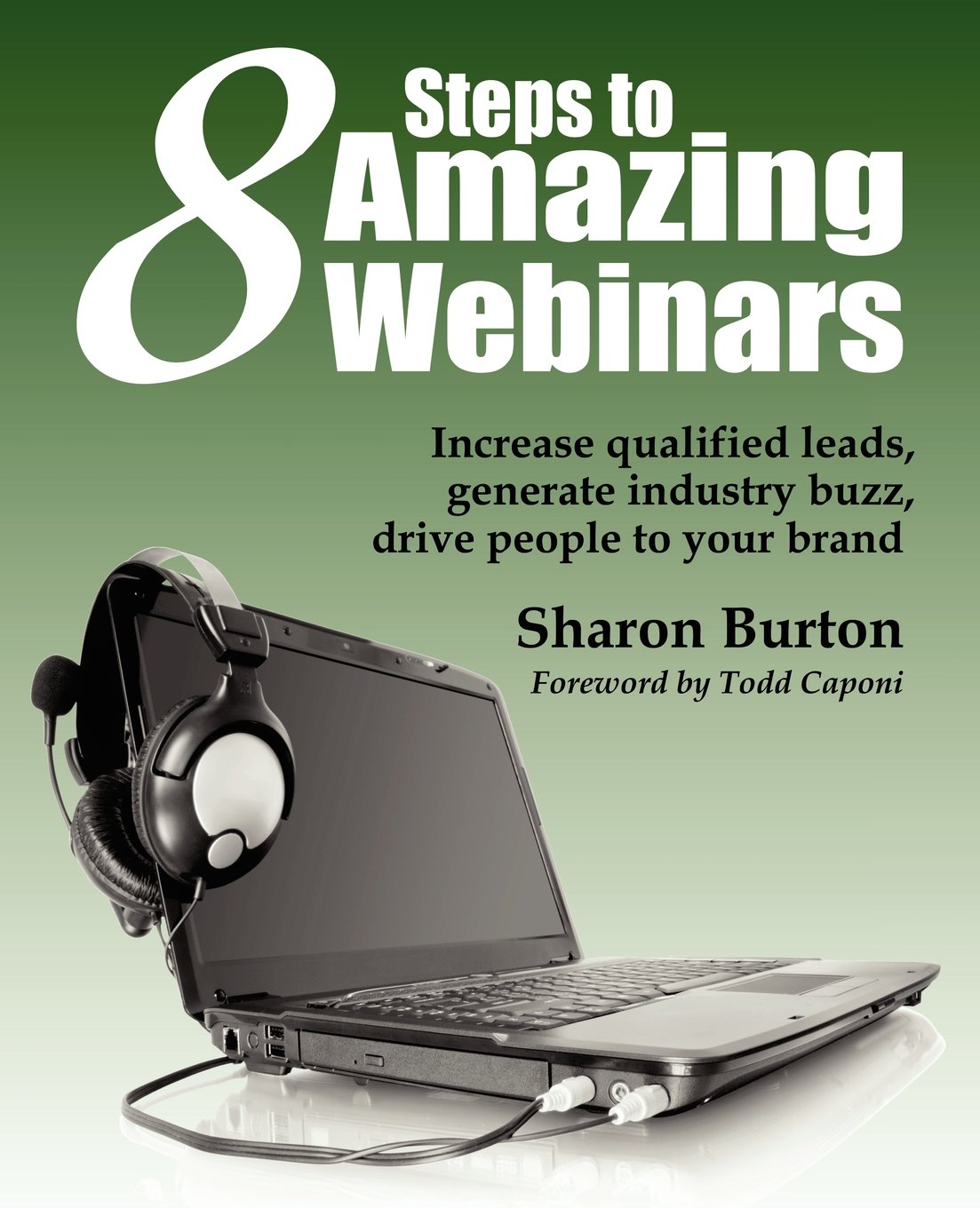
8StepsToAmazingWebinarsIn less than a week from this writing, I will be doing a new webinar that I was asked to do by one of the STC Special Interest Groups (SIGs). I was really honored to have been asked, and it’s about a topic that I think I know a little something about–blogging. After all, this little webspot has been going strong for about 21 months now.

But in putting this latest webinar together, I realized that while I felt that I could whip something decent together, it’s been a while since I had to craft a webinar presentation. This, in turn, reminded me that I had a promise to fulfull, as I sought out a reference in my personal library written by one of my tech comm knitting buddies. Pulling this reference out reminded me that I’ve been meaning to write this review since last spring, but had been side-tracked several times until now–when I really needed it most.

Sharon Burton’s book, 8 Steps to Amazing Webinars, is a slim volume of only 81 pages (and that’s the end of Appendix B), but it’s loaded with very concise information. 81 pages is all you need! Considering that this is a short and concise how-to book, it shouldn’t have taken me this long to write this! I truly try to read any books that I’m asked to review cover to cover, and this was a quick but highly informative read!

There are several things I like about Sharon’s book. It’s short and to the point, as already mentioned. For busy presenters who have many things to do other than solely doing webinars, this is great resource because she gets straight to the heart of what needs to be done. Additionally, one of the things that I’ve found that Sharon and I have in common with our tech comm perspective is that our views are highly customer service-oriented. Before my life in an IT/tech comm world, I came from a customer service/client services background, so much of her advice on the how and why webinars can be great marketing tools geared towards customers made a lot of sense to me.

Sharon’s eight steps take the reader from the point of understanding what a webinar is, through every step of the process of creating and following-up with the webinar, including choosing presenters, topics, technology needed, advertisting the webinar, and all the other preparation steps to creating the webinar. She even includes pointers on how to set up the presentation slides that are most likely going to be used in the presentation.

As I read the book, I was quickly reminded of the first webinar that I did back in 2012 for Adobe’s Technical Communications group (you can find the link on the right-hand column of this blog). I remember not knowing the first thing about how to put together a webinar. At the time, Maxwell Hoffman, who is one of the evangelists for Adobe TCS, guided and coached me through the process, and it ended up being a great success. Looking back, I would not be surprised if Maxwell was already well-versed in the steps that Sharon outlines in her book, because I’m fairly sure that we followed every single step. When I also look back to the first in-person presentation I did, which lead to a recent webinar on the same topic, I realized that I had followed much of the same steps again, and got a great response as a result. These steps are practically foolproof, so I can assure you that if you follow Sharon’s advice in the book–and much of it is really common sense, you should have success in presenting a webinar.

Sharon’s viewpoint in this book is from a marketing perspective, in that webinars are used to drive people to a brand, increase leads, and provide resources to your customers. And for 99.9% of time, this is a main focus for most people who would read this book. But even for people who are academics, for example, who are not necessarily trying to create a brand, but rather disseminate valuable information, this book is still helpful because it put the reader in the right mind-set to create a virtual presentation that is meaningful for his or her audience. For example, while I am promoting my “brand” of TechCommGeekMom, I’m not really selling a product or service the same way that a software company or communications service consultancy would be. (At least I’m not at that stage yet!) Even so, I know that when I present the webinars that I’ve done, there is some sort of value based on the type of information that I’m providing. By referring back to 8 Steps to Amazing Webinars as I prepared for this upcoming webinar, I knew that I was on the right track to maximize the information that I will be delivering. It also made me reflect, based on these steps, what made for a bad webinar, and I’m sad to say that I’ve attended a few of those in my time. I think I even remember one that Sharon and I attended at the same time, and I remember us talking about how disappointed we were with that one webinar, and we had the same sticking points about it.

I highly endorse this book for its strong content and its easy-to-read, straightforward language. Anyone who is doing a webinar–or even an in-person presentation–can gain some great pointers and advice following Sharon’s advice. Hey, it’s such good advice that the book is endorsed by the STC itself, and I know that many of their best webinars follow Sharon’s methods. So that says something right there!

You can find the book on Amazon.com, Barnes & Noble, and XML Press websites. And be sure to follow Sharon on Twitter too– she’s @sharonburton, or on her blog found at sharonburton.com. She always has good information to pass along that goes beyond just how to do webinars!


Posted in Uncategorized

Adobe Day @ Lavacon 2013: Scott Abel’s 5 Technologies Tech Comm Can’t Ignore

voodoodonutsignI realized as I was writing this post that this would be my 500th post on TechCommGeekMom. Who knew that so much information and thought could accumulate through original posts and curated content?  I’m also very close to my all-time 15,000 hits mark (only a few hits away at this writing). I wouldn’t have believed you if you told me that I’d hit these benchmarks when I started this blog, but of course, I’m going to keep going! I debated about what I should write for my 500th post–whether to finish my Adobe Day coverage or do something else, and in the end, it seems fitting to finish my Adobe Day coverage, because in many respects, knowing and writing about the presentation of Scott Abel, aka “The Content Wrangler”, shows how far I’ve come already in my tech comm journey from beginner to covering internationally known presenters.

Scott is one of the most prolific and vocal speakers out there on the conference circuit speaking about content–whether it be content management or other technical communication topics.  It also seems like he has written the forewords of many of the best tech comm books out there. He’s everywhere! To boot, he’s an accomplished DJ, and I found myself “bonding” with him over dance remixes and mash-ups while at Lavacon, because I always enjoy when he posts either his mash-ups or his favorite mash-ups on Facebook. (I’ll be writing a post about the relationship between tech comm and dance mash-ups in the near future.)  He is a person who is full of so much kinetic energy that you wonder when he’s going to explode, but he doesn’t. Even the time I saw him at the STC Summit last spring with a bad cold, he was still more on top of his game than a lot of people would be on a good day.  Much like Val Swisher, my love for all things Scott Abel also knows no bounds.  He knows how to stir things up at times, but there is no denying that in his frenetic pace of delivering a presentation, you learn SO much. I’m lucky that he’s so kind to be one of my cheerleaders!

ScottAbel
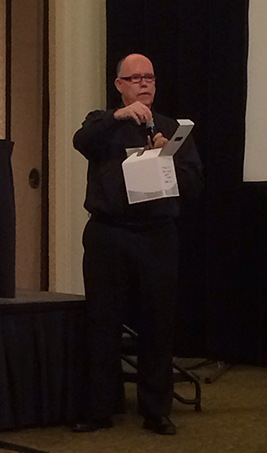
Scott Abel checking his files before his presentation

So when it came to thinking of a garden in Portland to use as an analogy to Scott, I had to deviate. In my mind, he’s the Voodoo Doughnuts shop located about four or five blocks away from the Chinese Garden. Scott’s talks always have lines going out the door, and like many of the Voodoo Doughnuts themselves, the unique flavors dispensed open your mind up to new and delicious possibilities and ideas, and you come back wanting more (hence, more long lines!).  They are both crazy and sweet at the same time. You can’t beat that combination.

Scott was the keynote speaker for Adobe Day as well as the moderator of the discussion panel later in the event. Scott’s topic for his talk was called, “Five Revolutionary Technologies Technical Communicators Can’t Afford To Ignore.”  If Joe Gollner went fast during his presentation, then Scott went at lightning speed, so my notes below are the highlights.

Scott started by telling us that translation is going to be an important part of automated content going forward. It’s important to understand that for the web, the World Wide Web (WWW) is equal to the “land of opportunity.” The WWW can reach a global market reaching new consumers. As American users, we forget that 96% of web users are not in the US. We don’t all speak English globally. In fact, less than 6% of the global population speaks English well, but don’t necessarily read or write it well.

Scott’s list of the five technologies the Tech Comm can’t ignore were as follows:

1) Automated Translation
Why would be need automated translation? We write for the *worldwide* web.  There are over 6000 languages in the world, so translation is a big deal for a global reach and global connection. We need to recognize that content is written for both machines and humans. Even though we write for both machines and humans, we need to write for machines first, as they are the “gatekeepers” of content, such as for searches. Everything goes through the machine first. We need to recognize that writing rules learned in elementary school are no longer sufficient for a world in which language science is needed.  We need to examine our content from the vantage point of a rules-processing engine and ensure it’s optimized for machine translation.

2) Automated Transcription
Automated transcription involves software that translates speech to text for machine use. Without transcription, content is locked and hidden from view. Transcription allows for better searchability of content.  Scott recommended Koemei as a good transcription software tool for video and general transcription, as it can help transform editable content into other languages.

3) Terminology Management
Terminology management controls words in a central place, namely the words used the most and used consistently for branding, products, etc. Terminology management is important for consistency as well as for regulatory reasons. This is an instance where seeking a global content strategist is needed to help standardize processes.  It’s best to adopt a terminology management system, such as Adobe partner and Scott’s suggestion, Acrolinx.

4) Adaptive content
Adaptive content is content that is structured and designed to adapt to the needs of your customer; it’s about substance of the content. Adaptive content adapts to the devices, e.g. laptops, GPS, and smartphones.  Customers are demanding exceptional experiences, so we need to meet their expectations, so it’s up to responsive designers to meet that challenge. Adaptive content makes it possible to publish to multiple platforms and devices.  It is content separated from formatting information. By allowing authors to focus on what they do best, adaptive content makes content findable and reuseable by others who need it. We need to rethink content, as the move to adaptive content involves work, but the ROI (return on investment) can be realized in months instead of years.

5) Component Content Management
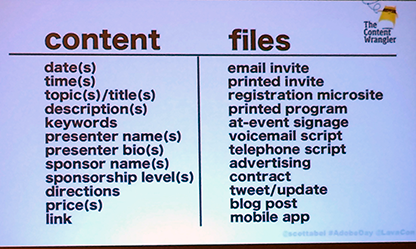
Component content management systems are needed. They focus on the storing of content components that are used to assemble documents. Components can be in all sizes, and can be photos, video, and text. It’s about managing CONTENT not FILES.

Scott provided these slides as his example to show this:

ScottAbel_ExampleA ScottAbel_ExampleB

Structured content, combined with a component content management system, supports personalized content and  targeted marketing, which in turn increases response rates. In this end, this process can save money! The key is to remember that all customers are not the same! Reusing content without the “copy and paste” methods produce the best results. You can ensure that content is consistent by seeking a content strategist who understands content and is a technologist. Implement a component management system. Scott suggested checking out Astoria Software for a good component content management system. 

At this point, Scott’s talk had pretty much finished, but in answering audience questions, he pointed out that there’s a lot more than just these five technologies to watch. He suggested that we should look out for wireless electricity, flexible surfaces, more wireless devices, wearable computing, and augmented reality as well. He also said that in order to mature as a discipline, we need to be content craftspeople, content designers and content engineers. We need to leverage using content and code. We need to think more like engineers, and less like writers and editors. Even websites that are very localized still need to be written for global purposes to improve the English used for the native speakers as well. Controlled vocabulary helps all end users!

Scott covered a LOT of information in a short amount of time, and he set the tone for the rest of the session, as the presentations that followed repeated much of the same information. (This is a good thing, because then we know that the information is valid, coming from several experienced technical communicators!)

Scott posted on Twitter than his presentation was available on SlideShare, but I have it below.

And as always–Scott, if I misinterpreted or misquoted any of the information I summarized above, please let us know in the comments!

Posted in Uncategorized

Adobe Day @Lavacon 2013 – Val Swisher Says It Starts With The Source

Ladds_1
Ladd’s Addition Rose Garden
Photo from http://www.rosegardenstore.org

Val Swisher was the next to last individual to speak at the Adobe Day at Lavacon 2013 event. For those who are regular readers of this blog, you know that my love for all things Val Swisher has no bounds. I’ve always been able to take her easy-to-digest information, and absorb it quickly into my brain, as well as relay her knowledge to others.  When I looked at Portland Gardens to compare her to, I chose Ladd’s Addition Rose Garden.  While it’s not as well-known (unlike Val, who is very well-known), this particular park, according to The Rose Garden Store,  was one of four rose gardens especially built from the Ladd estate, in which the design included these gardens coming together to form the points of a compass. I often think of Val as my compass, as she has never steered me wrong with her information or with the wisdom and fun that she’s shared with me one-on-one.

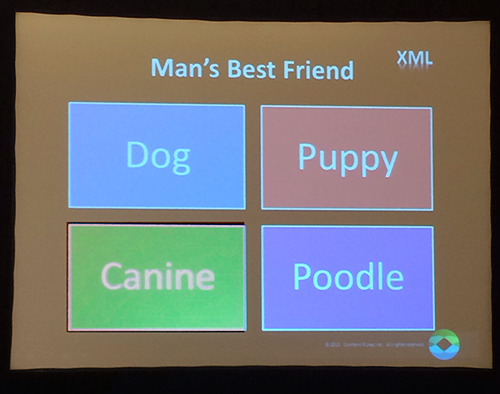
Val’s Adobe Day presentation centered on talking about source English terminology in a multi-channelled, global world, and how terminology affects structured authoring, translation and global mobile content. She started the talk by reminding us that historically, we’ve always created content, whether it’s been on cave walls, through stenography, through typewriters or eventually on word processors. In every instance, consistent terminology has been essential for structured authoring and content. Managing terminology is also essential for translation and for reuse.  She stated that prior attitudes used to be that the more complicated the writing was, the more “fancy” the product was. Today, that’s definitely not true.  She used the example that I’ve heard her use before, but it’s so simple itself that it’s a classic. Her example involves writing for a pet website. If multiple words meaning dog are used, there can be problem with reuse, because you can’t reuse content if you use different words.

Val_example_dog
Here’s the example Val showed.

Val pointed out that it would be an even worse situation if technological or medical terminology was used instead.

Val continued by saying that when it comes to  XML, reuse , and terminology, you cannot realize the gains of structured authoring if you’re not efficient with your words. Terminology is critically important to gain more opportunities.

ValSwisher
Val Swisher explaining how to approach content from a translation perspective.

Translation comes down to three elements– we’re trying to get better, cheaper, and faster translation output. We MUST use technology to push terminology and style/usage rules to content developers. In order to make it cheaper, we need fewer words, reused words, and reused sentences. It’s impossible for writers to know or even know to look up all term and usage rules. We MUST automate with technology. For example, “Hitting the button” is not translatable, but “Select OK” is fine!  She said, “Say the same thing the same way every time you say it.”

For better translation, translation quality needs to improve and meanings need to match in order for better machine translation to be a possibility. Bad translation comes from the source itself.  If the source information is problematic, then the translation will be problematic.  The best way to save money and time is to say the same thing, every time, using the same words, and use shorter sentences. For machine translation, don’t go over 24 words in a sentence.

Faster translation is seen as content that takes less time to translate, needs fewer in-country reviews, and gets to market more quickly. The key to delivering global mobile content is responsive design, global mobile apps, text selection is key, and terminology is the most important element. Val showed this example of how translation in responsive design isn’t working, where the Bosch websites are not exactly in synchronization:

The mobile website on the left looks nothing like the English language version on the right.

The simpler the design is for the website–especially in mobile, the less you have to tweak it. This is especially true where consistent terminology is important, because consistency is needed for structured authoring. Creating truly faster, cheaper, and better translation enables a true global responsive design. This is not a simple task, as there is no such thing as simple, even when writing about complex concepts. Even if you think you’re not translating, your customers are, so the content needs to be very clear. The scary part of this is that some companies use Google Translate as their translation strategy, which is risky at best. To use something like Google Translate as the translation software, the content had better be tight, clear, and consistent.

One of the things I enjoy with Val Swisher’s presentations is that it all comes down to common sense, and she breaks it down into easy manageable parts for those of us–like me–who might not have thought about the context of language for structured authoring, and the consequences for not strategizing content to include translation considerations.

I highly recommend checking out Val’s blog for other great insights.

(As always, Val–if you’d like to add or correct anything here, please do in the comments below!)

Posted in Uncategorized

Adobe Day @ Lavacon 2013 – Rich Media in Framemaker with Matt Sullivan

photo from www.portlandoregon.gov/parks
Crystal Springs Rhododendron Garden
photo from http://www.portlandoregon.gov/parks

Matt Sullivan presented the last individual presentation for Adobe Day at Lavacon 2013, and it was a little different than what I had seen before. To me, it was like Portland’s Crystal Spring Rhododendron Gardens, because while Portland is known for its rose gardens, here’s something that’s different, but not out of place either.

MattSullivan
Matt Sullivan doing his presentation.

Matt recently co-authored the book, Unstructured Framemaker 11 with Sarah O’Keefe, and took the time to show us some of the more special features of Framemaker 11, specifically in reference to the use of rich media and XML. What made this a different presentation from what I had seen before was two-fold. First, Adobe prides itself in presenting these Adobe Day Thought Leadership events as the antithesis of a long commercial for the Adobe Technical Communications Suite applications, so having this presentation about Framemaker specifically seemed to go against that. But the deeper the presentation went, it was obvious that it wasn’t as much about how to include rich media in Framemaker (although that was certainly presented), it was about opening up minds to the idea of using rich media in digital documentation, and Framemaker happened to be the tool used to demonstrate this. Matt Sullivan is one of the foremost experts out there on the use of Framemaker (he did co-author a book, after all, and I’ve seen the book–it’s a hefty tome), so this made a lot of sense. The second part that seemed different was that it was a demonstration at all. As mentioned before, I was a little confused that an aspect of Framemaker was being demonstrated.  For those who were familiar with the product, it was easier to follow along. For those who weren’t as familiar with the product, they could keep up, but it didn’t necessarily have the same impact, but opened eyes to possibilities.

All that aside, Matt gave a lively demonstration of how one can produce rich media output from DITA/XML. Because this was a live demo, it was hard to track all the nuances of the presentation, so there weren’t a lot of notes taken as it would be difficult to describe the processes step-by-step as he was doing them. The audience went along for the journey through these processes, and we could see how Matt used Framemaker to include of rich media. Matt showed us how one can place videos, flash components, and other multimedia into Framemaker docs. He also showed us how to integrate these into the DITA map, and how a PDF document can be produced for both print and interactive versions. One of the best examples Matt showed us was  how 3D models can be used in Framemaker documents in addition to control tables. Matt explained that the beauty of the ability to add rich media to documentation is that it’s all about the single-sourcing features to be able to integrate the rich media.  The other part of what makes it optimal is that rich media can be saved to online formats. He stressed that rich media can be used in unstructured Framemaker as well as structured Framemaker.

Matt has also done several Adobe webinars covering much of the information presented in this presentation and more. As a refresher, he offered a 45-minute demo with the details found at http://wp.me/p1KX8V-4P, which is also available on his blog at http://mattrsullivan.com.

While it was a little difficult to cover and summarize this presentation (no fault of Matt’s–he did an excellent job), as I said before, this was something new for me to experience at an Adobe Day.  I learned not only about how to include multimedia objects in Framemaker specifically, but Matt was also showing how valuable rich media can be when used correctly and methodically in almost any kind of documentation and content out there, which is really the more important part of the bigger picture. As technical communicators, we need to remember that we don’t have to be limited by text and stand-alone images.

(Matt, if you need to correct anything I’ve said here or would like to add anything, please feel free to add in the Comments section!)

Next in the Adobe Day -Lavacon 2013 coverage: Val Swisher’s presentation.

(Yes, I’m going backwards with how everything was presented. Why? Because I can. 🙂 )