Posted in Uncategorized

Adobe Day Presentations: Part I – Scott Abel and Structured Content

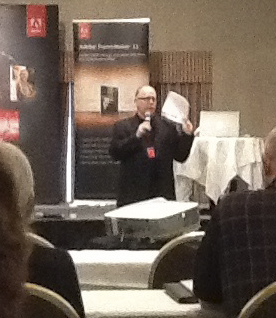
Scott Abel
The Content Wrangler

As I had mentioned in my first post about Adobe Day, there were several well-known tech comm authorities presenting, and Scott Abel was the first presenter. Scott is the founder and CEO of The Content Wrangler, Inc., and he has a great Twitter feed and blog, if you haven’t read them. Scott’s presentation was called, “More than Ever, Why We Need to Create Structured Content.” If you’ve never read Scott or seen Scott speak, he is a force to be reckoned with, as he’s definitely got strong opinions from his experiences, and he’s not afraid of letting you know what he thinks.

Scott explained that structure is in everything we do–including in nature–so it would make sense that content needs to be structured as well.  Structure formalizes a content model and provides authoring guidance. It can enhance the usability of content, providing visual cues and is the foundation for automatic delivery of content through syndication. Structure makes it possible to efficiently publish to multiple channels, outputs and devices from a single source, making it a critical component of transactional content and making business automation process possible. By providing structure, it is possible to adapt content and leverage responsive design techniques. Structure also allows us to leverage the power of content management systems to deliver content dynamically and increasingly in real time. By creating structured content, it is possible for us to move past “persona-ized content” and facilitate innovative reuse of content in known sets of related information as well as in the unknown needs as well.

Scott quoted author and technologist Guy Kawasaki by saying that innovators must allow time for the majority to catch up; new ideas take time to filter through. He followed up with the question, “How much time does it take to adopt?” He answered his question by explaining that technological innovation is getting faster, and the technological adoption rate is becoming shorter, which is good news. However, how long to adopt structured content? He explained that it’s actually not a new idea–the idea started in 1963! It started with the Sequential Thematic Organization of Publications created in the airline industry to standardize airline manuals.

With that in mind, Scott presented that the question now is to figure out where are we today with structured content. Scott concluded that right now, one of the major challenges is that old ideas are getting in the way because many technical communicators are still stuck with design concepts created in the print paradigm.  Other major challenges include the lack of knowledge and experiences, writers making manual updates, the lack of human resource support, and making tools work with configurable content. He did point out that lots of reuse content is going on! His point was that the tools work, but it’s the people and processes are the problem, as Sarah O’Keefe paraphrased him on Twitter.

So when asked why we should be technical communicators, Scott’s response was that as technical communicators, we know how to create structured content. Knowing how to create structured content increases our value and makes us marketable. “Our professional needs to change whether we like it or not,” he concluded, to keep up with these technological changes.

Much of what Scott talked about in his presentation was echoed again in the panel discussion later in the morning. Scott had provided a few examples during the presentation which showed what unstructured content versus structured content looked like, and it was very clear what the differences were. As technical writers, as Scott said, we understand the importance of structured content and how reused content can be used effectively. Those who don’t have that mindset tend to repeat the same processes and make more work for themselves, wasting time and money for a company. We have value, and we need to promote our skills in creating this kind of content organization.  I think technical communicators take this ability for granted, and by being proactive in showing how we can help create efficient and structured content, we can add value not only to ourselves, but also provide on a larger scale a true cost-saving service to our respective companies and clients.

(Scott–if you are reading this, please feel free to clarify anything that I’ve written if I didn’t interpret it quite correctly in the comments.)

Scott later offered his slideshow online, which is available with his permission.

Scott’s talk was a great way to start the morning, and lead smoothly into the next presentation by Sarah O’Keefe, titled, “Developing a Technical Communication Content Strategy.”

Next: Adobe Day Presentations: Part II – Sarah O’Keefe and Content Strategy

Posted in Uncategorized

Missed Adobe Day at LavaCon2012? Here’s the scoop…

One of the “Three Sisters” mountains
outside Portland
(don’t know which one–took this from
my airplane seat coming home!)

As I write this, I am still recovering from quite the whirlwind of a weekend! I flew out to the West Coast on Friday night, and returned to the East Coast on Sunday.  I met SO many people who are not only leaders in the technical communications field in one capacity or another, but they are also nice and SMART people in the field. You couldn’t help but be inspired or feel smarter once you walked out!

Now granted, this was the first time I ever attended a conference-type event within the tech comm field, so I was excited to be there and soak everything in as much as I could. This is not to say that I’ve never been to a professional conference or travelled to this type of event; I just never have done it with the tech comm crowd.

Like I said, for me, at least, as the “new kid on the block”, I didn’t know exactly what to expect of the event, the topics, or the people I would encounter, and I’m glad to say that everyone was very welcoming to me, and I felt included as a fellow technical communicator very quickly. It was a little surreal in some instances, because many of the people I met were those whom I had only met online through Twitter or Facebook–Twitter mostly, so to be among such a collection of established tech comm thought leaders could have been a lot more intimidating, but it was not that way at all.

There was so much great information that came out from the morning that I will be splitting up my report over the next few days. Each day going forward will have my summary about each speaker at the event. And I have some photos as well!

So, let me get started into the Adobe Day event itself –with some photos!

Saibal Bhattacharjee (@saibalb79) from Adobe setting up.

The Adobe Day event started with an introduction from LavaCon organizer Jack Molisani welcoming everyone to the event. Jack, thanks for organizing and running LavaCon! Although I’m missing the main conference, I’m hearing awesome stuff about the speakers on Twitter, so I think you deserve some kudos for helping to assemble all of it!

Jack Molisani

Jack was followed by a short introduction and welcome by Maxwell Hoffmann, who is one of the key players of Adobe’s Technical Communications marketing team. If you’ve ever attended any Adobe Tech Comm webinars, more than likely you’ve heard Maxwell moderating the webinars. He is also one of the bloggers for Adobe’s Tech Comm blog. Having worked with him while creating my own webinar for Adobe, I can say that he does a fantastic job at what he does.

Maxwell Hoffmann of Adobe

One thing I’d like to mention, before continuing, is that the nice thing about Adobe Day was that is wasn’t actually about Adobe or promoting Adobe products. I don’t recall during the entire duration that any speaker promoted any Adobe product or the brand other than possibly to thank the company for the opportunity to speak. All the speakers spoke broadly about technical communications as a whole, so whether one supported Adobe products or not, everyone could benefit from the information being provided.  This really was a collective presentation of the best and brightest in thought leadership, and an opportunity to network and learn from those who are considered top in the technical communications field.

Now, for this post, I’m actually going to start this Adobe Day series going backwards in the day’s event, starting with the panel discussion that was at the end of the morning.

The panel topic at the end of the Adobe Day event was titled, “The Decade Ahead: Opportunities and Challenges for Technical Communications Professionals.” Scott Abel, who is also known as “The Content Wrangler,” moderated the panel.  The panel included several of the leading thought leaders in the tech comm industry. The panel consisted of Joe Gollner, Beth GerberBernard Aschwanden, Joe Welinske, Val Swisher,  Sharon Burton and Joe Ganci.

Adobe Day Panel.
L to R: Joe Gollner, Beth Gerber, Bernard Aschwanden, Joe Welinske,
Val Swisher, Sharon Burton, and Joe Ganci

As far as the opportunities in tech comm right now, Sharon Burton said it best when she exclaimed, “We are in the Wild West!” meaning that the field is still so very wide open that anything done right now would be in the pioneering spirit. Another point that Sharon summarized was that 99% of the content consumers are not happy with the tech comm content they are receiving, and so a revolution is brewing. It was agreed by all that so many new ways to deliver content are out, such as using audio, video, shared content, personalized content and mobile content. The choices are limitless and there is so much to explore that there is room so that we can all contribute! Interactivity and structured content will be key to communicating information as well.

That said, the group presented the challenges ahead, which included providing technical communicators with an education on understanding all the available possibilities, combating management’s misperception of cost, the general resistance to progressive change, business models still tied to old metrics, and too many tech comm specialists instead of tech comm generalists. An additional challenge mentioned dealt with the relationship that technical communicators have among themselves as well as to the rest of the world. It was suggested that technical communicators are not creating appropriate relationships with other business departments, and need to be proactive in business affairs to prove the value of tech comm as a whole and how it integrates with other business needs, thus providing a good ROI (return on investment). When the panelists were asked what skills were needed to go forward, they replied that the need to create communities to support each other and learn from each other was key, which could be done through such activities like participation in branding and discussion on the Twitter website with other technical communicators.  Bernard Aschwanden did comment, “People are not lazy enough!” which elicited a laugh. However, his point was that in this day and age, people just want more direct route to complete tasks, and community building was part of that.

Nolwenn Kerzreho, another attendee at Adobe Day, noted on Twitter during the discussion  that “[T]ech writers need to change, have to get an education in structured writing and writing for a global audience…Key is that needs to be promoted…everywhere!” Good point that I missed noting on Twitter myself, Nolwenn!

In other words, the panel felt that while this is a time with a lot of changes due to technological advances with plenty of opportunity to use different kinds of content to deliver information, there are still obstacles in the way that prevent those opportunities from coming to fruition. However, those obstacles aren’t anything that can’t be conquered over time. A big part of making these opportunities happen will be adopting the use of structured content and community building.

Now, if this was the caliber of the discussion just for the panel at the end of the Adobe Day event, then you can only imagine that each of the presentations before this were equally great as well, and why I’ve come back with renewed enthusiasm.

I’ll also just add here that I had the chance to meet SO people that I had only met through social media or featured in various technical communications media. It was like a parade of tech comm stars to me, and I was a little in awe to be among them! I enjoyed meeting so many people who really enjoy what they are doing and trying to make a difference in this field.

Waiting for Adobe Day to start!
Me and Kyle Johnson of Rocket Software
(photo courtesy of @barriebyron, also of Rocket Software)

I also have to say that in addition to Maxwell Hoffmann, I met others from the Adobe team as well, including Saibal Bhattacharjee, Ankur Jain (the Robo(Help) Cop!) and Tom Aldous. They did an excellent job putting this event together, and I appreciated their kindness and support in having me there to attend. I felt so welcomed! I was really happy to meet them in person after so many months of corresponding through Twitter or email.

I’ll be going through each presentation given prior to this panel in the next several posts over the next week, and I know you will find the information as educational as I did.

Next post: Adobe Day Presentations: Part I – Scott Abel and Structured Content.

PS– To anyone featured in this post or who attended this event, please let me know if I need to append or correct anything featured in this summary or in the future posts on the presentations. I am working off my “notes” that I tweeted during the event, so my recollection may need some tweaking. 😉

Posted in Uncategorized

Adobe Day Presentations: Part III – Joe Welinske and Multi-Screen Help Authoring

Joe Welinske
President of Writers UA

Joe Welinske of Writers UA followed Sarah O’Keefe’s presentation on Adobe Day. I was especially interested in hearing what he had to say, because the topic of his presentation was  about “Multi-screen Help Authoring–How to Deal With the Explosion in Device Sizes.” Anyone who’s read this blog before knows that I’m very much into the mobile revolution, and while I’m usually talking about m-learning more specifically, mobile goes beyond learning, and using mobile in technical communications is connected to m-learning in many ways.

Joe explained that the device population keeps growing! Smartphones and desktops are changing; the sizes between smartphone and tablet devices, whether they be iOS, Windows or Android devices truly vary. The same content needs to be displayed on everything from large monitors to laptops to tablets to GPS to small phones–there are dozens of choices! How do you design a UI (user interface) for all these variations?

Joe explained that different devices have different dimensions, different operating systems, different user interfaces elements…lots of variations to contend with when creating content. He suggested that a “graceful, efficient adjustment is needed,” namely matching the amount of content and the type of content with a device without crafting solutions for each.  He contended that responsive design the key as it allowed for adaptive content. Responsive design would allow flexibility for different environments.

Joe mentioned that Scott Abel has touched upon this during his presentation, but Scott later clarified for me on Twitter, by saying, “That’s one way, although I question whether it is the best way…Lesson: Adapt content first, design second. Wrong content, right design = #fail.”

Joe continued by pointing out that one way to accomplish this objective included using HTML5/CSS3, tagging all objects in source code, create device-type style sheets, and including media queries in source. The end result would be a single-source content file that looks and works well on different devices. To prove his point,  Joe demonstrated how same source content looked on different devices, specifically the iPad versus iPhone in this example. Joe also showed an example of how he divides the devices by “buckets” when creating his style sheets into categories such as 10″ tablets, desktops, phones, etc. He recommended using a “parent” style sheet, then fine tuning with a device style sheet for each device type. This would help create a graceful adaptation using HTML/CSS and query to allow your content to flow automatically and intelligently. From that point going forward, a technical communicator can consider making mobile the starting point and expanding from there. Joe’s last point was that a small percentage of people from traditional technical communications are involved in mobile projects but the user experience and design skills are actually similar.

I agree with Joe that designing for mobile really does use many of the same skills as traditional design methods, but it does take a little extra time to lay out the thought process and structure needed to make the content be delivered from a single-source to multiple types of mobile devices. It’s a little tricky, but with some careful thought, it’s not really as complicated as it could be. By using single-sourcing and customizing style sheets, multiple output of content can easily be attained.  I strongly agree as well that this is the mentality that people need to adopt, whether involved in technical communications or e-learning/m-learning now.  I think this opened the eyes of many attendees in the room. Mobile really is an important consideration now in content output!

Next: Adobe Day Presentations – Part IV: Val Swisher asks, “Are You Global Ready?”

Posted in Uncategorized

Who says you can’t have a PDF book and print it too?

I’m in the process of recovering from a great weekend I had at the pre-conference of Lavacon hosted by the Adobe TCS team this weekend. There is so much to tell, but I’m working on a separate post for that, so stay tuned–it should be up in a day or so.

In the meantime, I just wanted to share something that I thought was pretty cool. Lavacon is taking place in Portland, Oregon, which is the home of the world famous Powell’s Bookstore. It is one of those landmarks that anyone who visits Portland has to visit, even if it’s just for a few minutes. The store occupies an entire city block, and includes both used books and new in print books. I was told by multiple sources that one should not think that an hour is enough time to spend in the store, as an hour easily turns into a whole day there. It’s THAT cool.

Marcia leads Val and I to Powell’s!

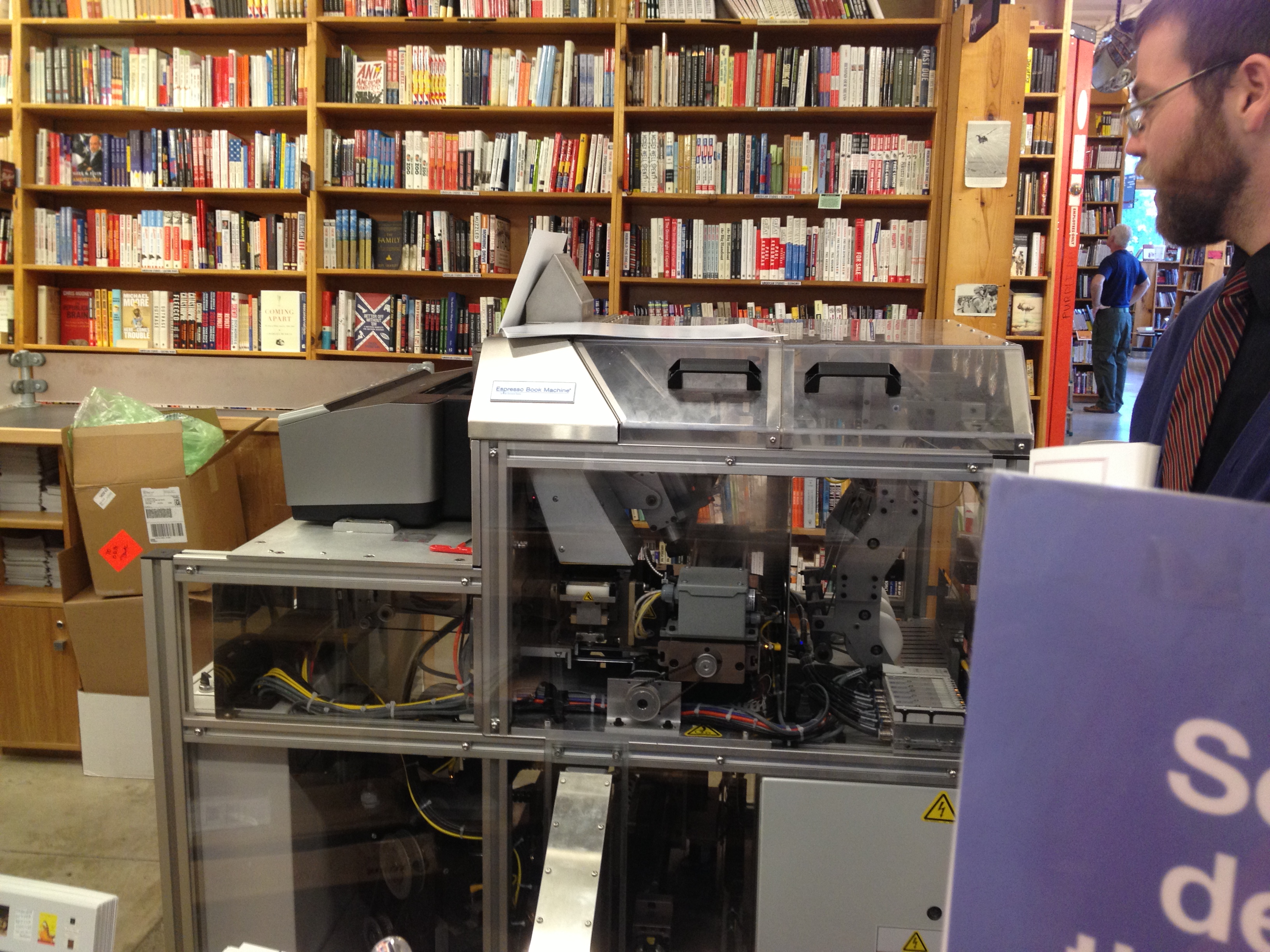
Well, I had a very limited window where I was going to be able to check out the city before returning home from the Adobe Day event, and my new friend, author Marcia Riefer Johnson who writes the blog, “How to Write Everything,” took me and Val Swisher, who is an Adobe Day and Lavacon speaker as well as the CEO of Content Rules, to Powell’s just for a quick visit, so that a) we could say that we had been to Powells, even if it was just a brief visit, and b) to show us this neat machine that prints books for customers on the spot! It’s called the “Espresso Book Machine“, and it prints out digital publications that are in the Powell’s catalog, and will print the book for you right on the spot.

Powell’s Espresso Book Machine!

Yes, while you wait!  Marcia goes into more details about how it works, and how she is using it for pre-publication purposes of her upcoming book coming out in April 2013 called, Word Up! How to Write Powerful Sentences and Paragraphs (And Everything You Build from Them.  Read about how she’s doing this in her blog.

In the meantime, as one of the things Marcia posted on her blog, she shared a YouTube video of how Powell’s Espresso Book Machine (EBM) works. I think this is pretty cool:

Now…imagine writing the user manual for this gadget? That would be quite the interesting and exciting task, now wouldn’t it be?

Val Swisher and I at Powell’s!

Val and I both felt that if we had the chance to go back to Powell’s, we definitely would. Thanks for taking us, Marcia! This looks like a great tool, not only as a consumer (this way, we can find lots of great tech comm resources and have them specially printed for us), but also as creators, allowing us to print our content as needed. Print is not dead! It has gone digital in more than one way!